GPX track - e.g. TET - editing

Berin

Well-known member
UKGSer Subscriber
Joined
May 29, 2006
Messages
7,769
Reaction score
3,579
Location
South Oxfordshire
As per many previous post, I’ve been trying to find a a way to manage tracks on the go with an iPad, most commonly TET GPX files - which are always tracks.

As anyone who’s downloaded TET Tracks knows, one GPX file contains all the tracks for a country - this can be many tracks - and the tracks can be hundreds of miles long and therefore exceed size limits on gps devices or software.

So, a tool is needed to edit, split, join, and reverse tracks - for example into day-long rides. Basecamp is still the best tool for this, but it doesn’t work on portable devices.

MRA will download the tracks, but it’s really not good for editing - it does split but doesn’t join, and although you can drag a waypoint, adding one always it to the end of the track and the only way to move it is to drag it in the waypoint list, which, if you have hundreds of waypoints is tedious. It also has a waypoint limit of 200. Tbh, if it could insert a waypoint it would be bad

scenic will download the tracks, but you can’t edit them. You can change a track to a route and edit it, but it will only route on what it thinks are navigable roads - but at least you can see the original track as you navigate.

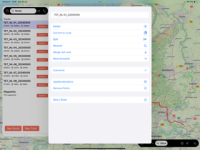
I’ve been playing around with GPX Hero, free with ads or £4.99 for pro.
IMG_0054.png

It has split, join, rename, add - only at the end of the track - but, like Basecamp, it has ‘rubber banding’ so you can drag the track.

Then you can export/save and run the track in your app or gps. Best in mind that MRA will want to navigate you to the start of the track, all well and good it you’re near it but a pain if your 200 miles away and testing!
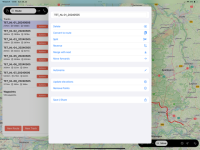
 
Pro version, I guess- none of that available on the free version.

Does that do anything that GPX Hero doesn’t do?
 
Hi!

I'm the developer of GPX Hero. It's great to see people finding it useful, and really interesting to see the different type of activities people are using it for. I came up with the idea on a cycle tour across Europe and the goal is to create a simple app to manipulate GPX files that works well on phones and tablets.

If you have any ideas for new features let me know and I'll see what I can do.

BTW you can add points to the middle of a track if you use the select function first. New points will be added after the selected point.
 
I can't find GPX Hero in Play store is it Iphone/pad only?
 
Hi!

I'm the developer of GPX Hero. It's great to see people finding it useful, and really interesting to see the different type of activities people are using it for. I came up with the idea on a cycle tour across Europe and the goal is to create a simple app to manipulate GPX files that works well on phones and tablets.

If you have any ideas for new features let me know and I'll see what I can do.

BTW you can add points to the middle of a track if you use the select function first. New points will be added after the selected point.
Is an internet connection required or can it be used offline?
 
Is an internet connection required or can it be used offline?

Offline kind of works but will be improved. It will use maps that have been downloaded in the Apple Maps app (search for a place, then select download). Offline support for Open Street Map maps is in development.
 
Edit the track.
You can delete/ add points
Just to save me spending £6.99, could you tell me if it;

Splits tracks
Joins tracks
Adds/deletes points in the middle of the track
Rubber bands a track
Allows track drawing - i.e. draw a track, not calculate a route over what it thinks is a road
Does it split a big gpx file like the TET route into separate tracks
what’s the limit on waypoints on imported tracks?

Thanks!
 
Just to save me spending £6.99, could you tell me if it;

Splits tracks
Joins tracks
Adds/deletes points in the middle of the track
Rubber bands a track
Allows track drawing - i.e. draw a track, not calculate a route over what it thinks is a road
Does it split a big gpx file like the TET route into separate tracks
what’s the limit on waypoints on imported tracks?

Thanks!
Holy thread resurrection!

Since I need to do this in anger this year, I’m still looking for the best GPX editor. I’m now including online editors, not just iOS apps.

GPX studio looks quite good, but it requires some actions that are pc/mac based, like ctrl/cmd click to select multiple tracks and right click to access menu options.

Some answers to the above would be good, as well as if anyone can advice how to cmd-click and right click on an iPad - maybe with Apple Pencil?
 
Quick update. GPX viewer does appear to be just a viewer, unless I’m missing something. I wasted £3.99 to find that out.

GPX studio has most of the functionality I want. It’s online only, which is easier to manage these days. The only issue I find is that a lot of the functionality depends on right click of a mouse, and I haven’t found a way to do that on the iPad. For example, tracks or track segments can be joined, but this requires multiple segments to be selected, and I can’t see how to do that.

The other functionality is good - a GPX file containing say, day 1, day 2, etc, shows each day a a separate segment, colours can be changed, new sections added, tracks split, etc.
 
Last edited by a moderator:
Had a wee play with this with an old Ipad Air. If you split a track (I was looking at the French tet.) and want to joint several sections click on one of the sections and hold your finger on it. A context menu appears on the right of you finger and this includes "select all" select the open tracks and hit merge items together. (fourth item down on the left hand menu). I selected "merger the contents and keep the traces disconnected. The track merged into one again. Not sure if that's what you are trying to achieve. So I could split the track and merge the pieces together if I wanted and split it in a different way. Nice find BTW.
 
Had a wee play with this with an old Ipad Air. If you split a track (I was looking at the French tet.) and want to joint several sections click on one of the sections and hold your finger on it. A context menu appears on the right of you finger and this includes "select all" select the open tracks and hit merge items together. (fourth item down on the left hand menu). I selected "merger the contents and keep the traces disconnected. The track merged into one again. Not sure if that's what you are trying to achieve. So I could split the track and merge the pieces together if I wanted and split it in a different way. Nice find BTW.
Kind of, but the only option is to select all, not select some. If you have a minute, could you have a look at this ACT file?

Day 1 has a loop that goes up to Col de Puig. What I want to do is create a separate track for that loop, to make it optional. This would mean splitting the day 1 track into 3 tracks -
Day 1 part 1, up to the the loop start
Day 1 part 2, the loop,
Day 1 part 3, continuation after the loop

And then join Part 1 and Part 3
 

Attachments


Back
Top Bottom