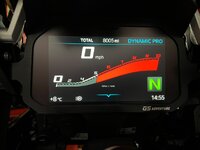
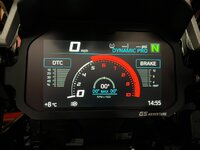
GS-911 option adding “Adventure” display to R1250GS TFT screen

P248

Registered user
Joined
Jan 20, 2019
Messages
189
Reaction score
14
Location
UK
I connected my GS-911 to my 2019 R1250 GS this morning, intending to make some adjustments to the TFT display. I opened the app and navigated through the “Instrument Cluster” option to the screen where you can make changes to the bike’s TFT display, including, for example, adding the “Sports” screen. For the first time, I saw an option called “Adventure”. I selected this and the GS-911 added it to the tile options on the first drop down level on the TFT, next to the “My Motorcyle” tile (unfortunately, I can’t work out how to add a pic here). However, it is greyed out and can’t be opened.

Can anyone tell me what this “Adventure” screen option is, and why I can’t access it?
 
Firstly. I’m no expert. However. Was adjusting mine today. 2022 R1250GS Adventure.
I changed the Start up screen to make life a ride. Then changed the speedo and installed the Sport screen a couple of days ago.

Perhaps the Adventure screen is what you have already?

IMG_4067.jpegIMG_4068.jpegIMG_4069.jpegIMG_4070.jpeg
 
It could be that, I’m not sure. The TFT “Adventure” tile has the down pointer below it, indicating that there are further options below, normally accessed by clicking down on the “menu” button. In this instance, it didn’t work, presumably because the tile is greyed out.

There is also a “Touring” alternative to the “Sports” and “Adventure” screen options in the app, . I selected that and the original speedo display appeared on the TFT; the “Sports” screen option disappeared from the TFT.
 
It certainly makes sense that an adventure bike would have an “Adventure” screen. Maybe I just didn’t see when I was in the app before. But I’ve definitely never seen the greyed out “Adventure” tile on the TFT before, and I’ve owned the bike from new.

And I’ll have to look again to see if I can identify the differences between the “Touring” and “Adventure”screens.
 
I connected my GS-911 to my 2019 R1250 GS this morning, intending to make some adjustments to the TFT display. I opened the app and navigated through the “Instrument Cluster” option to the screen where you can make changes to the bike’s TFT display, including, for example, adding the “Sports” screen. For the first time, I saw an option called “Adventure”. I selected this and the GS-911 added it to the tile options on the first drop down level on the TFT, next to the “My Motorcyle” tile (unfortunately, I can’t work out how to add a pic here). However, it is greyed out and can’t be opened.

Can anyone tell me what this “Adventure” screen option is, and why I can’t access it?
Hi P248

I'm not entirely sure what the purpose of this tile is, but I suspect it was placeholder for some future developments that BMW were planning, but never released. The only reason it's available, is because it's available on the TFT's tile options, so we list it as well. As you mentioned, it doesn't serve any purpose, so no point to keep it enabled.

Please feel free to let me know if you have any questions

Kind regards


Back
Top Bottom