GS1250 TFT - Iphone connectivity

For a while now I have been struggling to be able to make calls from my TFT (GS1250). I can receive calls fine, however I cannot get my 'contacts' or 'recent call list' to appear

I had that for a while and then worked out that I hadn't given permission to share contacts etc - changed the setting and all was fine. Not Apple though.
 
Had similar issues on my last two GS bikes with TFT,my helmet would never connect at certain places.
An example was always outside the sportsbike shop in Boston, I had to ride half a mile then it would connect.The same at AJ's in Shipley.
It was if something from their network wireless signal was affecting my bike.
Problem solved with my KTM as they give two options for connecting a riders headset.
Wireless or wired.You select wired and the phone connects to the headset first time all the time and same with the bike.
This gives all the controls through the bike including turning volume up and down.
BMW should look to follow this example.
My phone is an Iphone XR
 
To minimise issues with mine not staying connected, I deleted all pairings (TFT and iPhone) and deliberately avoided including the Nav V when I re-paired stuff. I had the TFT connected to just the iPhone 12 Pro and my Packtalk Bold intercom. In 20+ rides the TFT/phone connection dropped off every time.

I’ve given up on it now because it’s so flaky. Now I have the iPhone and Packtalk Bold paired up, and both the TFT and Nav V sitting unconnected to anything.


Sent from my iPad using Tapatalk

Yes, i now do the same. I use google maps on the phone which has an inbuilt player for he music (stop/start/pause/ff only) - never have any trouble now and google maps are bang up to date with live traffic.
I have checked data usage and its basicaly nothing - a few mb per ride.
 
Disappointing to hear some of you are having difficulties with the TFT system, particularly using an Apple phone. I assume the advice from BMW has been deafening?

That said I use a N-Com B-902X (Sena) headset and Samsung S21 Ultra phone pairing both with the TFT but NOT to each other. So far (11,000 miles+), and I say that with fingers crossed, operations have been seamless. That said I've found, through trial and error, that its best to have the phone and headset switched on first, then switch on the TFT. I normally do this as soon as I get to my bike, then put helmet and and gloves on etc. This gives time for it all to connect and you hear "phone connected", then you're ready to go. The telephone works very well using the BMW wonder wheel and TFT menu, Music is clear from say Spotify and on the odd occasion when I use Google Maps from the phone, turn by turn audio is clear and uninterrupted.

As always with BMW though, I cannot seem to get the Nav VI audio to connect without confusing the system, cutting off the TFT's output or sometimes both, clearly there is a conflict somewhere. I haven't exhausted all combinations as yet as I now prefer the BMW Connect app for Navigation and the ease of uploading GPX files from Google Maps to it, so I haven't been too bothered.

Good luck to the Apple guys, let's hope BMW/Apple fix the problem, though I wouldn't hold your breath!!
 
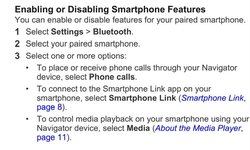
You should also pair the phone to the nav to utilise smart link but you need to do it correctly and de select the phone as per the video so it doesn’t act as a phone book and route calls via the nav.

I've never found the need for Smart Link (didn't know what it was until I just Googled it) The way I have the set up with the Iphone-12 to TFT and Headset to TFT with second channel on Headset to Nav VI works fine for Radio from phone plus incoming and outgoing phone calls working along with the Address Book being available.

Will have to check out Smart Link to see if I'm missing out on something :-)
 
Last edited:
I've never found the need for Smart Link (didn't know what it was until I just Googled it) The way I have the set up with the Iphone-12 to TFT and Headset to TFT with second channel on Headset to Nav VI works fine for Radio from phone plus incoming and outgoing phone calls working along with the Address Book being available.

Will have to check out Smart Link to see if I'm missing out on something :-)
Here is a link to the smart link info.
The safety camera, weather and routing are very good. It also tells you nearby parking and where you parked last and a route back if needed.

https://buy.garmin.com/en-GB/GB/p/111441
 
There is a facebook group that covers the TFT and the problems and answers. You will find that the majority of issues are with iphones and much less with Android. Most of the Android problems are because people have not correctly set the app permissions within the phone. iphone users always deny that it is down to the phone and seem to think that it is down to BMW. As only 28% of the worlds smart phones are made by apple it seems that BMW have managed to keep 72% of people reasonably happy.
My girl and I both have TFT BMWs but have no need to add the complication of a standalone GPS when the phone can do it all with the BMW connected app.
 
I've never found the need for Smart Link (didn't know what it was until I just Googled it) The way I have the set up with the Iphone-12 to TFT and Headset to TFT with second channel on Headset to Nav VI works fine for Radio from phone plus incoming and outgoing phone calls working along with the Address Book being available.

Will have to check out Smart Link to see if I'm missing out on something :-)
Here is a link to the smart link info.
The safety camera, weather and routing are very good. It also tells you nearby parking and where you parked last and a route back if needed.

https://buy.garmin.com/en-GB/GB/p/111441
 
This is where most people get the set up wrong regarding the Nav 6 when installing their phone. You need to deselect phone calls, select smart link and media and all will be good, do not allow contacts on the navigator as they should have been selected when you paired the smart phone to Tft.
 

Attachments

  • 7803B38C-22C5-4200-8721-C758FAE7CE67.jpeg
    7803B38C-22C5-4200-8721-C758FAE7CE67.jpeg
    85.4 KB · Views: 168
" iphone users always deny that it is down to the phone and seem to think that it is down to BMW. As only 28% of the worlds smart phones are made by apple it seems that BMW have managed to keep 72% of people reasonably happy."

my car works with my apple phone.
my tv works with my apple phone.
my wife's car works with my apple phone (and hers).
The stereo works with my apple phone, and ipad.
my headphones work with my apple phone.
my crash helmet works with my apple phone

why the hell wouldn't my bike work with it too?
 
" iphone users always deny that it is down to the phone and seem to think that it is down to BMW. As only 28% of the worlds smart phones are made by apple it seems that BMW have managed to keep 72% of people reasonably happy."

my car works with my apple phone.
my tv works with my apple phone.
my wife's car works with my apple phone (and hers).
The stereo works with my apple phone, and ipad.
my headphones work with my apple phone.
my crash helmet works with my apple phone

why the hell wouldn't my bike work with it too?

As I said Apple users always deny that Apple is to blame.
My Android works with everything including my BMW TFT.
Why would BMW worry about a minority 28% of phone users?
 
Here is a link to the smart link info.
The safety camera, weather and routing are very good. It also tells you nearby parking and where you parked last and a route back if needed.

https://buy.garmin.com/en-GB/GB/p/111441


Thanks for the link, a misunderstanding on my part as I was Googling for just "Smart Link" as an iPhone App and had forgotten that I already have the "Garmin Smart Link" App.

I've never tried to use the Garmin Smart Link while riding and have only rarely looked at it, if as you suggest to find where the bike is parked.

Just read the instructions that you added below and it seems this set-up and pairing routes phone calls directly between the Nav6 and Phone where-as my calls are between the Phone and TFT so don't really see any need to have them routed directly to the Nav as everything works fine using the Wonder-wheel and TFT.

Am I missing something as all seems to be working fine for me?
 
Thanks for the link, a misunderstanding on my part as I was Googling for just "Smart Link" as an iPhone App and had forgotten that I already have the "Garmin Smart Link" App.

I've never tried to use the Garmin Smart Link while riding and have only rarely looked at it, if as you suggest to find where the bike is parked.

Just read the instructions that you added below and it seems this set-up and pairing routes phone calls directly between the Nav6 and Phone where-as my calls are between the Phone and TFT so don't really see any need to have them routed directly to the Nav as everything works fine using the Wonder-wheel and TFT.

Am I missing something as all seems to be working fine for me?
Sorry this is the opposite your tft controls the calls, the nav connection is for the smart link app and media most of the problems with apple connections is due to using both tft and nav to route the calls thereby causing a conflict, by unselecting phone calls on the nav it allows all calls to be handled by the Tft.
 
Sorry this is the opposite your tft controls the calls, the nav connection is for the smart link app and media most of the problems with apple connections is due to using both tft and nav to route the calls thereby causing a conflict, by unselecting phone calls on the nav it allows all calls to be handled by the Tft.

Thanks for your suggestions but think that I will keep things as they are being this set up without the Smart Link has worked fine on my present 1250GS and previous 1250GSA, other than initially having Bluetooth connection problems between the Sena 10u Headset on the GSA TFT until its software was updated.

Appreciate your comments and will continue to use the Smart Link if and when I forget where the bike is parked. Not joking about this as many years ago on a day trip to London did forget where the car had been left and spent hours searching the general area before finding it!

So going back to basics, my Comm's are set up as follows and hope these help the OP:

iPhone12 paired to TFT
Sena 10u main channel paired to TFT
Nav VI paired to secondary Channel on Sena.

With this set up being able to send and receive phone calls besides scroll through Contacts and recent calls, plus listen to radio or stream music from the Phone and still having verbal instructions from the Nav VI take priority over radio reception.
 
As I said Apple users always deny that Apple is to blame.
My Android works with everything including my BMW TFT.
Why would BMW worry about a minority 28% of phone users?

I’m not blaming anyone, I just want it to work. As advertised.
 
I dont have any issues with my iPhone 7+ (iOS 14.8.1) connected to my TFT. I don't have a Nav VI however, and it works perfectly fine (I use a Nav mount adaptor to place my iPhone in the Nav VI's location)

It occasionally drops out when I'm moving but manages to reconnect itself within a minute or 2.
 
I’ll just leave an update as to the position currently (TFT version 022_007_020, iPhone 13 Pro iOS 15.1). BMW are reluctant to update the TFT currently as it appears they have issue. Mine was to be updated to 022_007_500 but damaged something in the SOS system so had to have a part replaced. (Not in stock in UK but now fitted after a few weeks). Still no TFT software update. My experience. Phone and media generally connect well and work most of the time. Phone is still the worst quality. Music (via Spotify) is fine. The connection has been moved to the end of the TFT boot sequence which means you often have to wait a full minute before the system connects to phone and lid. In reference to the OP issue of contacts. There is a limit of (I think) 1,500 contacts and also a limit on tracks and playlists (but as only Apple Music displays track and play lists it doesn’t apply to other music providers)

I have been pestering the app developers and they assure me (they’ve done that since v 13.2 of iOS when the issue started) that there is a major update to the software if the TFT due in Feb/Mar 2022 to address these issues (and finished with a very Germanic “please be patient”).

In short. The phone/media is now 90% (doesn’t use the app at all). The navigation (In the TFT) is still very broken (on certain iPhones/configs) due to the way Apple iOS manages Bluetooth connections

Watch this space

NOTE: If you have issues with contacts, general connections, etc try resetting the TFT (Settings>Reset) and restore all the pairings (you may fine the bleep on alarm (if you have one) will need resetting and possibly some units (psi, bar,etc) but that will often fix the OPs issue. When you get skilled at it the whole reset, delete pairings, re-pair takes a few minutes and often helps


Sent from my iPhone using Tapatalk

 
I’ll just leave an update as to the position currently (TFT version 022_007_020, iPhone 13 Pro iOS 15.1). BMW are reluctant to update the TFT currently as it appears they have issue. Mine was to be updated to 022_007_500 but damaged something in the SOS system so had to have a part replaced. (Not in stock in UK but now fitted after a few weeks). Still no TFT software update. My experience. Phone and media generally connect well and work most of the time. Phone is still the worst quality. Music (via Spotify) is fine. The connection has been moved to the end of the TFT boot sequence which means you often have to wait a full minute before the system connects to phone and lid. In reference to the OP issue of contacts. There is a limit of (I think) 1,500 contacts and also a limit on tracks and playlists (but as only Apple Music displays track and play lists it doesn’t apply to other music providers)

I have been pestering the app developers and they assure me (they’ve done that since v 13.2 of iOS when the issue started) that there is a major update to the software if the TFT due in Feb/Mar 2022 to address these issues (and finished with a very Germanic “please be patient”).

In short. The phone/media is now 90% (doesn’t use the app at all). The navigation (In the TFT) is still very broken (on certain iPhones/configs) due to the way Apple iOS manages Bluetooth connections

Watch this space

NOTE: If you have issues with contacts, general connections, etc try resetting the TFT (Settings>Reset) and restore all the pairings (you may fine the bleep on alarm (if you have one) will need resetting and possibly some units (psi, bar,etc) but that will often fix the OPs issue. When you get skilled at it the whole reset, delete pairings, re-pair takes a few minutes and often helps


Sent from my iPhone using Tapatalk

What fun it would be to take delivery of a new GSA then tell BMW 'please be patient' I'll pay for it some time next Spring.....;-)

This doesn't help Apple owners but I have to say the TFT/Connect App works very well with Android. I've just returned from a long trip across Europe and around Sardinia. The BMW Connect App Nav worked seamlessly, planning the next days routes on Google Maps then converting to GPX and opening in the BMW App. I was impressed. My Nav6 is now a back-up/ Compass/.....not a lot else. Great to hear from you, stay safe and well. Regards, Tony
 
Yes we planned on the PC, transferred the GPX to both Android phones and then spent two weeks all around the south of France and Corsica on the bikes. We don't need the BMW navigator on either bike as the phone can sit in the mount on the bikes and I can't see what the Navigator would add.
I see iphones a bit like Hardly Davidsons, over priced American products that don't really perform very well, but owners seem to think that they are a fashion accessory. As Apple has 28% of the smart phone market then that is probably the US and Britain with a few scattered around the world.
 
28% of the mobile phone market is the highest of all phone manufacturers and represents approx 1.6 billion handsets. The population of USA and UK is 350 million combined. that makes a lot of very fashionable phone users that are not from USA or UK. the truth is iPhones work the way the majority that have them, want them to.

Back to the point, my fancy fashion accessory works fine with the Nav VI, TFT and Sena 50R. it just needs connecting up correctly. Sena have recently admitted that there is an issue with recent firmware that's caused a problem. I just use an older version firmware until they fix it.

Using the Nav from the wonderwheel with gloves on is the added benefit through having Nav VI

Each to their own.


Back
Top Bottom