Has anyone found the Navigation Unicorn ???

JaySal

Member
UKGSer Subscriber
Joined
Apr 5, 2023
Messages
68
Reaction score
41
Location
Malton, England
Help and advice wanted, pretty please., I can't ride at the minute so I've been trying various bits of software on an Android tablet to find the perfect navigation too. I plan routes for each day in My Route App web based platform and always select cross compatibility for HERE, TomTom and OpenStreetMaps then export the Route, Track and POI as a GPX file and here starts the problem.

  • Osmand ( sometimes accepts the route sometimes throws a wobbly) When the route is in if you miss a waypoint it constantly wants you to go back to the waypoint, won't re route and for the live of me can't find a 'Skip Next Waypoint' option,
  • Sygic works pretty much the same as Osmand, tells you in the online literature you can 'Skip Waypoints' in the Quick Menu but that option doesn't show.
  • MRA Nav I think isn't as nicely presented as the above and even though Ive planned the route in there web based software still does the sending you back and forth along certain roads because it has the waypoint on the opposite side of the carriageway.
  • DMD2 still being developed for turn by turn navigation and will not re route you back to your route is will just tell you your going the wrong way.
  • Garmin XT in the past has sent me all over the place and will never trust again
So can anybody shed any light on how to overcome any of the glitches in any of the above platforms so I don't have several different ones and a zillion gigabytes offline maps on my tablet. Surely there is the Unicorn of a system out there?🦄
 
Last edited:
So can anybody shed any light on how to overcome any of the glitches in any of the above platforms so I don't have several different ones and a zillion gigabytes offline maps on my tablet. Surely there is the Unicorn of a system out there?🦄
Unfortunately not.

For OSMand I've found it hard to use. Imported GPX files are navigated as tracks. I also haven't found a way to skip named waypoints (But there may be a setting). The planning tool is a bit clunky to use. learning curve is a bit steep. OSMand+ works in Android Auto.

Sygic no experience

MRA. The best app for road based navigation. I find it very easy to use. Some have issues with maintaining phone charge. I keep my phone wired into my Africa twin to use it in Android Auto mode and it has been fine. OSMand probably better for Offroad if you can get past the interface.

DMD2 No experience. With the tablet it seems expensive for what it is. But on the tablet you can use any Android compatible software you like (I have read)

Garmin. The XT and XT2 are no longer WYSIWYG with basecamp in the way that my zumo 340 and 390 are. I have an XT which caused me untold frustration in use. But you can get round its foibles and after that its grand. There is plenty of information on here about getting a Zumo XT to work as required. Another excellent resource is here.

 
Unfortunately not.

For OSMand I've found it hard to use. Imported GPX files are navigated as tracks. I also haven't found a way to skip named waypoints (But there may be a setting). The planning tool is a bit clunky to use. learning curve is a bit steep. OSMand+ works in Android Auto.

Sygic no experience

MRA. The best app for road based navigation. I find it very easy to use. Some have issues with maintaining phone charge. I keep my phone wired into my Africa twin to use it in Android Auto mode and it has been fine. OSMand probably better for Offroad if you can get past the interface.

DMD2 No experience. With the tablet it seems expensive for what it is. But on the tablet you can use any Android compatible software you like (I have read)

Garmin. The XT and XT2 are no longer WYSIWYG with basecamp in the way that my zumo 340 and 390 are. I have an XT which caused me untold frustration in use. But you can get round its foibles and after that its grand. There is plenty of information on here about getting a Zumo XT to work as required. Another excellent resource is here.

Thanks Mzokk, The DMD2 interface and software is excellent but you are following a track but they are working on the routing software so fingers crossed. The planning on the web based MRA site is so easy so ideally finding the perfect solution to work along side that. Thanks for the detailed response (y)
 
Two things.
Take extreme care with waypoints, wrong side of the road/carriageway, expect the nav to take you to that waypoint. The programmes and devices take things in a literal sense and are very precise. Which is good and bad..
If you know the nav is taking you to a ‘bad waypoint’ then hit the miss next waypoint button..if you can find one. NOT recalculate..becuse that is what these bloody things do. Recalculate and ditch the planned route.

I have been using MRA with Tomtom Go app on phone and it has been really good. Long routes take a lot of work and double checking, worth the effort though if you want to avoid waypoint errors. Open google maps on another screen to zoom ‘right in’ to where you think you need a waypoint to gain more visual info.
Generally, waypoint every junction and even waypoint if there is a parallel road (to avoid it) navs just love an excuse to detour, even by a few hundred yards!
Long, complex routes that are designed for holidays (Picos for example) where you want to include various roads, turns, miss sections..then break the route up in to morning and afternoon. That way IF things go badly wrong, hopefully half the day can be rescued.

There is no simple solution though. Everything requires a lot of input unless you are happy to be riding around at the whims and electronic fancies of the nav.
 
MRA Nav I think isn't as nicely presented as the above and even though Ive planned the route in there web based software still does the sending you back and forth along certain roads because it has the waypoint on the opposite side of the carriageway.

It has? Or is it that you have put the point there, when you created the route in MyRoute?

The only time I see points ‘On the wrong carriageway’ is when I have placed them there by accident or, more often, when MyRoute’s ‘Expand’ function has misplaced the point.

See:


You might also have a real problem if you reverse a route.

Check the routes you create and then check them again. That should be your motto.
 
Last edited:
I have found the XT very reliable, running bespoke routes that I have created in MyRoute’s web based Routeplanner app, running on my iPad.
On a single carriageway even fully zoomed in on a route I've had MRA want me to 180 to return and then back to my original spot again. On the XT some the routes won't even take you fully down a road without it wanting you to do a 180. It's as if someone when developing the software physically drove the road and there was a blockage in the carriageway causing them to drive around to the other side of the blockage. When riding ignoring the diversion it is a straight road.
 
I have found the XT very reliable, running bespoke routes that I have created in MyRoute’s web based Routeplanner app, running on my iPad.
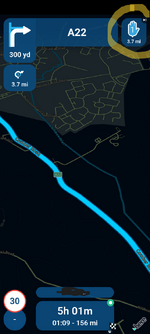
On this GPX file MRA Nav wanted me to return to point 6 when I had past point 7, Its a single carriageway road, none of the points are on junctions there doesn't appear to be any conflicts to why this occurred, this was on a T865X Android tablet which has better GPS than a smart phone.
 

Attachments

I like Kurviger and now it supports AA, that's the route I'm heading.
I like the choices from fastest to a ridiculous amount of curves and each street type can be selected on a sliding scale of 1 to 5.
Only played with the AA today, but so far, so good.
You can use the basic version for free.
Offline maps are also available.
Cloud storage available for your planed routes in the paid version.
Web version for planning.
 
I like Kurviger and now it supports AA, that's the route I'm heading.
I like the choices from fastest to a ridiculous amount of curves and each street type can be selected on a sliding scale of 1 to 5.
Only played with the AA today, but so far, so good.
You can use the basic version for free.
Offline maps are also available.
Cloud storage available for your planed routes in the paid version.
Web version for planning.
Yeah I have thought about that and it does offer the option to skip waypoints. Do you know what mapping its based off TomTom, HERE or Open Street Maps?
 
Help and advice wanted, pretty please., I can't ride at the minute so I've been trying various bits of software on an Android tablet to find the perfect navigation too. I plan routes for each day in My Route App web based platform and always select cross compatibility for HERE, TomTom and OpenStreetMaps then export the Route, Track and POI as a GPX file and here starts the problem.

  • Osmand ( sometimes accepts the route sometimes throws a wobbly) When the route is in if you miss a waypoint it constantly wants you to go back to the waypoint, won't re route and for the live of me can't find a 'Skip Next Waypoint' option,
  • Sygic works pretty much the same as Osmand, tells you in the online literature you can 'Skip Waypoints' in the Quick Menu but that option doesn't show.
  • MRA Nav I think isn't as nicely presented as the above and even though Ive planned the route in there web based software still does the sending you back and forth along certain roads because it has the waypoint on the opposite side of the carriageway.
  • DMD2 still being developed for turn by turn navigation and will not re route you back to your route is will just tell you your going the wrong way.
  • Garmin XT in the past has sent me all over the place and will never trust again
So can anybody shed any light on how to overcome any of the glitches in any of the above platforms so I don't have several different ones and a zillion gigabytes offline maps on my tablet. Surely there is the Unicorn of a system out there?🦄

With the XT (and any Sat Nav) you need to switch off auto route re-calculation. Unless you have waypoints at every single junction, and every KM it will try and add in its own logic to the route depending on how you have it set up.

I export my routes from MRA as a 1.1, and when it's on my XT i check the imported route, vs what it should like to check nothing has changed.

I used to have issues with the XT deviating from my route until i switched off auto-recalculation - and now it follows my route exactly as planned.
 
I use Sygic , now called Tripomatic , cant recall seeing / using that function

when i get some free time i'll have a look see
 
The "other side of the road" thing I've found that happens on most navigation software I've used (Google, MRA, Basecamp, Bing). With any of them you have to zoom right in and put your maker in the exact spot on the road else that will happen.
My recommendations are (I switch between the two depending on my plans/activities)
  • MRA. It's pretty good to be fair and pretty cheap. It looks great on something like a Chigee or Carpuride.
  • Google. Limits to 9 waypoints (free) unless you pay and even then up to 25 I think (not checked recently.
  • Bing is pretty good too but a bit of a faff to export to kml/kmx, then you have to do more work when its on your sat nav.
In my experience, if you want an exact route you have to do the work. Most will have a good go, but you'll get (I'd say) 80-90% of what you want, assuming you're not getting too adventurous.
 
On this GPX file MRA Nav wanted me to return to point 6 when I had past point 7, Its a single carriageway road, none of the points are on junctions there doesn't appear to be any conflicts to why this occurred, this was on a T865X Android tablet which has better GPS than a smart phone.
Had a wee look at that route. The route looks good I can't see anything wrong with it. But there are three scenarios that I thought of that could cause it to have a hissy fit :D

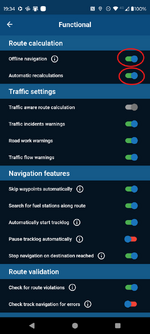
1. Automatic route recalculations not selected in the navigation settings. So you go through Point 6 but you are using Online navigation rather than offline navigation with downloaded maps. You lose phone signal before 6 and regain it before 7 you don't have auto recalculations turned on (its turned off by default I think) so it wants to go back to 6 as it thinks it hasn't passed through it.

2. Automatic route recalculations not selected in the navigation settings. So you go through Point 6 but you briefly loose GPS signal going through the trees on this part of the route (Unlikely) and you have automatic route recalculations turned off.

3. Automatic route recalculations not selected in the navigation settings. But you are online and you get an e-mail/call app update that occupies the CPU of your phone briefly so it wants you to go back to 6 as it thinks it hasn't passed through it.

I all scenarios I think that you would have to had auto recalculation switched off. On testing MRA I've found that with this switched on the app will try and route you back to a missed waypoint until you pass through the next one then it will carry on. You can only Skip Via points manually waypoints can be skipped automatically and manually.


1740339475942.png

1740341478707.png

Functional
The settings below affect how navigation is calculated and how the route may be modified while driving. This is from the MRA support pages.

Functional

The settings below affect how navigation is calculated and how the route may be modified while driving.

  • Offline navigation: Are you going to drive somewhere where you are not sure about your internet? Then turn on the offline navigation. ATTENTION! Before using this option, you must make the map of the region in question available offline.
  • Skip waypoints automatically: The route cannot be followed completely and you cannot pass a route point, by enabling this option this route point will be skipped automatically. You will then see a pop-up message with which you can still cancel the skipping. If you do nothing, the route point will be skipped.
  • Traffic-aware route calculation: If this option is on, you will see the delays on the map when starting the navigation. If there is a long delay, the arrival time will turn yellow. The app will also choose the fastest route during a recalculation.
  • Search for fuel stations along route: Choose here whether you want to see fuel stations along the route. This way you can easily add one to your navigation.
  • Check if routes were made in the HERE map: Choose whether or not to check if the route has been created in the HERE map or not. If the route is not created in the HERE map, differences may arise between the created route and the final route that will be navigated.
  • Check for route violations: It may sometimes happen that your route contains a road that you are in principle not allowed to drive on, but the route still runs on this road due to circumstances (think of a placed waypoint on a road with a weight limit for trucks). With this setting, you will receive a warning when starting the navigation and while driving if your route contains such a road.
  • Check track navigation for errors: With this option turned on, you will receive an informative message before the navigation starts with points that may cause problems. Click no if you are not interested in seeing these points and click yes to show the points on the map.
  • Allow track navigation for routes: Select here if track navigation for routes is allowed or not. If this function is on, track navigation will always be started, regardless of whether it is a route or track.
  • Automatically start tracklog for routes: If you enable this setting, the track will start automatically when you start driving. ATTENTION! This function only works while navigating routes.
 
Had a wee look at that route. The route looks good I can't see anything wrong with it. But there are three scenarios that I thought of that could cause it to have a hissy fit :D

1. Automatic route recalculations not selected in the navigation settings. So you go through Point 6 but you are using Online navigation rather than offline navigation with downloaded maps. You lose phone signal before 6 and regain it before 7 you don't have auto recalculations turned on (its turned off by default I think) so it wants to go back to 6 as it thinks it hasn't passed through it.

2. Automatic route recalculations not selected in the navigation settings. So you go through Point 6 but you briefly loose GPS signal going through the trees on this part of the route (Unlikely) and you have automatic route recalculations turned off.

3. Automatic route recalculations not selected in the navigation settings. But you are online and you get an e-mail/call app update that occupies the CPU of your phone briefly so it wants you to go back to 6 as it thinks it hasn't passed through it.

I all scenarios I think that you would have to had auto recalculation switched off. On testing MRA I've found that with this switched on the app will try and route you back to a missed waypoint until you pass through the next one then it will carry on. You can only Skip Via points manually waypoints can be skipped automatically and manually.


View attachment 388059

View attachment 388067

Functional
The settings below affect how navigation is calculated and how the route may be modified while driving. This is from the MRA support pages.

Functional

The settings below affect how navigation is calculated and how the route may be modified while driving.

  • Offline navigation: Are you going to drive somewhere where you are not sure about your internet? Then turn on the offline navigation. ATTENTION! Before using this option, you must make the map of the region in question available offline.
  • Skip waypoints automatically: The route cannot be followed completely and you cannot pass a route point, by enabling this option this route point will be skipped automatically. You will then see a pop-up message with which you can still cancel the skipping. If you do nothing, the route point will be skipped.
  • Traffic-aware route calculation: If this option is on, you will see the delays on the map when starting the navigation. If there is a long delay, the arrival time will turn yellow. The app will also choose the fastest route during a recalculation.
  • Search for fuel stations along route: Choose here whether you want to see fuel stations along the route. This way you can easily add one to your navigation.
  • Check if routes were made in the HERE map: Choose whether or not to check if the route has been created in the HERE map or not. If the route is not created in the HERE map, differences may arise between the created route and the final route that will be navigated.
  • Check for route violations: It may sometimes happen that your route contains a road that you are in principle not allowed to drive on, but the route still runs on this road due to circumstances (think of a placed waypoint on a road with a weight limit for trucks). With this setting, you will receive a warning when starting the navigation and while driving if your route contains such a road.
  • Check track navigation for errors: With this option turned on, you will receive an informative message before the navigation starts with points that may cause problems. Click no if you are not interested in seeing these points and click yes to show the points on the map.
  • Allow track navigation for routes: Select here if track navigation for routes is allowed or not. If this function is on, track navigation will always be started, regardless of whether it is a route or track.
  • Automatically start tracklog for routes: If you enable this setting, the track will start automatically when you start driving. ATTENTION! This function only works while navigating routes.
Thanks again for the very full response. I have fully zoomed in on the web app to check but the other stuff maybe a factor, as it is a site which has poor phone reception. I'll toggle around with the settings like you suggested and give it another go. I have had a play this evening with Kurviger and its worked spot on this evening but haven't tried the same route that made MRA have a wobble. I basically can't ride or drive at the minute so have to wait for the misses to drive me somewhere to keep testing. Thanks again (y)
 
The auto recalculations are turned on but I wasn't using offline maps I also have check tracks for navigation errors selected. Ill be travelling the route again Thursday so I will see if I can emulate it and video it using my phone.


Back
Top Bottom