heated grips symbol missing

wmckeown09

Registered user
Joined
Apr 22, 2024
Messages
7
Reaction score
2
Location
hampshire
Hello - I recently bought the HEX GS911 tool and tried to change the heated grips level from 2 to 4 which seemed fairly straight forward, but I no longer have the heated grip symbol on the TFT screen but yet the heated grips are working. I have repeated the process several times, no fault codes and still no symbol. Any help would be great.
 
What bike?
What model
What year


The more info you give, the easier it is for people to help you
 
Yes of course
2021 r1250gs
At the same time as trying to change the heated grips levels. I also added the sports screen, not sure if this is relevant or not
 
Yes of course
2021 r1250gs
At the same time as trying to change the heated grips levels. I also added the sports screen, not sure if this is relevant or not
I take it you mean, sports screen on the tft??

If so put the old (original) screen back and see if the symbol reappears ;)
 
Sports screen in the GS is useless and doesn’t work properly.
Get rid of it,
I have removed the welcome M Sports TFT screen and additions sports screen on the sports menu, purchased a new battery, performed the heated grips procedure again on the HEX tool and still no symbol
 
I have removed the welcome M Sports TFT screen and additions sports screen on the sports menu, purchased a new battery, performed the heated grips procedure again on the HEX tool and still no symbol
If they are working, just forget about it. It's not like they are great anyway.
 
If you’re lucky, there may be a backup of your previous setting in the Hex cloud that you can revert to. It’s a while since I’ve changed any setting with mine, but I’m sure the option is at the bottom of the settings screen.
 
Hi W,

I don't know if you've re-configured any other functions besides the number of heated grip power levels. But if you've enabled the TFT heated-grip pop-up menu (GS-911 main menu > BMW model > Service Reminder and Vehicle Functions > Retrofits and Removals > Heat popup menu), it's important to specify exactly the same number of heat levels as in the body controller's heated grips interface (GS-911 main menu > BMW model > Body Controller > Service Functions > Coding Functions > Heated Grips.

Let me know, yeah?
 
Last edited:
Sports screen in the GS is useless and doesn’t work properly.
Get rid of it,
Sports screen 3 will show a blank tachometer if the maximum engine rev count is not set to at least 12 000 RPM (GS-911 main menu > BMW model > Instrument Cluster > Service Functions > Coding Functions > Tachometer Customisation).

This is not a GS-911 problem. In this case, GS-911 is being used to enable programming that's present in the TFT display (due to the same display unit being designed for use on a number of different bikes, including S-series - which is why the Sport screen function is there), but not normally accessible.
 
Last edited:
Many thanks for the replies, just off on a bike tour to south France so don't want to risk messing up the bike even further so will pick this up on my return
 
Many thanks Nick V ,carried out your suggestion and heated grips symbol problem solved. Just need to work out now why the green dipped headlight symbol is no longer on the tft screen when riding at night. The dipped headlight is physically on and the blue full beam symbol comes on when switching to full beam, but no green symbol on dipped.
 
Many thanks Nick V ,carried out your suggestion and heated grips symbol problem solved. Just need to work out now why the green dipped headlight symbol is no longer on the tft screen when riding at night. The dipped headlight is physically on and the blue full beam symbol comes on when switching to full beam, but no green symbol on dipped.

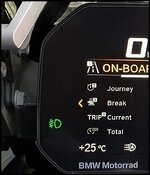
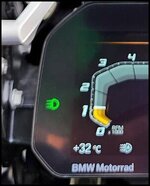
Do you mean either of the green icons below?

Screenshot 2026-06-28 at 17-52-30 BMW R1250GS Adventure Pro MY2020 - Style HP - The Comprehens...jpgScreenshot 2026-06-28 at 17-51-55 BMW R1250GS Adventure Pro MY2020 - Style HP - The Comprehens...jpg

If so, the left icon is for factory-fitted auxiliary fog lights (if fitted).

The right icon is for the bike's daytime running lights (the illuminated 'border' around your bike's high beam lenses). There should be an option to set automatic daytime activation in the bike's 'Settings' menu. If automatic activation is enabled, you won't have the option to activate the DRL at night - the icon won't appear, the DRL light will go to half-brightness, and the dipped beam will activate instead.

Not that you'd want to, but it is possible to have the DRL active at night. For this, disable automatic DRL activation (the white 'A' icon at the bottom right of the left image will not be seen), and manually enable the DRL using the button to the left of the hazard lights button on your left switchgear.

 
Do you mean either of the green icons below?

View attachment 516536View attachment 516535

If so, the left icon is for factory-fitted auxiliary fog lights (if fitted).

The right icon is for the bike's daytime running lights (the illuminated 'border' around your bike's high beam lenses). There should be an option to set automatic daytime activation in the bike's 'Settings' menu. If automatic activation is enabled, you won't have the option to activate the DRL at night - the icon won't appear, the DRL light will go to half-brightness, and the dipped beam will activate instead.

Not that you'd want to, but it is possible to have the DRL active at night. For this, disable automatic DRL activation (the white 'A' icon at the bottom right of the left image will not be seen), and manually enable the DRL using the button to the left of the hazard lights button on your left switchgear.
Many thanks Nick V all sorted, got no where on the HEX help line


Back
Top Bottom