Help needed understanding Mapsource

  • Thread starter Thread starter Ibex
  • Start date Start date
Should only take minutes. Ring me on 07815 677404 sometime after 25th May and I'll give you the address. Alternatively, if you have Mapsource on a laptop, bring it with you (with the necessary cables) to Abercrave and we'll do it over a pint, which sounds even better, if you're not going till mid June. :thumb

Friendly word of advice though. When it comes to computers etc, don't leave it till the last minute, because if there's a problem you wont have time to sort it. :confused:

What maps are you using? Hopefully, it will be City Navigator Version 8, but Version 7 should be fine though.
 
Only version 7 afraid, and not on a laptop. I will conact you after 25th.Have a good holiday :thumb
 
Guys, I've just read this whole thread over, right from the top of page 1, and after thinking about the difficulties that folks have reported (that I personally have not encountered), I am wondering if perhaps people are not attempting to use the MapSource application in the simplest possible manner?

Here's how I do my route planning. Typically, I ride about 20,000 miles a year. This is divided up about equally (mileage-wise) between 3 to 5 day jaunts that are 1,500 or so miles total, and one huge summer tour that takes 4 to 6 weeks to complete and runs about 8,000 miles.

I start with Michelin maps, and I do all my planning on these, long before I even turn on the computer. Once I have a good idea of where I want to go (final destination), and where I want to pass through (interesting places on the way), I turn on the computer and do the following:

1) I create one route for each day. If it will be an exceptionally complex day - for example, riding mountain passes - I might create two routes, one for the morning and one for the afternoon. But, typically, one day = one route.

2) I begin by defining the start and end waypoint for that day, and then letting MapSource calculate the route for me. I'll do a little tiny bit of tweaking of the 'Routing Preferences' (EDIT menu, then PREFERENCES, then the ROUTING tab, then press the DRIVING SPEED button) to encourage MapSource to generate a route that conforms with the riding style I want to follow that day. For example, if it is a transit day - just hauling ass to get from A to B as fast as possible - then I change my 'Interstate Highways' riding speed from the default value of about 65 MPH up to the ridiculous value of 100 MPH, and set 'fastest route' as my routing criteria. This will ensure that MapSource will very heavily bias towards the motorways and A class roads. On the other hand, if I want to ride twisties and I don't want to see a single dual carriageway under any conditions, I will set my riding speed on 'Interstate Highways' to a ridiculously low value (e.g. 30 MPH), and continue to say I want the fastest route. This means that divided highways and controlled access highways are heavily discriminated against, unless there is no other way to cross a pass or valley, and the secondary roads (twisties) get used preferentially.

3) Next, I look at the route that MapSource generates, and I tweak it a little bit by using the 'rubber band' feature to pull the route through towns that I want to pass through. I don't bother with precision accuracy - for example, If I want to go from Newquay to Taunton by way of Barnstaple (in other words, follow the coastal road), I just drag the route line to Barnstaple and drop it there. If it then calculates the first half of the route the way I want it (Newqay to Barnstaple), but it sends me down A369 to Taunton, instead of along A39 (the coast road), I'll just drag the second half of the route to some dinky town that is slightly past halfway to Taunton on the A39. I don't care if it routes me right downtown in front of the post office or cenotaph or whatever the exact center of that city is - hell, I'll bypass the city when I get there, and as soon as I pass abeam the middle of it, my GPSR will recalculate the route to get me to my final destination of Taunton. What I am trying to say is this: DON'T try to map your route out with millimeter precision, otherwise, you'll waste time and probably go blind at the computer.

4) Once I have the route laid out, looking more or less the way I want it, I save that file (that window), and I upload it to the GPSR. I then open a NEW window (a new .gdb file) for the next day's route. This is so that I don't screw up how one route got calculated if I tweak the routing preference around when I calculate the next day's route.

5) If there are certain places that I really, really want to see in or near a town (for example, let's say there is a pole dancer of international repute performing at some sleazy dive along the way), then I'll look it up on the GPSR the day I am riding, using the 'find POI' feature. Or, I might look the POI up in MapSource, and save it to my GPSR as a stand-alone waypoint, and when I start to get close to it (say, within 20 miles), I'll just ask my GPSR to take me directly to that place. After I leave, I'll just re-activate my planned route. I might not be on it, but the GPSR will automatically provide me with guidance to re-intercept that route once I start riding.

Everyone approaches tasks in a different way, and everyone strategizes and plans in a different way. MapSource is a very powerful application, but as all of us know, it can be quite complex, if we dive into it too deeply. I try to do the job as simply as I can, and not spend more than 5 minutes (at the most!) generating a route that I will spend a whole day riding. If it takes more than 5 minutes to lay out the route, then I know I am being too granular in terms of what I am trying to define with MapSource.

Hope this gives you some food for thought.

Michael

Illustration 1 - How MapSource proposed the route from origin to destination.


Illustration 2 - showing the first 'tweak' I made, rubber-banding the route up to Barnstaple.


Illustration 3 - with one more tweak - pulling the route line to somewhere just past halfway to Taunton - I think I will get the results I want...


Illustration 4 - yep, that worked, here's the final route.
If I decide later I want to pass through Ilfracombe (dead north of Barnstaple) - heck, I'll turn left at the sign that says Ilfracombe,
and my GPSR will eventually figure out that I have decided to improvise along the way.


 
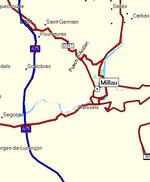
Thanks michael. :thumb Very useful step by step guide that i will use to plan my Alps trip. One question though. I am trying to find the Milau Bridge in france. How do I find it in mapsource if I don't know where it is - do i need to look up the location on the web and then look on the maps tin mapsource to locate it, then add it as a waypoint?
 
Actually, ignore my question. It would help if I could spell it - Millau not Milau. (Still can't find the bridge though...)
 
Bateman said:
Thanks michael. :thumb Very useful step by step guide that i will use to plan my Alps trip. One question though. I am trying to find the Milau Bridge in france. How do I find it in mapsource if I don't know where it is - do i need to look up the location on the web and then look on the maps tin mapsource to locate it, then add it as a waypoint?

Use the search facility (pair of binoculars icon) and use the city tab and search for Millau (2 L's :) ) Then locate the road on the map displayed and stick a waypoint on it (the flag icon) :thumb
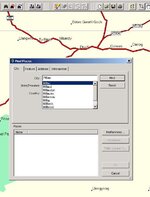
 

Attachments

  • ScreenShot005.jpg
    ScreenShot005.jpg
    47.3 KB · Views: 135
Bateman said:
Actually, ignore my question. It would help if I could spell it - Millau not Milau. (Still can't find the bridge though...)

A75 :thumb
 

Attachments

  • ScreenShot006.jpg
    ScreenShot006.jpg
    25.3 KB · Views: 136
Bateman said:
One question though. I am trying to find the Milau Bridge in France. How do I find it in mapsource if I don't know where it is... ?

I'm lazy by nature, so, my first approach would be Google the words "Milau Bridge" (Google will probably suggest the correct spelling), then, click on the 'Images' tab in Google, and someone will have probably posted a map showing where the thing is. Once I have a look at their map, I can then zoom in on the MapSource map, and figure out (intuitively) where it is. There will probably be a river or gully underneath it. Remember - you don't need to put the waypoint directly on top of the bridge - you'll know when you have arrived there, unless it is exceptionally foggy that day - all you have to do is ensure that your route passes OVER the bridge. :thumb So, once again, don't try to be too precise - you gain nothing from your extra efforts.

I reminds me of a ferry flight I once made from Khartoum to Dakar in the days before GPS- my teenage copilot stayed up half the night planning the route in great detail. We took off, and he asked me what route I had selected. I told him that all I intended to do was fly west until we hit a large body of water, and then at that point, I would try to determine if we should fly north or south until reaching Dakar.

Michael
 
After I leave, I'll just re-activate my planned route. I might not be on it, but the GPSR will automatically provide me with guidance to re-intercept that route once I start riding.
That is the problem I was having in THIS THREAD Using a 2610, does it give you guidance from wherever you are, as I thought it only gave guidance once you intercepted the planned route again. I'll have to test it out on a local route this weekend.
 
Taff:

I looked that thread over. I kind of think that Shedracer has proposed the best and most practical resolution.

There are a lot of different variables involved here - all relating to configuration of the GPSR (whether automatic route recalculation is on, things like that) - I am a bit reluctant to dive further into this right now, because I don't have a complete understanding of what all the configuration variables are on the different GPSRs (26xx, 27xx, 28xx), and on the different software builds for those GPSRs.

I think the best way to proceed would be for some of us to experiment with intercepting downloaded routes, and find out by trial and error what the best way of accomplishing this would be. I'm off to Africa for the rest of the month in a couple of days, so, I won't be able to help with this effort.

Michael
 
In some browing, I found This article on the Garmin c320. Basically it summs up my frustration with the Garmin Search. Here's the key section:

------
So the StreetPilot stumbles somewhat at the first hurdle, but unfortunately a lack of post code search isn’t the only problem. When you search by address, the first questions you’re asked is which country you wish to search in. Pressing E will instantly present you with England – so far so good. You’re then asked which city you’re looking in – you can either search all cities, or spell the one you’re after. Next you need to enter the house number, which is fine as long as the place you’re going has a number. Then you need to enter the street name, and this is where the problems begin.

I tried searching for my old address, which is on Eagle Lane in East London, but after typing Eagle and a space, I was presented with Eagle House, Eagle Lodge and Eagle Wharf Road. After contacting Garmin I was advised to enter just Eagle and press Done – then at the top of the list I was presented with “Eagle (Close, Court…)”. At first I thought that I still hadn’t been successful, but pressing the “Eagle (Close, Court…)” button then brought up a list of pretty much every road in London with Eagle in the name, including Eagle Lane. This is hardly intuitive, and the idea that entering data as accurately as possible will result in bogus results seems bizarre to me.

Looking for my current address was even more difficult. Trying to find St Mary’s Road, proved to be an impossible task. Typing “St Mary’s” resulted in a list that didn’t include my road. While typing “St Marys” brought up another list, where my road was conspicuous by its absence. Just when I was starting to think that my house didn’t exist, I searched for St Mary’s Road on the map itself, and sure enough, there it was!

But it was when I had to attend the CTS Show at the NEC in Birmingham that things really came to a head – yep, that’s right, the StreetPilot couldn’t find the National Exhibition Centre. I searched for both “NEC” and “National Exhibition Centre” in Birmingham, but to no avail. I then noticed that the StreetPilot has a Halls/Auditoriums section under the banner of “attractions” – “this is where I’ll find it” I thought to myself – but yet again no. Again I contacted Garmin and was told that the NEC was indeed in the database, but that I had to select the “Near Birmingham” setting, and then search under the Halls/Auditoriums section. With a heavy pinch of scepticism I tried this, but it worked.

It’s this completely unintuitive interface that ruins the StreetPilot, which is a real shame since this device has such potential........


I can live with it, but finding somewhere easily is surely a basic requirement of a GPS
 
I agree that finding addresses in Mapsource can be a problem, but once you get the knack, it's ok. I've been using it to find addresses in Germany, Poland, France etc and I would guess that 95% of the time I find the street I want.

I admit to printing off Droopy Dicks thread MAPSOURCE WONT LET ME FIND ... and keeping it handy - just in case. :D
 
The problem that was described in the post that Jimbo quoted above arises when you give the GPSR (or MapSource) too much information. With any database system that provides a search feature based on entering multiple criteria, the more criteria you enter, the more likely it is that the search engine will not find the record you are looking for. Conversely, if you enter fewer criteria, but criteria that is unique to the record you are searching for, the more likely it is that you will find what you are looking for on the first go.

It's not a Garmin specific problem, it's a universal problem. If you are searching Google for information, if you enter a whole bunch of different criteria and cause the criteria to concatenate by encasing it in quotes (more or less what it is you are doing with a map lookup), chances are you will get a 'nothing found' page. If you just enter one or two carefully chosen words, you will probably find what you are looking for at the top of the list.

Michael
 
PanEuropean said:
3) Next, I look at the route that MapSource generates, and I tweak it a little bit by using the 'rubber band' feature to pull the route through towns that I want to pass through.

Hi Michael,

This is the point I got stuck, I can't find the "rubber band" feature :confused: , Tried the "route tool" but it won't let me change the route, it will instead create another route, which I don't want...

So, where is the "rubber band" tool then (or whatever it's called)? :o

Thanks very much
 
OK, I comprehend your problem now.

To 'rubber band' a route, do the following:

1) Create a simple route from A to B.

2a) With your mouse, click on the tool that looks like a little arrowhead, or;
2b) Go to the TOOLS menu and select the line that says 'Selection', or;
2c) Simply touch the 'S' key on the keyboard (not Control-S or Alt-S or anything else, just simply the letter 'S').
It doesn't matter which of the three methods you use, the end result is the same.

3) Now, click once on the route - it will change colour - then click on the place that you want to 'rubber band' it to.

See illustration 2 and 3 on the previous page of this thread - that is what things will look like after you have clicked on the route with the selection tool.

Michael
 
The things you learn surfing this website...

Well guys, since asking the first tentative question on this thread I've been amazed at the level of debate that has ensued. It's also encouraged me that I'm not alone!

I would like to report that my inaugural GPS guided trip to Brussels went fine after all my early concerns, and that the 2610 is now a feature I would not travel without in future (off to Spain on a business flydrive next week and will be taking it along)

One minor hiccup in Brussels however - the unit appeared not to aknowledge that we had actually done the Hotel "Waypoint," (did it expect me to park in the foyer?) with the result that it insisted on rerouting me back to it on the morning of my departure. Embarassingly enough I didn't realise this until I turned up outside the damned place again. (It was very early in the morning.) This is a very good reason for plotting the outbound and return trips as different routes rather than one long route which I did!

It was not until I had covered some distance from the hotel using my personal inbuilt direction finder (pidf) that it seemed to catch on that we had moved on to the homeward leg, and promptly started behaving itself, meekly routing me back onto the correct path (so much for accuracy of pdif) and never misbehaved again.

It's people like me that Garmin is up against. If I cant oil it or tighten it with a spanner, I struggle a little, despite availability of handbooks etc. Anyway, I feel as though I'm getting there now, and it was definately worth the effort.
 
Hi Ibex:

Funny post you made - it left me smiling.

The current system software for all the Garmin GPSRs is constructed so that once you pass abeam a waypoint, it will generally consider that you have 'reached' that waypoint, and skip over it and start routing you to the next waypoint.

However - in the rather unique case that you described - where you have a route set up that is A to B and then back to A - if you get very, very close to B (like, in the parking lot of B), then power down the GPSR, when you power it back up again, it will still attempt to route you to B. If you start heading back to A, it will 'eventually' figure out that you have abandoned all efforts to go to B, but that won't happen quite as quickly as it would if you were navigating an A to B to C route.

The moral of the story is exactly what you discovered - don't construct out and back trips on the same route unless they are circular in nature. In fact, I think it might not even be necessary to construct two routes for an A to B to A round trip - just construct the outbound leg (A to B), and when you want to return, pull that route up and invert it (ask to navigate it in the other direction). I think the automotive GPSRs support the 'invert route' function - I know the aviation ones do.

Michael
 
Take a look at the two maps below; both are of York at around the same scale. OK, they look a little different, but the main problem is with place names. On the picture below I see Malton, Easingwold, Boroughbridge, Market Weighton, Ripon etc, it’s a very typical representation of the area.

Michelin map
michelin_map.jpg


Mapsource map
mapsource_map.jpg


Firstly, what a great thread this is. I am very dissapointed with GPS systems and with my Sp3 and is why I have not upgraded to a newer version. The above map detail shows perfectly well why GPS will not replace a map for me. Its impossible to just navigate on the hoof, there is not enough detail at the correct zoom level. But maybe thats not what its designed for :nenau Am I expecting too much. Other points are the search function. Pan has provided some great answers, thanks, and I have learnt alot. But why, when the system is set to English language and the map I am using is in English, does mapsource use the local language spelling which I don't have? 1 other thing that really tries my patience is the fact that it uses road names rather than numbers on the major routes and minor. Can't we have both. Admitedly I am using version 7 so things may have moved on a bit. I won't even bother getting into the auto routing problems I have had with "keep right for...." when I should stay exactly where I was :spitfire or "turn left in 300 ft" when the road just bends round a little.

 
PanEuropean said:
The moral of the story is exactly what you discovered - don't construct out and back trips on the same route unless they are circular in nature. In fact, I think it might not even be necessary to construct two routes for an A to B to A round trip - just construct the outbound leg (A to B), and when you want to return, pull that route up and invert it (ask to navigate it in the other direction). I think the automotive GPSRs support the 'invert route' function - I know the aviation ones do.
Right. It is a good habit to never construct a route that cross itself or meet itself. Better to divide the route into several parts.

The 'invert route' feature is not available in all GPSR models which is very bad since it forces the user to up-front decide the driving direction of a route. If your GPSR doesn't support 'invert route' you need to create two separate routes in MapSource - "outbound" and "inbound" - and upload both of them to the GPSR.


Back
Top Bottom