Help needed with importing routes basecamp/zumo 390

I have had other riders create routes with BaseCamp and all of us have ended up with different routes. We all end up with the same waypoints.

The only route (not just waypoint) creating software I have had some joy with is MapSource, but you do have to change your Nav V from MTP to Mass Storage or MapSource won't recognise your device.
 
I have had other riders create routes with BaseCamp and all of us have ended up with different routes. We all end up with the same waypoints.

It's all to do with everyone using different profiles & settings in BaseCamp & their devices
 
Many people seem to manage using using basecamp with their Nav V, as with reference to your other riders and waypoints, a waypoint is a fixed point so providing they are all the same location they should all remain at the same point on each device, this is presuming you all had the same maps. Now the actual route part of the equation is a totally different thing and can be affected by many things and as many people.
Now i dont mean any disrespect when i say this, but when making a route for yourself and others to use, you need to know how to or learn how to make a route (solid or immovable as possible) by doing this it will not mater what settings or avoidances or preferences that anyone else has including yourself, the route will remain as is and will not be altered, unless of course you alter it yourself.
 
I think that is the case most times but we have even tried just connecting out satnavs and drag'n'dropping the .gpx files into the correct locations. We also turn recalculate off.

I'm still playing as I have just discovered a tutorial on how to set up BaseCamp and I'm ignoring my instructions from Garmin UK.

Your last comment iand46 was more helpful than 2 years of discussions with Garmin! Thanks. :beerjug:
 
Many people seem to manage using using basecamp with their Nav V, as with reference to your other riders and waypoints, a waypoint is a fixed point so providing they are all the same location they should all remain at the same point on each device, this is presuming you all had the same maps. Now the actual route part of the equation is a totally different thing and can be affected by many things and as many people.
Now i dont mean any disrespect when i say this, but when making a route for yourself and others to use, you need to know how to or learn how to make a route (solid or immovable as possible) by doing this it will not mater what settings or avoidances or preferences that anyone else has including yourself, the route will remain as is and will not be altered, unless of course you alter it yourself.

I will forward your post onto my colleage as he's in the frame of mind that his satnav is correct and mine is not. I'm more open minded and I can see where you're coming from in saying how to make a solid route. Thanks.
 
There is no right right or wrong way to set your nav or indeed basecamp, its all down to your own preference, but as i have said if you make a route solid it will get around other peoples preferences and settings, i have posted a small route as an example, this is a road based route and not off road, try it on your nav and see if it alters, as you have no idea of what my preferences are. You can see that there are many ways to reach the end point from the start, including a motorway stretch. send it to your mate aswell to see if it alters on his settings, and remember you have no idea of what my settings are. i will post a screen grab of what the route looked like to start off with and we then can see if it has indeed been altered.
 

Attachments

There is no right right or wrong way to set your nav or indeed basecamp, its all down to your own preference, but as i have said if you make a route solid it will get around other peoples preferences and settings, i have posted a small route as an example, this is a road based route and not off road, try it on your nav and see if it alters, as you have no idea of what my preferences are. You can see that there are many ways to reach the end point from the start, including a motorway stretch

I agree entirely a properly constructed route should work on any device. It is possible to put enough via points into a route to overide any preference settings but on a long route that requires a huge amount of effort. Better to agree that settings like "avoid motorways" or "avoid tolls" are used on all devices sharing the route. This will cut down the number of points required significantly.

I loaded your route into Mapsource (as you know I can't be bothered with Basecamp!) and would make the following observations Your route has one point that misses the road, rather helpfully Mapsource flags this up by showing it as a big green dot rather than a small black one. . If I re calculate it sends me around the houses to get there! I would say you have too many points on parts of the route that don't need them - on the B6418 for example and not quite enough to ensure the route remains as desired. My recalculate route avoids the B6417 through Clowne for instance. I would suggest placing via points just after each junction, that way every device is instructed to take the correct road.

Please excuse my pedantry, I applaud you and others who devote so much time helping others-often when said others have made no attempt to read manuals or otherwise help themselves. I feel you have more patience than I with some of them! (present OP is NOT included in this group)

John
 
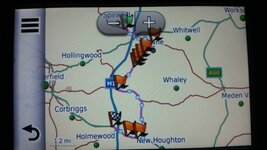
This is what I get....


I imported your .gpx file via explorer (drag'n'drop) and not through BaseCamp.

I did view it afterwards on BaseCamp and it is the same image.

I see you have added a lot of waypoints. That's what I have been doing when I create my .gpx files as that seems the only way to stop my Nav V from creating its own routes.

When my mates create routes they don't add many waypoints so I miss all the goat tracks they say they have plotted.

EDIT: I did make sure I had turned off "Avoid Motorways" before loading up the route, so it worked.
 
I agree entirely a properly constructed route should work on any device. It is possible to put enough via points into a route to overide any preference settings but on a long route that requires a huge amount of effort. Better to agree that settings like "avoid motorways" or "avoid tolls" are used on all devices sharing the route. This will cut down the number of points required significantly.

I loaded your route into Mapsource (as you know I can't be bothered with Basecamp!) and would make the following observations Your route has one point that misses the road, rather helpfully Mapsource flags this up by showing it as a big green dot rather than a small black one. . If I re calculate it sends me around the houses to get there! I would say you have too many points on parts of the route that don't need them - on the B6418 for example and not quite enough to ensure the route remains as desired. My recalculate route avoids the B6417 through Clowne for instance. I would suggest placing via points just after each junction, that way every device is instructed to take the correct road.

Please excuse my pedantry, I applaud you and others who devote so much time helping others-often when said others have made no attempt to read manuals or otherwise help themselves. I feel you have more patience than I with some of them! (present OP is NOT included in this group)

John

Jhon the route was created in mapsource and was just a quick example to the question, but you obviously understand what is meant by a solid route. I have not been able to get this route to alter on any of my devices(although not new type of devices) or using basecamp and mapsource, with reference to it sending you around the houses i can not explain that issue, please post a screen shot of this so i may further understand what i am looking for/at.
Having just a couple of thoughts on this, it maybe the differenc between NT maps and NTU maps, or even the map age, or new vs old devices.
With reference to people setting their preferences the same as each other, if they can not be bothered to learn how to use or create routes or learn to use their satnavs, there is little to no chance of them understanding settings and preferences. I have said it many times, its some peoples inability or the fact they cant be arsed or dont have time to learn to use what they have.
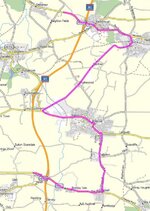
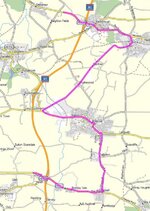
picture of route in mapsource below
 

Attachments

  • 20-09-2016 10-08-38.jpg
    20-09-2016 10-08-38.jpg
    88.4 KB · Views: 146
This is what I get....


I imported your .gpx file via explorer (drag'n'drop) and not through BaseCamp.

I did view it afterwards on BaseCamp and it is the same image.

I see you have added a lot of waypoints. That's what I have been doing when I create my .gpx files as that seems the only way to stop my Nav V from creating its own routes.

When my mates create routes they don't add many waypoints so I miss all the goat tracks they say they have plotted.

EDIT: I did make sure I had turned off "Avoid Motorways" before loading up the route, so it worked.


It still should have worked no matter what settings you used although the grey one said he had a problem with one part of the route.
 
Should the box be ticked or not?


I'm curious because one of my riding buddies uses an old out of date map or he uses MotoGoLoco to create routes.

When I use one of his MotoGoLoco created routes then my Nav V only picks up the waypoints and not the route.
 
Using other sources like motogoloco to create routes to share, will add another variable to the equation as that site i believe uses google maps, with reference to your question of the tick, this will have no bearing for yourself if ticked or unticked providing you have the same maps on your computer and nav, it may however alter the routes that you are sent from friends, depending on what was used to create them and how they were created.
There are so many variables when sharing routes from and to others that are using alternative sources and maps, and even different devices, that it becomes a mine field, all you can do is make your route as solid as you can, and if you are all using garmin devices, there should be little to no deviations, unless of course your mates map is that old it still has no motorways on it.
 
Ok. I get where you're coming from. One problem I think I have rectified is that I'm on my 2nd Nav V and BaseCamp was set up on the old serial no. Hopefully I'll be able to test out the correct settings on my BaseCamp and my Nav V very soon.

All I need to do now is sort out my stuttering mp3's and my draining battery but that's for another day. lol.

Many thanks for your input. Much appreciated. :thumb2
 
This is what I get....


I imported your .gpx file via explorer (drag'n'drop) and not through BaseCamp.

I did view it afterwards on BaseCamp and it is the same image.

I see you have added a lot of waypoints. That's what I have been doing when I create my .gpx files as that seems the only way to stop my Nav V from creating its own routes.

When my mates create routes they don't add many waypoints so I miss all the goat tracks they say they have plotted.

EDIT: I did make sure I had turned off "Avoid Motorways" before loading up the route, so it worked.

I have no idea why there are waypoints, just the same happened when I loaded the route into Basecamp and then onto my 390. Maybe our resident Basecamp experts can explain. I try to only use waypoints where I absolutely want to go somewhere. Usually this is just the start and end but occasionally there might be somewhere along a route I need to call in at. I will then use a waypoint as the device will insist I go there rather than a via point which it will only try to use but will ignore if I carry on.

I have just created a route for my own use with just the start (my home) and my destination as waypoints. I placed via points just after every junction to ensure the device follows my intended route. This has transferred as intended with no extra waypoints appearing so the extra waypoints in the other route remain a mystery.

John
 
Jhon the route was created in mapsource and was just a quick example to the question, but you obviously understand what is meant by a solid route. I have not been able to get this route to alter on any of my devices(although not new type of devices) or using basecamp and mapsource, with reference to it sending you around the houses i can not explain that issue, please post a screen shot of this so i may further understand what i am looking for/at.
Having just a couple of thoughts on this, it maybe the differenc between NT maps and NTU maps, or even the map age, or new vs old devices.
With reference to people setting their preferences the same as each other, if they can not be bothered to learn how to use or create routes or learn to use their satnavs, there is little to no chance of them understanding settings and preferences. I have said it many times, its some peoples inability or the fact they cant be arsed or dont have time to learn to use what they have.
picture of route in mapsource below

Apologies, it only recalculates differently using OSM maps. I have tried it in Mapsource and Basecamp using 2017.2 maps and it works OK. The difference is, I think, due to the much greater detail on the OSM maps. This means that your green dot appears on the wrong side of a dual carriageway on OSM and simply beside the road on the latest Garmin maps . Likewise the diversion around Clowne is caused by the fact that the first via point on the B6418 coming out of the town is on that road in Garmin mapping but just inside the junction with Boughton Lane on the OSM version, hence the re routing down Boughton Lane. The Google earth image proves that the OSM version is correct!

All this goes to show that we should always use the same maps. Once again I apologise for not noticing my error.

The mystery of the added waypoints remains. I and the OP got them showing on our devices. When I transferred it to my 390 the device was set for Garmin maps and I got the same result as the OP, lots of extra waypoints. Anyone any ideas?

As for getting a group to use the same settings the method I have used is to physically take each device and set it myself. If that is not possible I tell people clearly and simply that unless they use certain settings the route is unlikely to work correctly for them. I fail to see why if someone who is prepared to design working routes then should also have to take on the task of making those routes idiot proof. I learnt the need for setting devices when sharing routes I planned from our hotel in Austria. As you say most people can't be bothered to find out how to use their device. They do know how to make a fuss when it doesn't do what they expect though. By adjusting certain settings (why would you use motorways in the Austria Alps?) I could be reasonably sure guests would enjoy the wonderful roads I had planned for them.

John
 
Hard to see with 2 different scales but the routes looks very similar, i cannot say for sure.
 

Attachments

  • 20-09-2016 10-08-38.jpg
    20-09-2016 10-08-38.jpg
    88.4 KB · Views: 143
  • 20160920_103218.jpg
    20160920_103218.jpg
    41.4 KB · Views: 135
I am still of the opinion that when using a Nav V and BaseCamp you are only creating waypoints. Your Nav V will create it's own route to each waypoints. If you add enough waypoints then it will appear that you are following the intended route.
MapSource on the other hand will create a planned route with waypoints.

This all ties in with what Garmin technical support told me.

For anybody else that wants to test this out using MapSourse and has a Nav V then you need to change your Nav V from MTP Mode to Mass Storage. If you don't then MapSourse won't be able to see your Nav V.

To change from MTP to Mass Storage please do the following on your device:
  1. Touch Volume
  2. Touch and hold the upper right corner of the screen
  3. Touch MTP Settings (you may need to scroll down)
  4. Touch Configuration and Settings on some devices before getting the option for MTP Settings
  5. Touch Mass Storage
  6. Touch Save
 
Apologies, it only recalculates differently using OSM maps. I have tried it in Mapsource and Basecamp using 2017.2 maps and it works OK. The difference is, I think, due to the much greater detail on the OSM maps. This means that your green dot appears on the wrong side of a dual carriageway on OSM and simply beside the road on the latest Garmin maps . Likewise the diversion around Clowne is caused by the fact that the first via point on the B6418 coming out of the town is on that road in Garmin mapping but just inside the junction with Boughton Lane on the OSM version, hence the re routing down Boughton Lane. The Google earth image proves that the OSM version is correct!

All this goes to show that we should always use the same maps. Once again I apologise for not noticing my error.

The mystery of the added waypoints remains. I and the OP got them showing on our devices. When I transferred it to my 390 the device was set for Garmin maps and I got the same result as the OP, lots of extra waypoints. Anyone any ideas?

As for getting a group to use the same settings the method I have used is to physically take each device and set it myself. If that is not possible I tell people clearly and simply that unless they use certain settings the route is unlikely to work correctly for them. I fail to see why if someone who is prepared to design working routes then should also have to take on the task of making those routes idiot proof. I learnt the need for setting devices when sharing routes I planned from our hotel in Austria. As you say most people can't be bothered to find out how to use their device. They do know how to make a fuss when it doesn't do what they expect though. By adjusting certain settings (why would you use motorways in the Austria Alps?) I could be reasonably sure guests would enjoy the wonderful roads I had planned for them.

John

No need to apologise John. Getting hold of everyones devices may not be an option for some people, as they may all be decending on a point from different locations at different times as can and does happen.
Why certain devices choose to put waypoints at some but not all points i do not know i will have to look into this, its not just new devices that this happens on, it does it on the 550 and 660 as well.
 
I am still of the opinion that when using a Nav V and BaseCamp you are only creating waypoints. Your Nav V will create it's own route to each waypoints. If you add enough waypoints then it will appear that you are following the intended route.
MapSource on the other hand will create a planned route with waypoints.

This all ties in with what Garmin technical support told me.

For anybody else that wants to test this out using MapSourse and has a Nav V then you need to change your Nav V from MTP Mode to Mass Storage. If you don't then MapSourse won't be able to see your Nav V.

To change from MTP to Mass Storage please do the following on your device:
  1. Touch Volume
  2. Touch and hold the upper right corner of the screen
  3. Touch MTP Settings (you may need to scroll down)
  4. Touch Configuration and Settings on some devices before getting the option for MTP Settings
  5. Touch Mass Storage
  6. Touch Save

When creating a route using base camp, you decide what is a waypoint and what is a shaping point, i feel you are getting mixed up between the two, now when you send the route to your nav V what that then does is a different ball game, and as i dont have one i can not comment.
 
The Nav V ignores shaping points created with BaseCamp and uses it's own "brain" to calculate between the waypoints.

That's from the conversation I had with Phil Elliot (top techie at Garmin UK) last year.

That's also why they recommend using MapSourse because it does include traffic shaping and does work with the Nav V.

I sometimes wish they invented a Nav V with the software of a 550 because I had no problems with that device, except the small screen. lol.


Back
Top Bottom