How do I import a Google maps route into Basecamp?

Cheers Pootler,

I discovered that video after posting late last night. He does go on a bit, bless :sleep:

I created a map, exported it to BC under a new list, but it ain't there :blast

I'm not a natural on with a PC, and I reckon I'm struggling with the difference between routes and tracks. Anyway, I'll give it another go later (y)
 
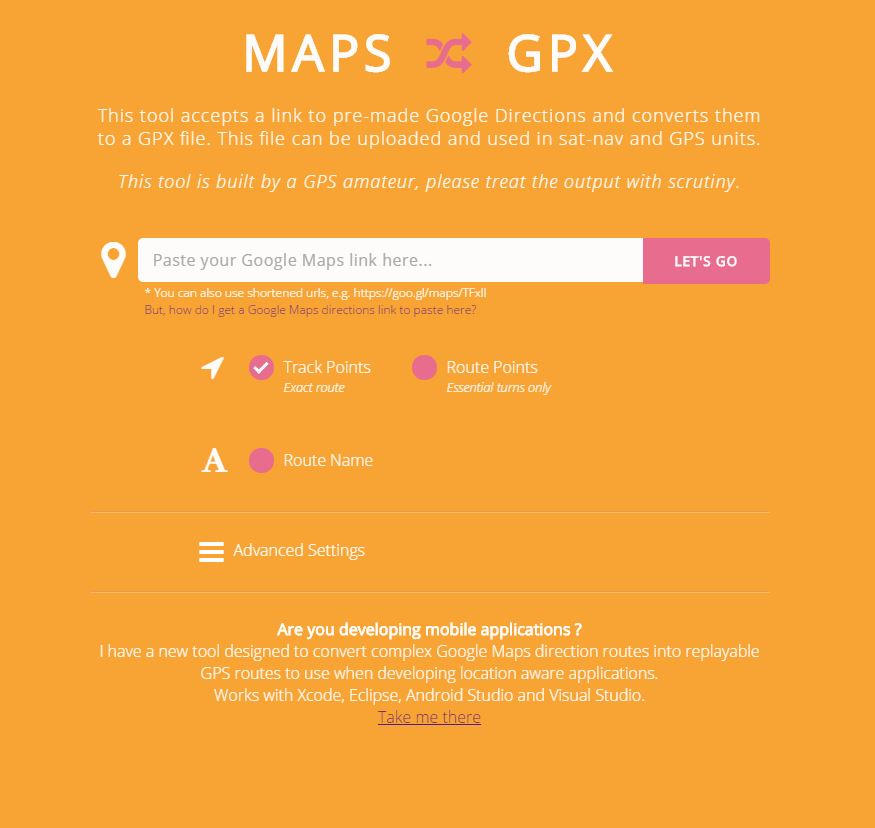
This should do it, converts a google maps file to GPX from the link.

Maybe consider a small donation if it works for you. It’s a handy tool.


Sent from my iPhone using Tapatalk
 
Shit the actual bed! I've cracked it!

It's like learning another language (in my case something like Mandarin or Swahili)

Anyway, thanks for the pointers folks :beerjug:
 
Wouldn't it be easier creating the gpx file direct from something like GPX planner then saving to a directory on your PC, and transferring straight to your satnav from there? Seems a lot of faff via "my maps" with some pitfalls when creating the route in basecamp.
 
Some people use Google maps exclusively. Knowing how to get them into GPX files is, for them, useful, I guess.
 
Yes, I can see that. I use google maps a lot when planing but as I don't use "my maps" I haven't the option to create files to gpx format. I'm a bit of a newbee (technophobe) to gpx but was recently converted when someone showed me how to upload them direct to my satnav, so very interested in anything that can help create them now. For donkeys years I used paper maps and usually throw one into the topbox as insurance as a matter of course. However, I really gelled with Nav 6 (zero issues with mine for now). I have downloaded basecamp, but the need to use garmin maps or my satnav connected for its maps seems a bit cumbersone, plus I don't want to have to pay for garmin maps, hence my interest in GPX planner.
 
I share routes on my maps with friends who don't use GPS devices and don't have software that can handle GPX files. Its also a handy way of sharing a route that can be edited (given the relevant permissions) by those doing a trip There are a couple of gotchas to be aware of however.

The first is that the co-ordinates used to describe where the road actually is vary slightly from map type to map type. So a google maps map and a Here map won't be exactly the same (nor will OSM or Tom Tom for that matter). The offset can be up to 50m (though usually its no more than 10m) and while for most rural routes this doesn't matter it could cause havoc in a city or if your route was close to two roads running either side of a river. (Don't ask me how I know :D) The other thing to be aware of is that it could put a waypoint/Via point a little way up a sideroad so you don't actually ride through it and your sat nav will want you to turn back. So if you use google maps for planning and import it into something else. Check it carefully against the mapping/device that you are actually going to use it with.

The second Gotcha is KMZ files import into basecamp as a Track. So if you convert it to a route using the motorcycling profile you will have a start and finish waypoint and nothing in between. If you don't want to go straight to the finish if you go off route, turn off automatic recalculation on your device or convert the track to a route using the Direct basecamp profile (so that you can specify the number of shaping points) and then recalculate the route using the motorcycling profile. This will preserve the shaping points created using the method above so that if you go off route you should be routed to the closest shaping point and not the end of the route.

MRA handles Google my maps file much better than basecamp. The via points that you used in google my maps to create the route in the first place are preserved when you import the Google mymaps route as an MRA route and you can convert them into waypoints/ via points in MRA. The same caveat applies as to basecamp you need to make sure the waypoints/shaping points/via points to shape the route are exactly where you think they should be on the mapping that you are using in MRA and on your device.
 
Yes, I can see that. I use google maps a lot when planing but as I don't use "my maps" I haven't the option to create files to gpx format. I'm a bit of a newbee (technophobe) to gpx but was recently converted when someone showed me how to upload them direct to my satnav, so very interested in anything that can help create them now. For donkeys years I used paper maps and usually throw one into the topbox as insurance as a matter of course. However, I really gelled with Nav 6 (zero issues with mine for now). I have downloaded basecamp, but the need to use garmin maps or my satnav connected for its maps seems a bit cumbersone, plus I don't want to have to pay for garmin maps, hence my interest in GPX planner.
Unless things have changed, you already have Garmin maps on your Nav 6, and you can install these to Basecamp on your PC or Mac using Garmin Express.
There’s then no need to have your Nav 6 connected to access the maps.

You could then use Basecamp to create the routes and send them direct to your device from Basecamp, or share them as gpx files.

If you use Google Maps the route, as Mzokk said, translate exactly and will likely need a tidy up in Basecamp or MRA.
 
Unless things have changed, you already have Garmin maps on your Nav 6, and you can install these to Basecamp on your PC or Mac using Garmin Express.
There’s then no need to have your Nav 6 connected to access the maps.

You could then use Basecamp to create the routes and send them direct to your device from Basecamp, or share them as gpx files.

If you use Google Maps the route, as Mzokk said, translate exactly and will likely need a tidy up in Basecamp or MRA.
Thanks, I'll try and upload the maps from my device. Seems that might be the most straightforward thing to try.

 
Thanks, I'll try and upload the maps from my device. Seems that might be the most straightforward thing to try.
That’s not how it works. Connect your device, then open Garmin Express. Click Manage Maps, and then select “install maps to computer”.
The maps should then install to Basecamp, and in future you won’t need to connect your nav 6 to see the City Navigator maps.

I caveat this by saying I don’t have a nav 6 but that’s how it works on Garmin devices and all the previous generation of BMW Garmin devices.


Back
Top Bottom