HOW DO I VIEW DETAILED GARMIN MAPS ON MY PC?

retroman

Well-known member
UKGSer Subscriber
Joined
Dec 11, 2002
Messages
2,656
Reaction score
491
Location
Cardiff & Cornwall
I'm new to the GPS game, I'm running a 2610 with City Navigator V6.

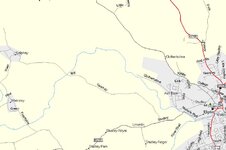
How do I view the really detailed maps that I see on this Forum? Attached is an example from one of Mike O's threads. All I can get is a 'bare bones' outline of roads and basic features. Some of the smaller lanes aren't visible until I get to a scale of 0.2 miles.

Am I missing something - or do I require additional software?

Cheers
Dave
 

Attachments

  • sample map.jpg
    sample map.jpg
    136.1 KB · Views: 225
Okay, I'm guessing here

I have a very old Roads and Recreation version which gives a "barebones" map unless I have the CD in the drive. You may have a similar problem.

I got so fed up with this that I got a copy of Virtualdrive from the front of a magazine (and paid and upgraded it) so I could have a CD image on my hard disk available all the time.
 
42

Top menu - "Edit" - "Preferences" and then look in the buttons for one with a sliding scale of left to right, as I can't remember its heading. Left = motorways, right = un-paved tracks etc.

Beware fully right on anything other than a fast machine will slow it right down, and you'll be overwhelmed with every hamlet and makes the map all but unusable at large scale sizes.

NB 1 The scale selected on the PC does not transfer across onto the GPSR

NB 2 Topographical shading / contours doesn't seem to be a part of the City Navigator. In your example of autoroute, "terrain" has been selected, "road" would show a similar presentation to City Navigator.
 
I dont think your image is a mapsource image. It does not get as good as that. But it is good. I will attach an image this evening with how good mine gets. City Navigator 6 also.

Or maybe I am missing something too...
 
richie said:
I dont think your image is a mapsource image. It does not get as good as that. But it is good. I will attach an image this evening with how good mine gets. City Navigator 6 also.

Or maybe I am missing something too...

You're quite right Richie.....that image looks suspiciously like Microsoft Streets & Trips........:cool:
 
I'm kind of happy to hear that Dutch. It would be nice though to have a it more non road detail to the maps in mapsource. But the bottom dollar is that for navigation they are great.

I am off to Ireland in a little while so I am waiting to see how bad it gets when I am there...
 
Re: 42

John Armstrong said:
Top menu - "Edit" - "Preferences" and then look in the buttons for one with a sliding scale of left to right, as I can't remember its heading. Left = motorways, right = un-paved tracks etc.

Beware fully right on anything other than a fast machine will slow it right down, and you'll be overwhelmed with every hamlet and makes the map all but unusable at large scale sizes.


Cheers John, that works, will make plotting dubious GS lane-only routes much easier in future.

I'll pm MikeO to see what software he's running, just to confirm that this is not City Navigator.

:beerjug:
 
Dutchman said:
You're quite right Richie.....that image looks suspiciously like Microsoft Streets & Trips........:cool:

Is that compatible with GPS 2610, Dutch?
 
Retro, I have not tried it yet but you can scan OS maps and upload them to a GPS using www.gpsutility.co.uk where they offer a program to do it. I have no idea how hard or easy to do it is. You lose the auto routing but gain the ability to put somewhere different into your GPS.

I imagine for example southern ireland or some mountainous region.
 
Re: Okay, I'm guessing here

trotsky said:
I have a very old Roads and Recreation version which gives a "barebones" map unless I have the CD in the drive. You may have a similar problem.

I got so fed up with this that I got a copy of Virtualdrive from the front of a magazine (and paid and upgraded it) so I could have a CD image on my hard disk available all the time.

With regard to this post.
All you need to do is to copy the complete CD contents to a folder on your desktop and open it from there. All the mapping is then contained on your PC so there's no need to have the CD at all.
This is the solution I used on my Dell Latitude notebook. It has an external CD drive. Now I can take it anywhere without needing to carry the CD drive as well.
Of course those using the new(ish) auto-routing CDs will know that all the mapping is loaded onto the PC at the time of installation. So Garmin use the same solution.


Back
Top Bottom