How do you use YOUR device?

Berin has it about right. Maps and devices, each have their own qualities and faults. Anyone who has tried to open a map in a high wind and rain, will remember that joy. I still have a half sheet Michelin map of the western end of the Pyrenees; the other half was last seen making a bid for the Atlantic and, I guess, America.
 
Taking a sat nav is like having an infinitely large piece of paper with your route on it, and the ability to carry 1:50000 or 1:25000 scale maps, for the whole of Europe, or wherever you happen to be. The maps conveniently zoom in and out, as well.
I’m not dissing sat nav’s, I do have and use one, what I’m saying is that in my case being a total tech numpty; what people are doing here in terms of route planning is way beyond my comprehension, nor do I have an up to date PC/Laptop I could use for all the other programs they are using and swapping to their devices.

The OPs opening post and some that followed may as well have been written in Chinese Mandarin for all the sense it made to me. It was all tech speak and acronyms and I would genuinely like to have a better understanding but nothing is in plain English for the numptys (me) out there.

I’m not criticising the OP as he and the other posters all seem to be on the same level so the posts are of value to them.

As mentioned earlier entering an address direct to the device and pressing go is as much as I can manage, planning an actual route is way beyond my skills hence looking at the big picture on a map works for me in tandem with the nav unit.

The issue is me not the tech, I’m thick as mince and don’t mind admitting it🤷‍♂️
 
I’m not dissing sat nav’s, I do have and use one, what I’m saying is that in my case being a total tech numpty; what people are doing here in terms of route planning is way beyond my comprehension, nor do I have an up to date PC/Laptop I could use for all the other programs they are using and swapping to their devices.

The OPs opening post and some that followed may as well have been written in Chinese Mandarin for all the sense it made to me. It was all tech speak and acronyms and I would genuinely like to have a better understanding but nothing is in plain English for the numptys (me) out there.

I’m not criticising the OP as he and the other posters all seem to be on the same level so the posts are of value to them.

As mentioned earlier entering an address direct to the device and pressing go is as much as I can manage, planning an actual route is way beyond my skills hence looking at the big picture on a map works for me in tandem with the nav unit.

The issue is me not the tech, I’m thick as mince and don’t mind admitting it🤷‍♂️
I get your point, and to be honest there’s a lot to be said for being a bit reluctant to use tech in general- it can easily create as many issues as it solves.

But there are some gains to be had, if you can get your head around it.

I had a head start as I was using ship based navigation systems as they switched, and bought very early hand held gps devices which did nothing more, really, than tell you where you were - very handy in a whiteout on Cairngorm!

I’m sure there must be some intro guides somewhere on the interweb!
 
I get your point, and to be honest there’s a lot to be said for being a bit reluctant to use tech in general- it can easily create as many issues as it solves.

But there are some gains to be had, if you can get your head around it.

I had a head start as I was using ship based navigation systems as they switched, and bought very early hand held gps devices which did nothing more, really, than tell you where you were - very handy in a whiteout on Cairngorm!

I’m sure there must be some intro guides somewhere on the interweb!
If he knows how to access the internet and can type in YouTube, he can watch instruction videos.
 
I’m not dissing sat nav’s, I do have and use one, what I’m saying is that in my case being a total tech numpty; what people are doing here in terms of route planning is way beyond my comprehension, nor do I have an up to date PC/Laptop I could use for all the other programs they are using and swapping to their devices.

The OPs opening post and some that followed may as well have been written in Chinese Mandarin for all the sense it made to me. It was all tech speak and acronyms and I would genuinely like to have a better understanding but nothing is in plain English for the numptys (me) out there.

I’m not criticising the OP as he and the other posters all seem to be on the same level so the posts are of value to them.

As mentioned earlier entering an address direct to the device and pressing go is as much as I can manage, planning an actual route is way beyond my skills hence looking at the big picture on a map works for me in tandem with the nav unit.

The issue is me not the tech, I’m thick as mince and don’t mind admitting it🤷‍♂️
Most GPS software will run on very humble and old hardware. I run basecamp on a very old 2012 Toshiba laptop running windows 10. I did upgrade the Ram in the machine from 4-8gb when it went from Windows 7 to Windows 10 and upgraded the hard drive to an SSD. I have one year of W10 security updates on that machine and as it already dual booted with Linux so it can continue to have a life creating routes on MRA which is browser based so the operating system is irrelevant. I'd take it on tour with me as its really worth nothing......but its a big lump with a 15.3" screen and it weighs a ton.
 
Most GPS software will run on very humble and old hardware. I run basecamp on a very old 2012 Toshiba laptop running windows 10. I did upgrade the Ram in the machine from 4-8gb when it went from Windows 7 to Windows 10 and upgraded the hard drive to an SSD. I have one year of W10 security updates on that machine and as it already dual booted with Linux so it can continue to have a life creating routes on MRA which is browser based so the operating system is irrelevant. I'd take it on tour with me as its really worth nothing......but its a big lump with a 15.3" screen and it weighs a ton.

I have no idea what that means. But it sounds good.

:beerjug:
 
Most GPS software will run on very humble and old hardware. I run basecamp on a very old 2012 Toshiba laptop running windows 10. I did upgrade the Ram in the machine from 4-8gb when it went from Windows 7 to Windows 10 and upgraded the hard drive to an SSD. I have one year of W10 security updates on that machine and as it already dual booted with Linux so it can continue to have a life creating routes on MRA which is browser based so the operating system is irrelevant. I'd take it on tour with me as its really worth nothing......but its a big lump with a 15.3" screen and it weighs a ton.
My Toshiba is running Windows Vista 😮 seriously.
 
Berin has it about right. Maps and devices, each have their own qualities and faults. Anyone who has tried to open a map in a high wind and rain, will remember that joy. I still have a half sheet Michelin map of the western end of the Pyrenees; the other half was last seen making a bid for the Atlantic and, I guess, America.

Which is interesting as an Easterly wind in the Pyrenees would be quite unusual…
 
map source will work with xp so will work with vista, and if you can get on the net with a half decent browser you should be ok with on line route creation sites, usb port in your pc jobs a good un, start learning.
 
I don’t regard myself as a Geek, but I do enjoy my Garmin devices on 2 wheels and 4.

All the time. Every day. Every journey (almost).

I’ve conquered Basecamp to my satisfaction and know absolutely nothing and have no interest outside the Basecamp / Garmin world. Except Google map o for planning purposes.

The 4 wheel device is primed to take me to a hotel break a long way north tomorrow.
The scenic path of course.
 
I don’t regard myself as a Geek, but I do enjoy my Garmin devices on 2 wheels and 4.

All the time. Every day. Every journey (almost).

I’ve conquered Basecamp to my satisfaction and know absolutely nothing and have no interest outside the Basecamp / Garmin world. Except Google map o for planning purposes.

The 4 wheel device is primed to take me to a hotel break a long way north tomorrow.
The scenic path of course.
Pretty much the same as I do. Basecamp for plotting routes then sent to either my Zumo 660 or my Camper 760. Depending on the vehicle being used. Very easy and user friendly for me.
 
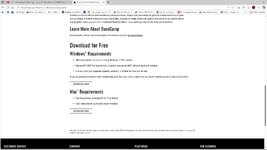
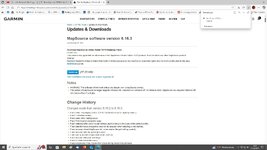
I got a new laptop this week. I downloaded Basecamp and Express but Mapsource seems to have disappeared from the internet? Yeah, I know but it's what I'm used to! Anyone know of a source?
 
MapSource was discontinued years ago, but this seems to suggest a workaround to reinstall it

 
you can still dowload it it is on garmins web site all you need to do is download and install basecamp first, not an issue. the maps however can cost .


base.jpgmapsource.jpg


Back
Top Bottom