How to combine tracks? Help please

  • Thread starter Thread starter WWFC
  • Start date Start date

WWFC

Guest
I just did my first track, but when I uploaded it to my puter it came in as 13 different tracks.. anyone know how to link them all together so that it's just one route?

Thanks in advance...
 
Sorry mind reading cost extra!

Have you tried reading the manual/s?


What GPS?
What software are you using on what operating system?
 
Had a similar thing happen to me recently, using an SP3. When I checked the tracks, it turned out that they started / stopped when I switched the bike off (and presumably the GPS unit), eg when we stopped for breakfast, the petrol station etc, ie one track for each time the unit was witched on. The only time I tought there were 2 tracks when I don't remember stopping, was when the unit "lost satellite reception".

Some units allow you to create a route directly from tracks - my SP3 doesn't, but creating one route out of several tracks is straightforward, by just plot a route over the 13 different tracks shown on your screen. Have a crack at it, but if it's any use to you I can attach a shot of the screen later. Hope that helps. ;)
 
If its a Garmin you can't, it starts a new track every time you stop for more than a preset time, even when your stood at lights.

Neither can you convert the track into a route.

I think maybe the 276 does but the rest don't.
 
NO the 276 don't do it

But Mapsource 6.3 and after can do that

( don't remember which one now)

And softwares like GARTrip do that too
 
thanks for the input guys.. it's not at all clear in the books, but I'll struggle on.. if it can't be done it's not the end of the world...
 
I think you will also find, anytime the GPS looses it signal (tunnel for instance) long enough to raise an alarm it will start another track.
 
WWFC said:
.... it's not at all clear in the books, but I'll struggle on.. if it can't be done it's not the end of the world...
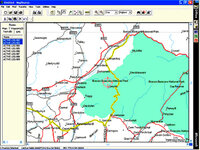
When you say "tracks" I assume you mean GPS "tracks" ie the breadcrumb trail recorded by the unit, and not literal tracks. Although the computer / unit will not do what you want directly, don't be put off too easily - it really is simple to do it manually, and well worth very little effort. I've just timed it, and it takes just seconds to create / save 1 route out of the 8 tracks I mentioned previously.

Just download the tracks from you GPS unit to your computer and highlight them in the left hand column - the track numbers will turn blue, and the corresponding tracks will show up yellow on the screen.
 

Attachments

  • untitled-1 copy 1.jpg
    untitled-1 copy 1.jpg
    111.2 KB · Views: 161
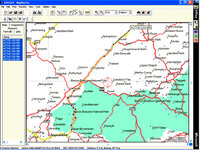
Then, using your route plotter just create a route over the yellow highlited tracks. With the one below, there was just one section of the total tracks that I wanted to save as a particularly impressive road, but of course you can create a route over every track. Job done. If you look carefully, you can just see the red outline of the route under the yellow track - it's clearer on the screen, than it is in the picture.

So now you have no excuse to forget any impressive roads you take ever again. ;)
 

Attachments

  • untitled-1 copy 2.jpg
    untitled-1 copy 2.jpg
    113.5 KB · Views: 172
Excellent job, thanks for taking the time to do that for us.. cheers...


Back
Top Bottom