In Basecamp, how do I.....?

Andy B

Well-known member
UKGSer Subscriber
Joined
Apr 6, 2006
Messages
2,573
Reaction score
55
Location
Lea & Perrins country
...extend a route? I've plotted some routes which ideally I'd like to join into longer routes. During the process of creating these, BaseCamp has taken it upon itself to finish one route and start a new one (user error I'm sure but I haven't worked out quite how yet!), hence the need to try and join some of them together.

I feel as if this should be easy to do, but the answer has evaded me so far!

All help greatfully received!:D
 
I use the add waypoint tool in the last section of the route to add the end waypoint that I want. Then open up the route and move the new waypoint so that it's the last one.

Probably a more technical way of doing it, but it works for me.
 
there's a Join Routes command somewhere. i've used it.

maybe highlight the 2 routes in the left hand panel and right click? summat like that anyway :)
 
Left click and CTRL for all the routes you want to join, then right click, choose advanced and select the join routes together. But there doesn't seem to be an extend route option :confused:

Could just "open" the route and add in the new end waypoint rather than dragging things around on second thought.
 
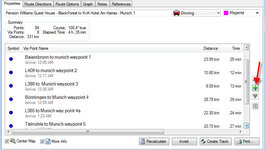
Add waypoints along the route you want to extend (right click -> new waypoint). Then double click on the route to open it, then click on the little green + sign on the right to add the new waypoints you have just created. Then drag the way points into the order you want.:thumby:
 
Thanks guys. I knew someone would know the answer!

I highlighted the routes in the lefthand column using the lefthand mouse key and Ctrl key (it wouldn't let me do it on the map itself) and then right-clicked and selected Advanced. One of the options was to Join Routes. BINGO!:D
 
i've just tried joining routes on basecamp 4.2.4 and i can no longer see an option to join routes. no advanced option either.

anyone know how it can be done?
 
i think i may have worked it out. i've certainly worked a way out :)

open the Advanced options of the first section of route by double clicking on it, then simply drag the other routes into the waypoint list in order, and basecamp will join them into the first section. then you can delete all the sections bar the first to just leave the one continuous route.

...i think :)
 
i've just tried joining routes on basecamp 4.2.4 and i can no longer see an option to join routes. no advanced option either.

anyone know how it can be done?
Hmmm, With v4.2.4 on Windows-BaseCamp if I select multiple Routes and right-click, I see an Advanced option and then a Join the Selected Routes option. The resulting popup window allows you to adjust the order of the routes and then join them.

With v4.2.4 on Mac-BaseCamp if I select a route and open it's properties (Get Info) all I have to do to join a route to it is to select the other route in the list and drag it into the details window of the first route at the end and drop it. I can also do this with a Track.
 
Odd. I don't have the join routes thing in the right click context menu. You're right clicking on the routes listed at the bottom of the left hand sidebar right?

Your second method is what I ended up doing, as mentioned in my last post.
 
Click create route
drag routes into window in the order you want them.
you can the delete the double end and start point if you wish but no need.
if you are using diiferent specific routing for each of the routes basecamp will load them the same as you put them in. you can change overall routing for the new route by clicking the drop down in the top right corner of the new route window.


Back
Top Bottom