Intaride IR-803 - Autocom connection

wheeledwidewebb

Registered user
Joined
Sep 6, 2008
Messages
660
Reaction score
0
Location
Location: Location: Broadstairs
I have ordered the IR-803 and realise that I can connect it to my Super Pro-AVI on aux-5 with the standard 'Kenwood' type lead. I can also power it using the Intaride battery back adapter.

However, does anyone know if there is a combined connection and power lead that is available, like the one that is available for the Kenwood PMR from Autocom?

I guess I could make one up, but I am sure that my lead making skills are really not up to the job.

Thanks.
 
Me too. sounds like a very good way of doing things.

If I've got this right, you can get:

A very good PMR
built in FM radio
remote antenna possible
uses standard Kenwood two pin socket
can be boosted upto 4watts (as long as you dont tell Ofcom)
can have a custom lead in order to be bike or Autocom powered
can use either the Intaride or Autocom PTT

Might be a go getter - on the way to the NEC perhaps...
 
I have ordered the IR-803 and realise that I can connect it to my Super Pro-AVI on aux-5 with the standard 'Kenwood' type lead. I can also power it using the Intaride battery back adapter.

However, does anyone know if there is a combined connection and power lead that is available, like the one that is available for the Kenwood PMR from Autocom?

I guess I could make one up, but I am sure that my lead making skills are really not up to the job.

Thanks.

Did you manage to get this lead?

Thanks

Ian
 
I've been thinking about the IR-803 but couldn't find any information about how the FM radio works.

Does the audio come over the same lead as the bike-bike comms (aux 5 on the autocom), because if so it seems that it will 100% mute all other autocom inputs (e.g. phone and GPS plugged in to Aux 2)?

Ta

Dae
 
I bought a lead from my local dealer which I think is no longer available from Autocom, no doubt GSRich can confirm.

Anyway the lead connects a Kenwood style radio to the push to talk lead, but as well as the connections for the PTT into the Kenwood (or Intaride 803) there were also a red and a black wire that carry 9v out from the Autocom unit. There is no false Kenwood battery like the current crop, just these two wires.

I then connected those two wires to the false Intaride battery and all is well.

Two issues however,

1. The Intaride expects 12v to come into the false battery, it then converts it down to 7v I think. As I said the Autocom only outputs 9v, so I spoke to Intaride and they 'thought' it should be OK, as indeed it was.

2. The actual wires that dangle from the Intaride false battery are very small, they are only about 4 strands of very fine copper and you have to solder these to the wires out from the Autocom lead. It is fidly to say the least and you will have to reinforce the connection with something stiff otherwise your joint just fails over and over again.

As for the PTT switch, I would use the set-up using the sonic bracket and a dedicated PTT switch, much easier to use. Details on here somewhere, or I can dig them out if you want.
 
That's useful info on the battery / autocom power side of things.

Do you use the FM radio, and if so how does it connect to the autocom (see my post above)?
 
I've just ordered one.

I'm keen to find out how well the FM Radio works too so I will post back here next week with how I get on.

The set-up will be:
Autocom Super Pro AVI
Autocom PTT
Autocom Kenwood audio and power lead (old style, like wheeledwideweb's)
Intaride IR 803
Remote antenna kit
Bike power/dummy battery (this is on back order).

Cheers,

Mike
 
Sounds good Mike, quite like my set-up.

Other things you may want to consider may be,

I made a backing plate from aluminium to go behind the number plate, then attached the antenna to it.

<a href="http://www.flickr.com/photos/wheeledwidewebb/3239242344/" title="Antenna Mount. by wheeledwidewebb, on Flickr"><img src="http://farm4.static.flickr.com/3303/3239242344_6927f4f74c.jpg" width="234" height="345" alt="Antenna Mount." /></a>

Got an under-rack bag from Touratech to go under the top box, very useful for housing the radio. I found that under the seat was getting a little congested just with the Autocom.

<a href="http://www.flickr.com/photos/wheeledwidewebb/3238403171/" title="Touratech Bag on BMW R1200GS. by wheeledwidewebb, on Flickr"><img src="http://farm4.static.flickr.com/3422/3238403171_a7803ce4ea.jpg" width="500" height="393" alt="Touratech Bag on BMW R1200GS." /></a>

Lastly, I got one of the natty PTT switch brackets from Sonic's supplier in Andover and installed a remote power switch for the Intaride radio in the top hole and the actual PTT switch in the bottom hole.

<a href="http://www.flickr.com/photos/wheeledwidewebb/3238403035/" title="PTT switch. by wheeledwidewebb, on Flickr"><img src="http://farm4.static.flickr.com/3465/3238403035_dd2f8917f4.jpg" width="271" height="392" alt="PTT switch." /></a>

I have to say it works a treat, having the power switch to hand is a must, unless you are going to have it all in a tank bag or somthing.

Can I just say that these are all ideas that I have cribbed from threads on here and BikersOracle.com, I just copied them.
 
Sounds good Mike, quite like my set-up.

...

Lastly, I got one of the natty PTT switch brackets from Sonic's supplier in Andover and installed a remote power switch for the Intaride radio in the top hole and the actual PTT switch in the bottom hole.

<a href="http://www.flickr.com/photos/wheeledwidewebb/3238403035/" title="PTT switch. by wheeledwidewebb, on Flickr"><img src="http://farm4.static.flickr.com/3465/3238403035_dd2f8917f4.jpg" width="271" height="392" alt="PTT switch." /></a>

I have to say it works a treat, having the power switch to hand is a must, unless you are going to have it all in a tank bag or somthing.

Can I just say that these are all ideas that I have cribbed from threads on here and BikersOracle.com, I just copied them.


The remote power switch is a v. good idea, I will see what I can think of to use instead of the Sonic bracket.

I was just going to cable tie the remote antenna between the pillion handles and rear luggage rack (mine's a 12GSA), but I think your set up looks much more permanent!

Cheers,

Mike
 
Radio and remote antenna arrived today, dummy battery pack to follow.

A quick function test using the supplied battery and everything works as advertised.

The FM Radio reception in my garage is loud and clear - I will need to test reception properly out on a ride once the snow and ice has thawed.

The Autocom PTT works fine, so may just leave that in place for now.

There is also a PMR Channel Scan function available which isnt mentioned in the Intaride notes: If you hold down the A/B button down (located on the top left hand corner of the LCD display) for more than two seconds, it will then do a rolling scan through the 8 PMR channels. When it detects a transmission, it will lock onto that channel.

If you receive or transmit the PMR when listening to the FM Radio, the FM Radio will mute 100% until 5 seconds after the last transmit/receive.

My current thinking is to attach it to the handlebars using a RAM belt clip holder and some velcro - covering the radio with a clear plastic bag to protect from the rain, etc. If I do that, I can then operate the channel knob or buttons to change either the FM or PMR tuning/channels.

Cheers,

Mike
 
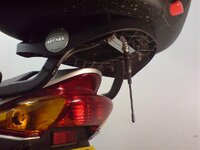
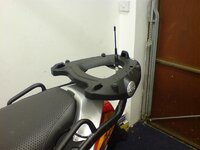
antenna location

Can i offer this as a possible solution for aerial location? I used it on my VFR but am transferring it to the GS. It is made easier by the fact that I'm keeping my Givi luggage so i have a Givi topbox. Because the connection to the aerial is reversable I can have the aerial in the up position when riding without a box, then swop the leads over to have it in the down position with a box. Either way it remains vertical. These pictures are of the trial installation, the final fixing was made with 2mm metal plate, drilled to locate on the bolts that secure the rack arms to the base plate. For the GS I just need to find some slightly thinner rubber washers to keep the height between arm and top plate the same as with the front securing bolts.
 

Attachments

  • DSC00103.jpg
    DSC00103.jpg
    46 KB · Views: 496
  • DSC00108.jpg
    DSC00108.jpg
    45.4 KB · Views: 496
The FM Radio reception in my garage is loud and clear - I will need to test reception properly out on a ride once the snow and ice has thawed.

The roads had thawed enough for me to ride into work this morning.

FM Radio reception was mostly ok; travelling through Farnham (a small market town) saw the reception noticebly reduced with frequent static bursts interupting things. It's a bid of a fiddle to retune, though you can use either the knob on top, or the push buttons on the front. I did find that too distracting though whilst town riding, so a quick turn on the volume knob was enough to put the radio and interference into the background.

Out in the open though, and it worked nicely.

FYI, I used the programming software available on Wuxon's website to reprogram the IR803 to exactly match all 16 frequencies used by Kenwoods TK3201. Its good software, better than Kenwoods in fact. There's also plenty of unused channels to add more frequencies if you want.

I think all of this (Reprogrammable, Scanning, FM Radio and external antenna) make this a very good PMR radio. :thumb

Mike
 
I've been thinking about the IR-803 but couldn't find any information about how the FM radio works.

Does the audio come over the same lead as the bike-bike comms (aux 5 on the autocom), because if so it seems that it will 100% mute all other autocom inputs (e.g. phone and GPS plugged in to Aux 2)?

Ta

Dae

Both the PMR and FM audio comes through the Autocom Grey lead - Aux 5.

I found on my Pro AVI that it doesnt mute the audio from the Zumo, nor does the Zumo mute the PMR/FM Radio. I use a wired lead to connect the Zumo for MP3 and GPS prompts, and an Autocom Bluetooth dongle for phone calls. Note though that this is just using the FM Radio function - I've not tested to see how Autocom mutes things if its PMR audio I'm hearing. I'm not sure if the Autocom could tell the difference...

I could open up the Autocom and adjust things so one mutes the other, but tbh, I will just leave it the way it is and turn the volume knob down on the radio if its a problem.


Back
Top Bottom