Internet Explorer won't let me download Firefox??

  • Thread starter Thread starter Marjorie Proops
  • Start date Start date

Marjorie Proops

Guest
Long story made short..

1) Computor slowed to an almost standstill.
2) Cleaned up - AVG, Spybot, Norton, optimised disk etc. etc - several virii removed.
3) Computor speeds up to normal in all but internet access.
4) Internet crap - for example scolling down on the sidebar in UKGSER threads takes an age.
4) Apple computor on same internet connection works fine (connected simultaneously) so fault is in PC not in internet connection.
5) Eventually binned loads of redundant programs.
6) Then, in desperation, binned the complete Firefox program and all internet connections.
7) Downloaded latest version of Internet Explorer yesterday.
8) Connection still very slow (pressing 'return' to move the curser to this '8' from '7' above takes 3 or 4 seconds for the curser to follow the instruction.
9) New AVG and Spybot scan this morning shows 'congratulations no threats' :nenau
10) But still slow on the internet (not offline programs).
11) Tried to go baack to Firefox but it will not let me load that (or any similar) page as if IE. is vetting the sites.
12) A search in Google takes ages before the list of search results comes up - it's almost as if IE is vetting the list for me!!


Any ideas Chaps ????
 
Download the FireFox on the Mac and burn it onto a disc or pen drive then transfer to the PC?

Simples. :)
 
Clear the cache.
Clear cookies.
defrag.
run a registry checker, adaware, av scan.
I don't think it's a prob with IE or firefox...i think it's more likely to be a problem elsewhere.
START>RUN> type in 'MSCONFIG' and disable all progs from startup you don't need.

PS It may actually be easier to do a fresh install of windows, after backing up all your files and settings to an external HD......then reload everything from scratch and IN THE RIGHT ORDER (AV software first for example) and once you have a fast, clean install with all your drivers working, install acronis and make an image of it- I can restore to a clean, new copy of windows with FF loaded, all my progs in and all the current files and structures in place in under an hour :)
 
PS Once you have a new install in place, copy all your installation discs onto an external hard drive- no endless shuffling of discs from then onwards ;)

(Office progs, adobe progs, security, everything you want on a 'clean' setup)
 
ctrl-alt-delete and disable all the searchindexer and search stuff.

if you've deleted and defragged it might be trying to re-index

also check your cpu usage when idle
 
Just download crap cleaner http://www.ccleaner.com/

Run it.. It'll do all the stuff mentioned below and very easy to use.
Use it every day to keep the crap piling up and keep the speed up.

Don't know why you'd bother with Firefox though.. another victim of the relentless Anti Microsoft Crusaders:rob

defrag .. are you living in 1996?

Clear the cache.
Clear cookies.
defrag.
run a registry checker, adaware, av scan.
I don't think it's a prob with IE or firefox...i think it's more likely to be a problem elsewhere.
START>RUN> type in 'MSCONFIG' and disable all progs from startup you don't need.

PS It may actually be easier to do a fresh install of windows, after backing up all your files and settings to an external HD......then reload everything from scratch and IN THE RIGHT ORDER (AV software first for example) and once you have a fast, clean install with all your drivers working, install acronis and make an image of it- I can restore to a clean, new copy of windows with FF loaded, all my progs in and all the current files and structures in place in under an hour :)
 
Just download crap cleaner http://www.ccleaner.com/

Run it.. It'll do all the stuff mentioned below and very easy to use.
Use it every day to keep the crap piling up and keep the speed up.

Don't know why you'd bother with Firefox though.. another victim of the relentless Anti Microsoft Crusaders:rob

Firefox is faster, safer and more configurable....why WOULDN'T you use it? If you run Firefox with Noscript you will never even have any crap to clean!
 
Firefox is faster, safer and more configurable....why WOULDN'T you use it? If you run Firefox with Noscript you will never even have any crap to clean!

:thumb2:thumb2
There are some things that FF does that are just years ahead of IE......it's just a shame that you have to keep a working copy of Microsoft's crappy browser on the machine so you can access MS update sites :blast:mad:
 
Sorry if I cannot keep up with this thread but the pc. is really playing up.

Just as as example, my UKGSER shortcut now reads 'ticker htm' under it (it never has done before) and I get directed to a similar but not identical address to the one typed:confused:

eg. This is what the address bar now reads;

http://www.ukgser.com/news/ticker.htm

The above is pasted direct from the address bar even tho' I typed in 'WWW.UKGSER.COM' - is this correct?

When I click on either the shortcut or the above link I get just the 'Gentlemans Airhead weekend' and a blank page - is that what you get?
 
Long story made short..


2) Cleaned up - AVG, Spybot, Norton, optimised disk etc. etc - several virii removed.
WTF have you got Norton and AVG, dump Norton completely and stick with AVG that should speed the machine up.

As for Firefox get a mate to download and save the file then zip it and email it to you, if you haven't got any mates pm me your email address:D.
 

Attachments

  • iesickjpg-2.jpeg
    iesickjpg-2.jpeg
    103.6 KB · Views: 143
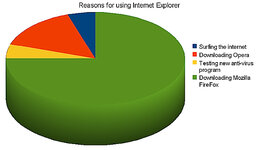
Sorry, perhaps I didn't make it clear - I don't need convincing about FF, I've used it for two years and am very happy with it.

I used to use IE before that but it never used to restrict/divert me in the way it seems to be doing now - it's weird.

I want to go back to FF but don't forget that these symptoms started whilst I WAS using FF!
 
just as an aside here - i've moved over to Opera - its actually better than Firefox .

email and torrent client built in - skins,themes - i love it
 
Agree 100% with Dickieboy, dump that piece of memory hungry garbage Norton completely. You may need to use the Norton removal tool (Google search will find it) to do it completely however.

Never run more than one A/V prog because of likely conflicts.

Also recommend Crap Cleaner, have used it for years.
 
+1:thumb2 for getting rid of Norton; first thing I did when I got the laptop. Keep Spy-bot and run it regularly, and maybe try 'Malawarebytes' (Google it). does a similar job to Spy-bot, and they each can pick up things te other misses. AVG is good from what I've heard, though I've never used it; I was on Avira for five years or so, until I installed www.cloudantivirus.com a few weeks back. Speeded up my machine no end! (It's web based as opposed to machine based, so uses very little of your machine's resources). Oh, and another +1 :thumb2 for 'Crap Cleaner'.

Can't understand the comment above about keeping I.E. for access to M/S update sites; I've just been for a nosey around them with Firefox; no probs. Of course, you could always install the 'I.E. Tab' add-on t firefox...


Back
Top Bottom