


- Forums
- Technical & Rider
- Equipment & Toys
- GPS Info
- Kurviger, Google and all other non-Garmin software
You are using an out of date browser. It may not display this or other websites correctly.
You should upgrade or use an alternative browser.
You should upgrade or use an alternative browser.
Is there a way to pull a route from MyRoue App and share it as a navigable Google Map
- Thread starter tjmouse
- Start date

@Wapping - do you know if there's a way to pull a route from MyRoue App and share it as a navigable Google Map if you're travelling with a group and not everyone has MRA?
there are a number of utilities and Youtube tutorials on how to convert a GPX file into a Google maps link
"convert gpx to google maps link" or "can you export an MRA route to google maps" entered into a search engine will get loads of links such as
You can't navigate with that method though. I can get routes into Google My Maps without an issue (KML is a better formate for Google than GPX) but you can't then open that route on a phone and share it with people to follow on their own devices.there are a number of utilities and Youtube tutorials on how to convert a GPX file into a Google maps link
"convert gpx to google maps link" or "can you export an MRA route to google maps" entered into a search engine will get loads of links such as

Google maps cannot navigate a GPX or a KML from Google my-maps for that matter with turn by turn directions.
then I would suggest to the person not willing to subscribe to MRA that he/she downloads one of the many free navigation apps to their phone that will import a GPX/KML file ... this is my approach when organising trips. If I plan a route I generate a GPX file and leave it up to the other riders to convert it to a format that works on their device. In September we had Zumo 390, Zumo XT and someone using a phone. I do enough admin for them without offering tech support.You can't navigate with that method though. I can get routes into Google My Maps without an issue (KML is a better formate for Google than GPX) but you can't then open that route on a phone and share it with people to follow on their own devices.
I tend to navigate for the group I regularly ride with (for over 40 years!). I share the routes I want to use on MRA so that they can see them (I used to use google my maps) so that folk can see them and make suggestions for alterations, but I lead the tours. Its difficult in some ways as you dictate the pace, are first to encounter road hazards, you are navigating and keeping an eye on your mirrors for issues behind. I don't think I could do it if it wasn't people who I've been riding with for years and trust.You can't navigate with that method though. I can get routes into Google My Maps without an issue (KML is a better formate for Google than GPX) but you can't then open that route on a phone and share it with people to follow on their own devices.

As above, whilst it’s possible to get a MyRoute GPX route converted, so that it displays in Google’s My Map, it’s not then possible to navigate the route from within Google Maps.
Why Google don’t allow it, I have no idea. There again, MyRoute cannot work with KML files, so honours are at least even there.
What to do?
A. Comfort yourself that bunches of bods went away for years, with no GPS navigation at all.
B. Persuade your chums to avail themselves of MyRoute’s Navigation app.
C. Tell them to copy (by hand) the route into Google Maps.
D. Send the MyRoute route into say, Kurviger. Then tell your mates to download the Kurviger navigation app, which will display and run the route.
Here’s the basics:
I would certainly tell your chums to have their phones powered, as navigation apps can be power hungry, I haven’t used the Kurviger navigation app, so I don’t know if it works off line. There again, data usage is generally fairly modest.
E. There are other alternatives to Kurviger, too. For instance, Pocket Earth, which some correspondents to this forum use.
Why Google don’t allow it, I have no idea. There again, MyRoute cannot work with KML files, so honours are at least even there.
What to do?
A. Comfort yourself that bunches of bods went away for years, with no GPS navigation at all.
B. Persuade your chums to avail themselves of MyRoute’s Navigation app.
C. Tell them to copy (by hand) the route into Google Maps.
D. Send the MyRoute route into say, Kurviger. Then tell your mates to download the Kurviger navigation app, which will display and run the route.
Here’s the basics:
I would certainly tell your chums to have their phones powered, as navigation apps can be power hungry, I haven’t used the Kurviger navigation app, so I don’t know if it works off line. There again, data usage is generally fairly modest.
E. There are other alternatives to Kurviger, too. For instance, Pocket Earth, which some correspondents to this forum use.
Last edited:
I haven’t used the Kurviger navigation app
I’ve now downloaded it. It seems easy enough to use. I already have a Kurviger ‘Tourer’ subscription, simply as I find that useful to access some of Kurviger’s more advanced routing algorithms. This allowed me to use many (but not all) of the Kurviger navigation app’s tools and features.
Just as a trial, I upgraded my ‘Tourer’ subscription to ‘Tourer+’ which turns on the voice instructions (which seems to work OK) and allows the downloading of offline maps, which also seems to work.
I’ve saved the Kurviger navigation app to my sacrificial iPhone phone and will maybe give it a go at some point. That said, as I have the fully functioning MyRoute Navigation app, it probably won’t be seeing a whole lot of use. As much as anything else, it will (like Beeline) be out of nothing more than interest, to see how it works.
Last edited:
Thanks Wapping. Helpful and detailed as always.
Kurvinger needs a subscription but whilst testing with it TomTom came up as an option and that accepts a gpx apparently so going to test that out as it’s free and has CarPlay.
Maps.me looks like an option as well. Pocket Earth doesn’t let you navigate a gpx apparently which is annoying as it’s a good app otherwise).
Kurvinger needs a subscription but whilst testing with it TomTom came up as an option and that accepts a gpx apparently so going to test that out as it’s free and has CarPlay.
Maps.me looks like an option as well. Pocket Earth doesn’t let you navigate a gpx apparently which is annoying as it’s a good app otherwise).
Pocket Earth doesn’t let you navigate a gpx apparently
That’s odd, as I thought there was someone on the forum who used it for navigation. The blurb on the Pocket Earth help plates, looks like it should be possible:
Pocket Earth App – Offline Maps & Travel Guides for iPhone & iPad » Help Manual
Offline Maps & Travel Guides - Pocket Earth is the travelers best friend. Giving you the most detailed, fastest and easy to use offline map on the market. Have fun getting lost with PocketEarth!
pocketearth.com
I think the fellow was perhaps, @Kritou - Maybe I was wrong or maybe he was using Pocket Earth Pro?
PS The subscription for most things is usually well under the price of a tankful of fuel and / or not much more that a couple of pints in some bars. Cheap for smooth navigation, perhaps?
Last edited:
That’s odd, as I thought there was someone on the forum who used it for navigation. The blurb on the Pocket Earth help plates, looks like it should be possible:
Pocket Earth App – Offline Maps & Travel Guides for iPhone & iPad » Help Manual
Offline Maps & Travel Guides - Pocket Earth is the travelers best friend. Giving you the most detailed, fastest and easy to use offline map on the market. Have fun getting lost with PocketEarth!pocketearth.com
I think the fellow was perhaps, @Kritou - Maybe I was wrong or maybe he was using Pocket Earth Pro?
PS The subscription for most things is usually well under the price of a tankful of fuel and / or not much more that a couple of pints in some bars. Cheap for smooth navigation, perhaps?
Yep it does navigation just doesn’t like a gpx import for some reason!
If you plot your own route it gets a different icon and you can navigate it.
Aha, I see. I have the Pro version of Pocket Earth, which can import very easily.
I’ve just downloaded the ‘non-Pro’ version of Pocket Earth app to my iPhone, sat in the pub.
It seems fully able to import GPX routes, which I’ve done:
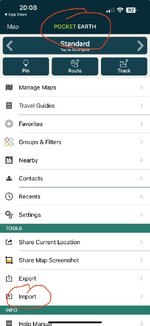
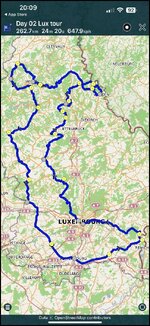
It seems fully able to import GPX routes, which I’ve done:
I’ve just downloaded the ‘non-Pro’ version of Pocket Earth app to my iPhone, sat in the pub.
It seems fully able to import GPX routes, which I’ve done:
View attachment 471104View attachment 471105
I’ve got pro as well but on that import you have a record icon not a navigate one

That’s no good

That’s the icon you need

That’s how they look in your library
OK
With a bit of tapping around (I have never used Pocket Earth to navigate by) I have got the basic app to:
A. Create me a route from my position in London, to the route I imported.
B. Navigate me.
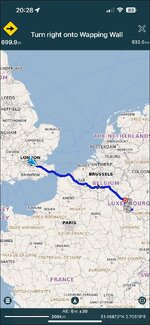
I think it works?
With a bit of tapping around (I have never used Pocket Earth to navigate by) I have got the basic app to:
A. Create me a route from my position in London, to the route I imported.
B. Navigate me.
I think it works?

what would be wrong with one of you doing a copy of the route in google maps and then sharing the link to the route to all who want to use google maps, that should work, or does know one want to make the one copy of the route.
or do the route in google maps and share it, then convert the route to gpx for who ever wants one. just a thought.
or do the route in google maps and share it, then convert the route to gpx for who ever wants one. just a thought.
what would be wrong with one of you doing a copy of the route in google maps and then sharing the link to the route to all who want to use google maps, that should work, or does know one want to make the one copy of the route.
or do the route in google maps and share it, then convert the route to gpx for who ever wants one. just a thought.
It’s a longer route so more than the A-J that Google allows. We’re planning in MRA as it can handle the complexity so ideally an export to gpx and share the days route will be best.
I’m going to test TomTom this week and see if that hold the route as if it does then it will be the winner for us given that it’s free.
well you could do it in as many sections as you wish in google, it does not have to be 1 long route, like i said it was just a thought and a way to solve the problem,
What to do?
A. Comfort yourself that bunches of bods went away for years, with no GPS navigation at all.
B. Persuade your chums to avail themselves of MyRoute’s Navigation app.
C. Tell them to copy (by hand) the route into Google Maps.
D. Send the MyRoute route into say, Kurviger. Then tell your mates to download the Kurviger navigation app, which will display and run the route.
Great minds think alike.

Agreed with both but given the wonders of MRA for route planning and the fact that some of the people int eh group seem to struggle with 1 google map link I was trying to come up with a smart alternative.
As I said it looks like TomTom will give that and if not then we’ll split it into a number of Google map links
As I said it looks like TomTom will give that and if not then we’ll split it into a number of Google map links

Similar threads

- Replies
- 7
- Views
- 767

- Replies
- 76
- Views
- 18,698
