iTunes

Baza 07

Active member
UKGSer Subscriber
Joined
Aug 29, 2020
Messages
386
Reaction score
53
Location
Wirral Merseyside
Morning all, could anyone help me with this issue please, I’ve downloaded an album from the ITunes Store it’s in MP4 and it’s on a usb stick, but it won’t play on my car stereo, it needs to be in MP3 format and the question is,how do I covert it,I’ve changed the settings in ITunes to MP3 but still no joy,what’s the easiest converter for me to use.
Thanks in advance 👍
 
To do it in iTunes just select the music file, chose convert and off you go.

You may need to first set up the file type you need to convert to: go to Edit, Preferences, import settings and choose mp3. That should do it.
 
To do it in iTunes just select the music file, chose convert and off you go.

You may need to first set up the file type you need to convert to: go to Edit, Preferences, import settings and choose mp3. That should do it.
Cheers bro, gonna give it a go later 🤞👍
 
Top Result fellas Eagles now on usb and playing in car,but the tracks are all jumbled up for some reason, any ideas why please 🤔
 
Top Result fellas Eagles now on usb and playing in car,but the tracks are all jumbled up for some reason, any ideas why please 🤔
You may need to open the file tree on your USB and number the tracks in the order you want them. if it goes into double digits add a 0 at the front of the single digit numbers.
 
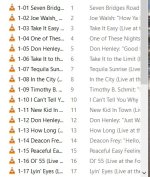
Here’s a twister, I plug my USB in the car and all the tracks on the Eagles album are jumbled up, but all the other albums are fine,so when I plug the USB in my computer the tracks are all in the correct order 🤔😵‍💫🤯
Any ideas please, it’s not a “Biggy” it’s my OCD going haywire 😲🙄
Cheers Baza👍
 
Your car stereo is probably old-ish and doesn't read the metadata in the mp3 files.
Metadata indicates Album, Artist, and a few other info including track sequence.

When you export the tracks in Mp3 from iTunes you have to save them with the naming format: 01_Title_Artist.mp3
Haven't used iTunes in a decade, but I think it can do that format automatically and should be in the options.
 
Is the Eagles album a compilation by any chance? iTunes can get in a right pickle with them if you're not careful.
 
Did you do what I suggested here? It'll sort it.


Here’s a twister, I plug my USB in the car and all the tracks on the Eagles album are jumbled up, but all the other albums are fine,so when I plug the USB in my computer the tracks are all in the correct order 🤔😵‍💫🤯
Any ideas please, it’s not a “Biggy” it’s my OCD going haywire 😲🙄
Cheers Baza👍
 
Here’s a twister, I plug my USB in the car and all the tracks on the Eagles album are jumbled up, but all the other albums are fine,so when I plug the USB in my computer the tracks are all in the correct order 🤔😵‍💫🤯
Any ideas please, it’s not a “Biggy” it’s my OCD going haywire 😲🙄
Cheers Baza👍
Did you do what I suggested here? It'll sort it.
No mate because when i plugged the USB in to the PC they all lined up perfect,plus whats a "File Tree" ????
Thanks for helping (y)
 
Were they all named: 01-xx, 02-xx, etc? it's the structure of the files in a list. It will sort from the first digits in order.
 
That’s what I thought mate, at least it plays 👍
Thanks for your help 👍
I've recently used MP3Tag free software to add the metadata.

Now, for the first time in years, I can select an album or artist on my Zumo XT rather than having a jumble.
 
I've recently used MP3Tag free software to add the metadata.

Now, for the first time in years, I can select an album or artist on my Zumo XT rather than having a jumble.
This is the first time i've had any probs,with downloading music from anywhere,glad MP3Tag
has made your life easier (y) (y)


Back
Top Bottom