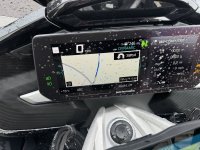
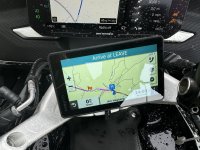
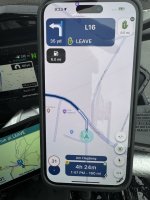
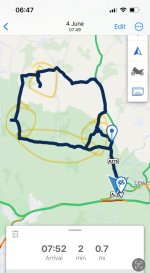
Joining a pre-made route, halfway along its length - How do you do it? - And how the hell do you stop it recalculating and sending you around?

Wapping

Well-known member
Moderator
Joined
Oct 21, 2005
Messages
90,842
Reaction score
15,623
Location
Wapping, London
Imagine a 150 mile bespoke route, created in MyRoute, with say 50 shaping points, one every three miles.

Imagine now standing roughly half way along the route. You import the route into the Connected app.

How do you then run the route? The only two options seem to be:

1. From where you are standing, back to the start point and from there forwards along the route

2. From where you are standing to the end point directly ie. Ignoring the 75 miles of the bespoke route you’d created

Thanks for any help.

Richard
 
Last edited:
In this situation I have taken the simple way forward, but there is probably a more elegant solution. All I do is open the Waypoints tab and delete all the waypoints one by one from the route start to the point I want to start at.
 
In this situation I have taken the simple way forward, but there is probably a more elegant solution. All I do is open the Waypoints tab and delete all the waypoints one by one from the route start to the point I want to start at.

That’ll take over an hour to demote say 75 waypoints. 🥴
 
Just go into menu 3 dots at bottom right of screen select waypoints and touch which ever waypoint you want to proceed from for more than 2 seconds.
(3 clicks)
 
OK thanks.

1. I have found, maybe by luck, that if you tap ‘Go direct’ it will (at least this time it has) pick up the bespoke route. I’ll experiment some more.

2. Now as to the comment about the shaping points. MyRoute recommends one every three miles, hence the 50 in my example. This works fine into a Garmin GPS device. However, the BMW Connected app limits the number to something like 90. Anything above that and it’s no go. That said, 90 times three equates to 270 miles, so you’d maybe break it into two parts anyway. Though my bespoke route yesterday was 280 miles, which my XT and the MyRoute Navigation app both coped with, admirably

I am having very mixed results with the Connected app but I’m sort of getting there, helped as I am running an XT and MyRoute’s Navigation app at the same time, running the same bespoke routes.
 
Forget that.

Once it worked and the next time, it failed, as it amended the bespoke route. It is very odd, as the first part of the second go was perfect. Why it then altered, I have no idea.
 
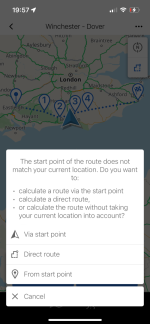
Picking the ‘Direct route’ option seems to navigate to the closest point (might be way or support point) on the route and then uses subsequent points to the destination.
FYI there are no limits to support points in the connected app. They’re not visualised in the app but are used like shaping points in the calculations.
 
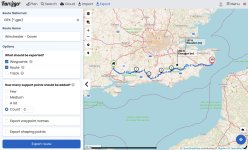
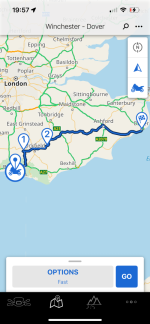
If I import the route from kurviger shown, and join from Brighton using the direct route option waypoints 3&4 from the original route are used in the calculations.
IMG_0110.jpegIMG_6203.pngIMG_6204.png
 
Thank you.

That was my experience the first time, but not the second. The second time around, it altered the bespoke route, quite significantly.

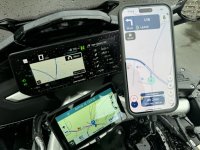
When I commenced the first go, I carefully checked that the distances and arrival times all matched (or near enough) on the BMW app, my XT and the MyRoute Navigation app, which they did, as per the screen shots:


IMG_5689.jpeg

IMG_5690.jpeg


IMG_5691.jpeg

IMG_5692.jpeg

This was all fine, right to lunchtime at Daun, roughly halfway around. On restart, the same items matched and indeed, all three devices performed exactly the same, right up to the moment when the BMW app made what I assume is a recalculation. The estimated arrival time fell dramatically and the remaining distance fell too. I looked at the route; the XT and MyRoute both matched, telling me to turn tight at the T-junction. The BMW app, said left. More importantly, tge BMW recalculated route now said, take the motorway. There is no motorway section st all in my bespoke route.

The shaping points in the bespoke route are three miles apart. The BMW app, overode these in its recalculation.

I will though experiment some more.
 
That's a weird one. I've never known the app to recalculate when following an imported route.
One thought - if you're using (invisible) support points, importing, saving and the exporting the route from the connected app and then importing back into Kurviger (and I assume My route) allows you to see the physical shaping points its been using. It might give you some insights into what's happening.
 
I agree, it’s very odd and it shouldn’t do it.

The stranger thing is that it failed to make a recalculation on a route the Connected app created itself, between my house and a road in France. I’ll make a separate thread for that one at some point.
 
It becomes odder. Today the Connected app worked perfectly, including a rejoining of a bespoke route mid-point and an off route recalculation. The downside? My 1600 was very reluctant to start its WiFi connection, which has been working very well.

Oh, an my quick shifter has broken AGAIN!
 
Total failure this afternoon but, the good news is that I think I have worked out what is happening within the app. Here we go:

1. Today I ran a 180 mile, non-circular bespoke route, created in MyRoute with roughly 60 intermediate shaping points.

2. I had three separate devices running the same route, so any errors would be easy to spot.

3. The start point was about half a mile from my hotel.

4. All three devices loaded the route perfectly, all displaying the same route shape, distance and estimated journey time.

5. All three guided me to the start point with no problem.

6. I went marginally off route (I missed a small road in a village) and all three dealt with the problem without any issue.

7. All three guided me to half way, roughly 90 miles, cross-country, with no issue.

8. After lunch I restarted all three devices. The XT and the MyRoute app were perfect. As far as I could tell, the BMW app was perfect too.

9. After about 20 miles, I went off-route on purpose. In essence, I carried on riding ahead, rather than turning left to follow my bespoke route, across the Meuse river, turning right and then crossing back again. In short, I purposefully missed out riding three sides of a square, an ‘off route’ gap of say, four or five miles.

10. The XT and the MyRoute app dealt with the problem perfectly.

11. The BMW app seemed to cope but then I noticed that the remaining mileage was increasing, not reducing.

12. I assumed (wrongly) that the BMW app would sort itself out, but no. It kept trying to send me back, to ride the section I had missed out.

13. This continued for at least 40 miles, the XT and MyRoute working perfectly but the BMW app’s remaining increasing. Other than giving me instructions to turn around and ride the missing section, the BMW app was working and showing the correct route onwards.

14. Suddenly, after about an hour, with no intervention from me, the BMW app corrected itself. In other words, it was as if it finally accepted that I had no intention of riding backwards. I thought, great, all three are now back in line and on track…. But NO!

15. The BMW app was still directing me to the end point but it had wiped out all the remaining shaping points. In short, it had all but crashed itself and rewritten the remaining 70 odd miles.

16. The XT and MyRoute app were both showing the correct route, along with the correct shaping points. It was the BMW app which was doing its own thing.

17. To compound the problem, because I was ignoring the BMW self-created route, it kept trying to correct itself and force me to ride backwards. The estimated mileage remaining increasing with each mile.

18. When I reached the end point, the XT and the MyRoute app showed, correctly, that the remaining mileage was zero. The BMW app, showed the cursor and the end but still wanted me to ride back and then forward again, a distance of about 35 miles.

I have assorted screenshots to show the problem.

The only thing I can think to do is to delete the app and reinstall it afresh….. and try again tomorrow!

 
Following on from post #14, the BMW Connected app pulled the same stunt when I left the UK.

I had created an installed a bespoke route with a start point inside the perimeter of the French side of the Eurotunnel to St Omer.

When I left home, I asked the three devices to route me, from my front door to the start point in France. The XT and MyRoute Navigation both routed me through the Blackwall Tunnel, down to the M25 and then down the M20 to the Chunnel. Then out of the Chunnel, to the start point and to St Omer. In a word, perfectly. It all took seconds to calculate.

The BMW Connected app span its wheel, clearly struggling to create a route. After about two minutes, it created the route…. But….. it insisted on routing me down the M2 to Dover and then on a ferry to Calais. Then via an imrnsly convoluted way to the start point, then to St Omer. I left it running, thinking that it shoukd reroute itself as I joined the M20.

As I left the M25 to join the M20, the Connected app kept on insisting that I turn around and retrace my steps to the A2 / M2 to Dover. As with today, the total distance for the complete journey (home to St Omer) kept increasing, the Connected app screen on my 1600 becoming more and more confused as I neared Folkestone, as the Connected app kept on wanting me to ride right back to the M25 and take the A2 / M2 to Dover. In other words, it would not correct itself at all. This is despite there being a very simple road from Folkestone, direct to Dover anyway.

As the BMW Connected app, created the route from my house to France, there can be no intervening shaping points to confuse the app. I can accept that it might chose the ferry (though I might wonder why, as it is slower) but what I cannot understand is the app’s insistence that I backtrack, back along the length of the M20, right back to the M25, to take the A2 / M2.
 
Last edited:
That's interesting.
I've had a few situations where, when missing a shaping point(s), and ignoring requests to turn around / re-route, and then rejoining the route at a later point, things go a bit wonky and the app constantly tries to direct me back to an early point on the route. It seems to be caused by missing a shaping point, and ignoring subsequent turn requests.
When it occurs, I've noticed that the app starts to add weird branches overlayed on to the map at the points where turn requests are made - almost assuming that I've made the turn when I haven't.
The branches shown below weren't ridden.
IMG_6206.jpeg

I've only experienced it with imported routes and not (yet) been able to find a consistent cause.
It feels like the connected apps version of the XT RUT issue...
Stoping and recalculating a 'direct' route fixes the issue.
 
By Jove, I think I might have fixed it…. But it’s early days.

1. I deleted the BMW Connected app. This is mildly annoying as it meant downloading the detailed maps again. Thankfully, I had a good WiFi connection.

2. I deleted any links the phone had to my 1600 and re-established them afresh.

3. I fired up MyRoute and summoned up today’s quite complicated 190 mile route in TomTom maps, as opposed to my usual default of HERE maps. BMW’s app apparently using TomTom software.

4. I saved the MyRoute route in version 1.1.

5. I uploaded the TRACK of the route into the BWW Connected app.

6. So far, it seems to be doing OK, recalculating correctly, if I go off route.

7. The acid tests will be now, when I restart after a coffee stop and, of course, after lunch.

Fingers crossed!

If it does work reliably, it would be good. Not least as the 1600’s coloured TFT screen is good at displaying the route, the screen split 55% rev counter, 44% GPS.

PS The XT and MyRoutes’ Navigation app have both performed, just as they should.
 
Last edited:
I spoke too soon!

After the coffee stop, the app refused to restart automatically.

I reloaded the route, with a remaining distance of well over 100 miles, which was correct. It suddenly recalculated, telling me I had a remaining distance of just 45 miles!

I loaded it all again and everything seemed fine. I then went a little off route. The app went straight back to its old habit of directing me back to the spot I had missed, then forward again on the route. The mileage remaining increasing each mile I did not turn around.

To cap it all, the bike then lost its WiFi connection with the phone and then its Bluetooth connection too.

Conclusions:

A. I think I am pretty good at GPS devices and do not panic when things go wrong, but this has me beat.

B. The app has some serious faults, which (given it has been out for a while) is pretty poor.

C. I get the impression that it is designed to cater for the simple, take me from A to B merchants, where it’ll probably work fine.

D. The cubbyhole on the 1600 for keeping the phone cool is garbage. A huge motorbike and they create the world’s most awkward, undersized, space.

E. The TFT display is very good but it has some faults. For example, the route is often displayed right at the bottom, when in ‘wide screen’ mode.

F. Wi-Fi connection is at best flakey.

I’ll be penning a letter to BMW…..
 
That's a pity, I've generally had a good experience with importing routes, including a 10 day jaunt to Austria and back last year with no major issues. I wonder if this is a new bug introduced with one of the updates or has existing for longer. I've not used it much this year, but plan to for a trip to Wales in August.
If it's a software issue in the app I assume that the CR Nav will have similar problems.
Interested to hear how you get on with BMW.
 
Just a thought, and assuming the route you're using is made of support points. have you tried importing waypoints as an alternative to see if they're handled differently by the app?
I will run some tests...


Back
Top Bottom