Loading new maps into Basecamp/Zumo XT

Berin

Well-known member
UKGSer Subscriber
Joined
May 29, 2006
Messages
7,679
Reaction score
3,470
Location
South Oxfordshire
Just trying to update maps in Basecamp, current latest City Navigator being 2025.10

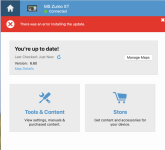
As per usual, start with Garmin Express (which oddly seems to have forgotten all my devices). The Zumo XT is recognised, and I did the Overlander and Cyclops update. The map on the Zumo is up-to-date, 2025.1, so all I want to do is install to computer.
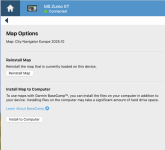
Screenshot 2024-08-11 at 14.22.17.png
It starts to download but with a suspiciously low time of 2 mins - fast even for my 1000Gb broadband
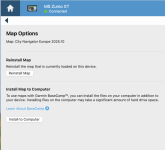

Screenshot 2024-08-11 at 14.22.17.png

And then, sure enough, it fails.

Screenshot 2024-08-11 at 14.25.01.png


I keep an old 590 Zumo, for this very issue - the maps load fine when using that, so it's clearly an issue with the XT.

Any ideas?
 
I should say, this is on a Mac.

you need these

swan-matches-1-vesta-lg.png
 
or a windows PC... :duck:
Install to computer
Manually remove old(er) map from unit and keep safe somewhere
Manually remove all unnecessary clutter files like languages etc from unit and keep safe somewhere to free internal memory
Then select map tiles you need and send to unit remembering units' limitations
Garmin servers are sssslooooooooooooooooooooooooooooooooooooooow
 
or a windows PC... :duck:
Install to computer
Manually remove old(er) map from unit and keep safe somewhere
Manually remove all unnecessary clutter files like languages etc from unit and keep safe somewhere to free internal memory
Then select map tiles you need and send to unit remembering units' limitations
Garmin servers are sssslooooooooooooooooooooooooooooooooooooooow
I’ve installed to the Zumo without problems.

It’s installing to the Mac that’s the issue.
 
I’ve installed to the Zumo without problems.

It’s installing to the Mac that’s the issue.
It’s Garmin. There’s a known issue with Express on Mac. Basically like quite a lot of their current offerings, they refuse to correct it and make out it’s operator error.
 
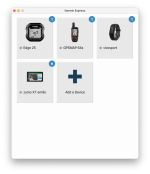
Yes, I'm even surprised your version of Express "sees" the XT. Mine doesn't.
I have all the devices, but doesn't connect to a few.

Screenshot 2024-08-12 at 10.13.48.png
 
Yes, no problem with it recognising the device at all. All the in-device updates work fine, just not install to computer.

Is your Mac intel or Apple silicon?

It’s moot really since I’ve installed the maps to the Mac using the old Zumo 590, bit nonetheless irritating that I have to keep a device I don’t use just for the maps.

Also, running Express in a Windows vm in the Mac, it works fine and installs to computer.
I’ve tried moving this map over but it remains locked.
 
Is your Mac intel or Apple silicon?

Apple Silicon, I think that is the issue. (I remember vaguely reading something about it). But also there was some issue with cabling. I think everytime I find a solution and then forget about it :)

I'll try to run the upgrades later today and see what happens, then we can compare.
 
Such problems are a Pita but maybe make a case for having a cheap windows basic laptop which can be had for chips these days to get things going- one should not have to but hey, if it saves headaches-
p.s maps are locked to each unit Berin so although you can install them in BC, they will only function in the unit they are linked to.

I have no idea about apples but if you already have the map image of the one you want ( unless misread) just put it in a garmin folder on a usb stick/micro sd etc and then load BC- it will find it. No need to actually 'install' in BC but you can also do that too from an image if you wanted to.


Back
Top Bottom