Map Set missing?

BTBR

Compulsive tinkerer........!
UKGSer Subscriber
Joined
Nov 17, 2003
Messages
4,762
Reaction score
0
Location
Round 'n' round in circles.........
When I first had the SPIII, version 6, I loaded a total of 36 maps onto the 128MB card. When using Mapsource it detailed on the left hand side of the PC screen, that there were 36 maps saved as a Map Set and I gave it its own bespoke name.

I have downloaded version 6.1 from the Garmin site and now the Map Set details have gone :confused:

However it all seem to work ok as I have just done a route ready for my ride around the Peak District this coming weekend and also loaded on to the SPIII :confused: :confused:

Am I missing something here or should I have done something else?

BTBR
 
If you made the route in an earlier Mapsource version and you are viewing it and uploading it from a later version you should right click on the route and recalculate it in the latest version. Then save it to your GPS otherwise you could find yourself getting into all sorts of problems. I had this last year on a GPS V just after an upgrade in mapsource.

Good luck
Gecko
 
Maybe this is too simple a question but did you use the Mapsource map tool to re-select the maps you want? When there is a change of Map data (City Nav x.y to City Nav z.w) the routes and waypoints will pick up from a saved file but I don't believe the maps will. My guess is that you were still using the 6.0 maps loaded on the card.

And yes, you should see all the maps segments listed when you choose the map tab and select maps with the map tool.

And, you will need to re-calculate it to have it match the new map data. Caution, check the new calculated route to make sure its the same.
 
K2R said:
Maybe this is too simple a question but did you use the Mapsource map tool to re-select the maps you want? When there is a change of Map data (City Nav x.y to City Nav z.w) the routes and waypoints will pick up from a saved file but I don't believe the maps will. My guess is that you were still using the 6.0 maps loaded on the card.

And yes, you should see all the maps segments listed when you choose the map tab and select maps with the map tool.

And, you will need to re-calculate it to have it match the new map data. Caution, check the new calculated route to make sure its the same.

Maybe a simple question but I think thats the answer K2R. Like you suggest I still have V6 maps loaded on the data card. I have upgraded the PC to V6.1 and not the card.:doh

When I get home tonite I will download the new version onto the card and see wot happens.

The rather odd thing is that it all seems to be working ok :confused:
I did a route last night in Mapsource, then saved it to a folder, then downloaded it to the SPIII. Afterwards I opened the route on the unit and it all seems to be correct?

Thanks for the pointer.............

:beerjug:

BTBR
 
BTBR:

I don't fully understand your question, but I think I can give you some information that might help you clear up any uncertainty you have about what maps and routes are in your GPSR.

The MapSource program is used to download information to two different physical storage areas of the GPSR:

1) Map segments get downloaded to the removable data chip of the GPSR.

2) Waypoints, routes, and tracks get downloaded to (or uploaded from) the non-volatile memory that is way inside the GPSR itself, on a tiny electronic part that is attached to the guts of the GPSR. Routes, waypoints and track data is never, ever, stored on the removable data chip of any Garmin GPSR.

If you uploaded or downloaded information to your GPSR using the cable that plugs into the round hole on the top/back of the GPSR, then it is very unlikely that you modified the map segments that were already on the data chip. Although it is technically possible to send map segments to the SP III using the serial connection, it would take forever (like, overnight, about 8 hours or so) to send 128 megs of maps to the data chip using the serial cable. This is why we use the USB programmer device to load maps to the data chip - it's much faster at transferring information to the data chip.

Most likely, what you did was transfer routes, waypoints, or track data to or from your GPSR, you didn't change the map information on the data chip in any way.

It's also worth pointing out that upgrading the program that we use to transfer data to and from our GPSR's ("MapSource") does not affect the actual map data that we have stored in our computer or the GPSR (in your case, "City Navigator" map data). You upgraded the tool that you use to transfer data, you didn't upgrade the map data itself in any way.

If you want to be 110% sure that you have the correct map segments that you want to use loaded onto your data card, connect your GPSR to your computer using the serial cable (the one with the round plug), open MapSource, and upload the map data from the GPSR to your computer. Uploading map data only takes a moment or so, because MapSource will not bother to suck up all the actual map details from your GPSR (why should it - the map details are already on your computer hard drive), it will just suck up the list of the names of the map segments that are loaded on your data chip.

Hope this helps you sort it out.

PanEuropean
 
6.0 and 6.1

The 6.0 update modified the maps that you download and that you use on the PC. 6.1 modifies how you interface with the maps on the PC. So (I think) upgarding to 6.1 will not have affected the datacard at all if you haven't asked 6.1 to download the maps to the card in the dialogue box.

In short 6.0 is the maps, 6.1 is how you get to use them on the PC.
 
PanEuropean said:
BTBR:

I don't fully understand your question, but I think I can give you some information that might help you clear up any uncertainty you have about what maps and routes are in your GPSR.

Hope this helps you sort it out.

PanEuropean

PanEuropean

Many thanks for the most excellant reply, its what we have come to expect!
I followed most of it, I admit that I had to read it several times though.

My 'problem' is that now I have downloaded to the latest V6.1 there is no Mapset shown on the left hand side of the PC screen?

I guess that this should show you exactly what you have saved on the data card?

As you and K2R have suggested I think that I will need to update my 128 mb datacard when I get home with the selected maps from the newly updated Map Source disc.

Watch this space............

BTBR
 
Hi BTBR:

I am a bit perplexed that you don't see the set of tabbed windows along the left side of the screen. As far as I know, there is no menu command that hides them.

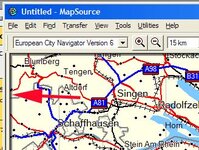
I experimented with MapSource 6.1 on my computer, and found that it is possible to 'squash' the windows all the way to the left, so they cannot be seen. If this is done, then there will be a small, shaded vertical bar running down the left side of the screen, just inside the MapSource window (see photo below, shaded bar is at end of red arrow symbol). If you place the cursor over that bar, the cursor symbol will change to a horizontal double-ended arrow. You can then press the mouse button down, and drag the mouse to the right, hopefully that will reveal the tabbed windows.

Let us know if that works.

PanEuropean
 

Attachments

  • tabs.jpg
    tabs.jpg
    46.1 KB · Views: 89
PanEuropean said:
John, thanks for putting it more succinctly.

No problem, when I have a really difficult question I know who to ask. The trouble is I'm self taught and you know what the say about that!

When I upgraded to 6.1 there was no change to the mapset or how it was presented on the PC. At least the "find" is now on a par with Autoroute, and that is praising it.
 
John:

Don't apologize for being self-taught, be proud of it. I have a degree from the "School of Hard Knocks" - I left the formal system the day I turned 16, and never went back.

BTBR:

One other "tip" for you, that might help save you confusion when you go to update the map set on your data chip:

If you have upgraded your cartography product from CityNavigator version 5 to CityNavigator version 6 - the fact that you refer to using a CD suggests to me that you bought a new version of the cartography product - you will now have two different sets of maps on your computer - the old version 5 of CN, and the newer version 6. (Note that this has nothing to do with what version of MapSource - the data moving tool - you are using).

Anyway, now that you have two different version of the maps - the old one and the new one - you will need to make sure you have the correct map product selected in the viewing window of the MapSource program when you are getting ready to make a selection of segments to download to your data chip.

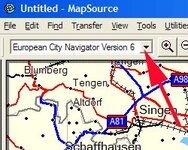
Note that in the toolbars at the top of the MapSource window, there is a place to make a selection of which map product you want to display and work with. (See photo below) Make sure you choose the correct map product. Most likely this will be CN Europe version 6, if you are getting ready to load a new chip, but it might be CN version 5, if you want to see what you had loaded (in the past) on an old chip.

If you don't see this little drop-down menu, go to the VIEW command up on the top, click on it, then go down until you see the line marked SHOW TOOLBARS, and from the sub-menu that appears, make sure there is a check-mark beside VIEW TOOLBAR.

Another way of changing what map product is displayed is to go to the VIEW command, click on it, then go down to the line marked SWITCH TO PRODUCT, then choose the map product (CN 5 or CN 6) that you want to work with.

Regards,

PanEuropean
 

Attachments

  • map set name.jpg
    map set name.jpg
    31.3 KB · Views: 79
added note on cartography version changes

As PanEuropean said, maps (cartography) reside on a data card or CF card. Routes reside within the GPSR memory.

Its easy to get a mismatch. Here are two examples. (1) You created routes on your PC using Mapsource City Nav v5. You then upgrade to v6. On Mapsource you fetch in an old (v5) file containing routes and download them to your GPSR. You then choose the maps you want (in this case v6) and download them to the data card or CF. You now have a mismatch. (2) You already have routes on your GPSR (either downloaded from Mapsource or created on the GPSR). You update your datacard or CF card with v6 maps.

I suggest you do this after you upgrade cartography. On Mapsource you fetch the file created under v5 into MapSource. Choose routes in the left screen window (notice no maps will be loaded from a v5 file, only routes and waypoints). Left click on the v6 route to highlight it, then right click on it and choose Duplicate Route. Left click on the duplicated route to highlight it. Right click on it and choose Recalculate Route. Now by clicking on each route, and seeing it highlighted in yellow, you can see the changes that have been made between v5 and v6. Make any changes you want to the recalculated route, delete the v5 route and save the file under v6.

Believe me, it can make a big difference. This may not be as big a problem when going from v6.0 from v6.1 but it can really make a difference if you are going from a major version like 5.x to 6.x. Hope this explanation is clear.
 
Right then, this is starting to really annoy me!

From the beginning when I bought the SPIII it came with V6 City Navigator CD. It all loaded ok and I transfered a total of 36 maps to the Data Card via the USB Card Programmer, no worries there at all. From memory the details of those 36 maps which formed part of the Map Set were shown in the Map Tabs section all of the time.

I have since downloaded V6.1 and the details of the Map Set are not there anymore? The Tabs section is but the Map Tab is empty?

So I have just erased the Data card and started from fresh again. I selected the Map Set tool, then selected the 36 maps that I required. The details of which were then shown in the Map Tabs section, then transfer to device.

All the data transfered ok to the data card, without any problems....BUT when I go to exit the Map Source programme and return to my desktop it asks me if I want to "save changes to untitled"??

If I say 'no' and just exit when I reopen Map Source via the shortcut on my desktop all the Map Set details has gone from the Map Tabs again.
The only way to save it is to give it a file name (ie Map Set 9-06-04) and save it in a folder somewhere. Now I did not have to do this with V6, so am I missing something here?

BTBR
 
Ahhhhh... now I understand. BTBR, Sit back and relax, you have done nothing wrong.

What you are seeing is a question that the computer operating system (Windows) is asking you, it really has nothing to do with the work you did with your data chip.

When you started up the MapSource program, and selected the 36 maps, you created a "document". In this case, the document was the blank map screen that you see on the computer, modified by you when you selected the 36 maps.

Once you created this unique and one of a kind cartographic selection ("BTBR's private map stash for sunny June weekends"), you then told MapSource to send the segments down the wire to the data chip - which you did correctly, as you have discovered when you checked your GPSR.

Now, you want to turn the friggin' computer off and go ride your bike, but the computer has one last question to ask you: "BTBR, do you want to save this unique document containing a collection of 36 map segments so you can call it up from the computer with a single double click in the future?"

If your decision is "hell, why bother, I can remember the 36 segments that I use, just in case I ever have to re-load that damn data chip again", then answer NO, and the program will exit without saving the document containing your map segment names.

But, let's say in addition to selecting 36 map segments, you also created a whole bunch of waypoints - each waypoint being the result of a lot of work - and you want to be able to share that file with a friend, or call it back up from your computer's memory in the future, in case some tosser steals your GPSR and you have to load a new one - then answer YES, and give the file a name - BTBR's favourite maps and waypoints, for example. The computer will then save the file for you.

What is happening when you say NO and exit MapSource is that the computer tosses out the information you entered (which has nothing to do with the fact that you successfully sent the information to the data chip), and the next time you start MapSource, you get a blank map - so you can choose a different set of maps, perhaps for that trip to the continent that you have been thinking of.

In short - it's a Windows related issue, same as your word processor asking you if you want to save (to your hard drive) the letter that you wrote. All previous versions of MapSource have also asked this same question - you just might not have taken note of it before. My guess is that previously, you were double-clicking on a document icon that represented a MapSource document (file) that you had previously saved when you wanted to start MapSource - this is why you were seeing your previous work appear - and now you are clicking on an application icon, which just launches the MapSource program, bringing up a blank map document, rather than the document you used the last time.

Hope this helps, but feel free to post again if you have any more grief or if you have any additional questions.

PanEuropean

 
PanEuropean said:
Ahhhhh... now I understand. BTBR, Sit back and relax, you have done nothing wrong.

PanEuropean

Phew...........!

Many thanks Pan (and others) for sticking with me on this, I suspected that it was something stupid. It was ..............me :(

I fully understand everything that you said and also understand about the saving of bespoke folders etc containing Waypoints, routes etc

One last question though, which you should be able to answer quite quickly.
When I do a new route, (opening the Map Source programme from the shortcut on the desk top) because there are no map details shown in the Map Tabs section, do I first need to select the maps of the areas that I need to travel in before I start using the Route Tool?

Forever in your debt

Alan
 
In short

No.

However, to make life as easy as possible I have several different files (see above from PanE) and in thes different files there are different map sets, waypoints and routes. It helps the download speed and sucess rate no end if you only have a few routes / waypoints. So I have a file for work, this years holiday, next years plans etc. As this years holiday is in the USA:D but in a car:( and next years is in France :D then you can see why I've split the files up. All you need to remember is to load the appropiate map set / routes / waypoints for the appropiate journey you want to take. ;)
 
Re: In short

John Armstrong said:
No.

However, to make life as easy as possible I have several different files (see above from PanE) and in thes different files there are different map sets, waypoints and routes. It helps the download speed and sucess rate no end if you only have a few routes / waypoints. So I have a file for work, this years holiday, next years plans etc. As this years holiday is in the USA:D but in a car:( and next years is in France :D then you can see why I've split the files up. All you need to remember is to load the appropiate map set / routes / waypoints for the appropiate journey you want to take. ;)

John

Excellant, thank you. Although I did have to read it a couple of times to fully absorb it, but I can see the logic behind it all now.

Well, thats it from me then....until the next time........

:beerjug:

BTBR


Back
Top Bottom