Mapsource and multiple Sat Navs

Slowdown

Registered user
Joined
Mar 11, 2007
Messages
3,559
Reaction score
1
Location
Woking
I've had a Zumo for a couple of years and have just bought the Mrs a Nuvi 765T.

The Nuvi doesn't come with map DVD's etc However, the Nuvi does qualify for a free map update.

Mapsource v6.15.4 seems to talk to the Nuvi and the Zumo.

However, once I've downloaded the map update for the Nuvi I don't want to trash anything.

Has anyone run two versions of maps on the same PC/version of Mapsource?

Or does it just know to run one version of the maps for the Nuvi and a different one for the Zumo?

Or do I need another PC :(
 
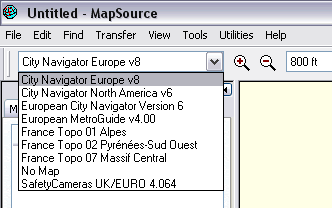
I've ran three versions of Mapsource for my Quests and Zumo on my PC. You just select which version to use on a drop down menu at the top and it uses that version and transfers it as such to the unit.

Only problem I find is the units being recognised by Mapsource, usually after updates I ahve to contact Garmin to ask why none of my Sat NAVS are not recognised AGAIN!!
 
Can you install two unlock codes on the same mapping? As both units mentioned run NT mapping and if both are on the same version then you'd have the same mapping for both. If the mapping version is different then I can't see a problem.

Transfer of waypoints doesn't need a compatible unlock or the same mapping in Mapsource and the on the unit. I regularly add favourites to my wife's i3 (shopping centres, car parks etc.) though I only have 2008 mapping for my StreetPilot 2720 in Mapsource.
 
You should have no problems. You can 'upload' the unlock codes from the units to Mapsource. Both the Zumo & Nuvi will work perfectly well with PC mapping that's either newer or older than installed on the units although, obviously, some roads may be in error. You can run multiple maps on your PC - they are selectable from a drop-down box.

For newer Garmins, the original sequence of planning routes using Mapsource and then transferring them, without any re-calculation, has changed. So, a 2610/2720/2830 can take a route planned on a PC and you can ride that exact route provided the PC & unit mapping are identical. For your Nuvi 765, you will just upload a list of waypoints/vias which the unit will recalculate when Importing a route. This means that having identical maps on the GPS & PC is no longer required. No matter what you do, the GPS will do its own recalculation, so having lots of vias/waypoints (& not having the unit avoids set differently) is the way to go.

I'm not sure about the Zumo, having never owned one. However, the new Nuvi 500/550 and (I would guess) the Zumo 660 will, again, only upload a list of waypoints/vias rather than a Mapsource planned route.

I run Mapsource (and now RoadTrip) with a Quest, 2610, Nuvi 770 & Nuvi 550, and have 2 sets of mapping installed.
 
You can have as many mapsource applications as you like and you can chose between them through a dropdown Options menu

mapsource1.gif


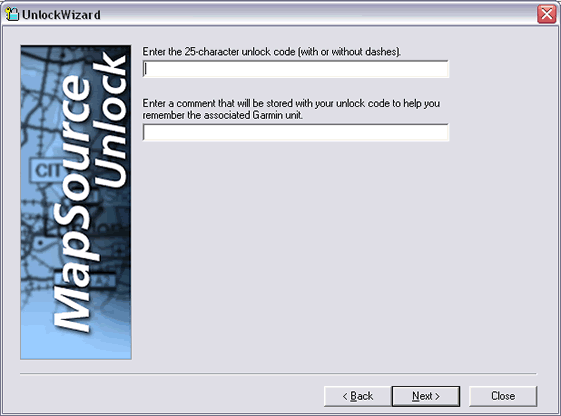
and if you are going to download maps to your device you can also register/unlock them using the Utils menu

mapsource2.gif


The Zumo is a terrific piece of kit and will allow you to create routes in any version on your PC and upload them to your device - the device then converts them into waypoints and remaps the route via these waypoints using whatever version of maps you have on the device. Makes for route sharing easy... Unlike the older versions which only worked if the PC software was unlocked for the device.

If you have an on-line account with Mapsource then you can manage your unlock codes and devices also if you later phone customer support they will transfer maps between devices and provide relevant unlock codes. Up to Version 8 of mapsource you could have 2 devices registered per copy and could generate unlock codes online in your account. Customer services have always been helpfull when I have called them.


Back
Top Bottom