Mapsource crashing when routing on Italy map

Lord Snooty

Well-known member
UKGSer Subscriber
Joined
Jan 6, 2002
Messages
11,406
Reaction score
2,799
Location
Redditch, Worcs
Bit of an odd one this - I still use Mapsource, yeah I know Basecamp is the latest but it is frankly godawful to use.

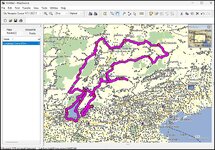
I have been trying to create some routes in Italy and every time I do Mapsource crashes. Using the routing tool, click on a start point, select the next point, Mapsource goes into calculation mode and crashes out.

I have changed the version of mapping from 2018.2 to 2018.1 to see if that was the issue but the result is the same. I have also tried it on a different laptop - same result.

It only does this when on Italy mapping - I have tested routing in UK, Belgium, France, Germany, Greece etc and that all works fine.

Anybody else had this or have any idea what is going on?
 
There are some old (2012) comments on the www with bods having a Mapsource problem with Italy.

I would start by checking your settings. For example, that you haven’t clicked onto a mountain pass and have seasonal closures ticked or onto a motorway when you’ve set it to favour goat tracks.
 
Richard, my routing preferences are set at avoiding Toll Road, Unpaved Roads, U-turns, Date and Time Closures. Road Selection is bang in the middle, Calculation set for Faster Time, Route Style is set to Auto Routing.

I have been trying to set a route from Brescia towards Lake Garda so no mountain passes or goat tracks involved;)
 
Ok.

Many years ago I created a whole bunch of Italian routes on my PC, using Mapsource.

I do recall that a couple did throw me a challenge creating the route between some points. Sometimes I had to literally force the route to take a turn by clicking in very small increments along the roads I wanted to use. Sometimes it was because of a mapping error, whereby the map thought that it was not possible to turn say right, when it was plainly evident that you couid. To get around this problem, I stopped the route at the right turn and started a fresh one just around the corner.

Other than that, I can’t help..... other than to say, buy a Mac and embrace BaseCamp, your world will be changed forever.

PS I guess you might have hit an ‘avoid this’ problem. If the only way from A to B does involve a toll road (some passes levy a small charge) the PC’s brain might have gone into a flat spin. See what happens if you deselect any preferences.
 
Thanks Rich - I will start a process of elimination by changng the preference settings one at a time to see if changes things.
 
Richard, my routing preferences are set at avoiding Toll Road, Unpaved Roads, U-turns, Date and Time Closures. Road Selection is bang in the middle, Calculation set for Faster Time, Route Style is set to Auto Routing.

I have been trying to set a route from Brescia towards Lake Garda so no mountain passes or goat tracks involved;)

remove all your avoidances and just keep it on faster time, then you can tweak the route to suit
 
Richard, my routing preferences are set at avoiding Toll Road, Unpaved Roads, U-turns, Date and Time Closures. Road Selection is bang in the middle, Calculation set for Faster Time, Route Style is set to Auto Routing.

I have been trying to set a route from Brescia towards Lake Garda so no mountain passes or goat tracks involved;)

I have the same preferences set and have just tried a series of routes for that area with no problems. I would tentatively suggest uninstalling/re-installing Mapsource and trying again.

P.S. Brescia region is lovely - we went there for the Mille Miglia a couple of years ago. Marvellous!
 
Having "avoid seasonal closures" set is a recipe for disaster for a bike trip in the summer as so many of the interesting roads are shut in the winter. The system does not take into account when they are open so just refuses to route you over any road that is subject to winter closure. I would also be careful with the "avoid toll roads" option as so many fantastic roads do have a toll. Most of us would think those tolls are more than worth it. In any mountainous area you would be better to use "avoid motorways" and "unpaved roads" ( unless rough tracks are your thing ) and use the "fastest route" option. On newer devices the "curvy roads" option is also of doubtful benefit in a mountainous area. Often all this does is to take you off already twisty roads and onto very minor ones just to add a few more bends.

John
 
Bit of an odd one this - I still use Mapsource, yeah I know Basecamp is the latest but it is frankly godawful to use.

I have been trying to create some routes in Italy and every time I do Mapsource crashes. Using the routing tool, click on a start point, select the next point, Mapsource goes into calculation mode and crashes out.

I have changed the version of mapping from 2018.2 to 2018.1 to see if that was the issue but the result is the same. I have also tried it on a different laptop - same result.

It only does this when on Italy mapping - I have tested routing in UK, Belgium, France, Germany, Greece etc and that all works fine.

Anybody else had this or have any idea what is going on?
Did you ever get this sorted? I'm having exactly the same problem even with the latest maps installed.
 
Last edited:
Did you ever get this sorted? I'm having exactly the same problem even with the latest maps installed.

This is an eight years old thread.

Just to be sure: You are referring to Italy and to MapSource, specifically?
 
Last edited:
Hi Number 6. I still have a copy of MapSource on my computer and tried a bit of routing in italy. On the first couple of attempts if I put in a waypoint then put the second some way off (in this case halfway round Lake Garda then Mapsource crashed. This happened twice. Then I started a route and put three waypoints fairly close together before creating waypoints that were more distant. Mapsource behaved itself then I put waypoints further away and it was fine. I saved the route and started another and it was fine no matter if the second waypoint was close or far away (cue father ted jokes). I closed mapsource and reopened it and it was fine no matter the route in Italy again. Then I rebooted the computer and Routing in Italy or elsewhere was fine on reboot. My guess is Garmin Express, Mapsource and Basecamp work with Windows .Net environment and this changes with various iterations of windows so this may mess stuff up slightly. A couple of crashes and the error handling bits of the software settle down and off you go again. I my case Mapsource crashed twice and has been fine since even with long routes. So let it crash a few times and hopefully it will settle down. MapSource has not been updated by Garmin for yonks so there may come a time when it just stops working if Windows no longer supports it. Same goes for Basecamp.

1780307915270.jpg
 
I AI'd the problem. It spat out this.

Yes, Garmin MapSource is notoriously unstable on modern Windows versions (Windows 10 and 11). Because Garmin officially discontinued MapSource years ago, it is highly prone to crashing and registry errors when paired with modern operating systems and newer Garmin software (like Garmin Express). [1, 2, 3, 4, 5]
Common issues and how to fix them:

1. Crashes at Startup ("There was an Error Reading Files from the Registry")
This is the most common error when opening MapSource on Windows. It usually stems from permission issues or a corrupt registry key, often caused by newer mapping updates overwriting old paths. [1, 2]
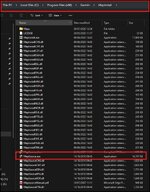
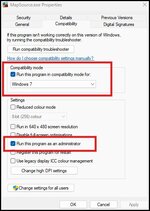
  • The Fix: Find your MapSource.exe file (typically in C:\Program Files (x86)\Garmin\MapSource), right-click it, select Properties, go to the Compatibility tab, and check the box that says "Run this program as an administrator." [1]

2. Runtime Errors or Map Disappearing
If you are using third-party maps (or older templates from GPSFileDepot), or if Garmin Express has recently updated your device maps, MapSource may crash or fail to find your map files. [1, 2, 3]
  • The Fix: Ensure you are running the final legacy version of MapSource (v6.16.3). If the issue persists, you may need to uninstall corrupt maps via the Windows Registry (regedit) or uninstall/reinstall the Microsoft Visual C++ Redistributables. [1, 2, 3]

3. "Not a valid MapSource file"
Trying to open modern GPX files or routes created on newer devices can cause this error. MapSource cannot always handle the modern XML schemas used by today's units. [1]

The Recommended Alternative: Garmin BaseCamp
Because MapSource is outdated and unsupported, Garmin officially replaced it with BaseCamp, which is fully supported, reads modern files natively, and is much more stable on Windows. You can download it for free directly from the Garmin BaseCamp Portal. [1, 2, 3, 4, 5]
 
To do this navigate here in File Explorer.

1780310003460.jpg

Open the properties of the .exe file right click on the file select "Properties" and change these settings under the compatibility tab. Hit apply and try it out.

1780310075723.jpg
 
You could always run it in a Win7 VM.
If you can't get it to run via Windows Compatibility this is the best way to do it. But if you set up a VM make sure the Windows 7 or whichever iteration you chose cannot connect to the internet!!
 
This is an eight years old thread.

Just to be sure: You are referring to Italy and to MapSource, specifically?
Yes Richard, I was looking for something else 660 related and came across this thread. I thought the problem was unique to my install but it's obviously not uncommon. (y)

It only occurs in about a 60 mile radius of Milan, I can overcome it by plotting routes with small distances between waypoints but when it crashes it loses everything.

(this is on Windows 10)


Back
Top Bottom