
Mapsource: Locked maps detected, but not wanted anyway!

notagser

Registered user
Joined
Jun 21, 2004
Messages
288
Reaction score
29
Location
South Queensferry
I've changed from using an SP2610 to a 2720, and have three mapsets associated with the mapsource programme that are no longer needed. I tried removing them from the map list but all that happened was that they locked, and I have now ended up with a pop-up each time I start using mapsource advising me that locked maps are detected.
Ok, i can hit the "skip" button, but how do I remove all traces of the maps I don't need anymore?
Do I need to uninstall mapsource and do registry stuff, or is there a simple solution?
I don't want to lose the latest map updates, and the last download (nüMaps Lifetime™ Europe 2010.20) has now expired so i can't re-download it.
 
Mmmmmm....that didn't work.
Seems to have screwed up Mapsource completely, and it now won't start. (asking to be reinstalled)
Trying a system restore.............
 
daft question it was the maps you unintsalled and not mapsource itself ?

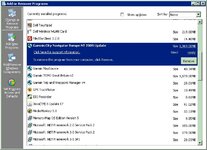
you should have seen something like

gar.JPG

only highlight the map products in the above image it's the TOPO and City Nav NT update
 
No, it was only the maps I removed. I left mapsource in place.
The error message is:
There is a problem with the City Navigator Europe NT+V8 installation.Please reinstall City Navigator Europe NT+V8 and start Mapsource again.

Same message after system restore, and reinstalling V8 stalls with an error relating to the unlock wizard.
 
Normally just uninstalling the maps should've worked, ir's something I've done plenty of times and never had an issue.

What it sounds like is Mapsource is trying to start up and display the map you have uninstalled but since it's not there it's throwing a wobbly.

do you still have a copy of the unlock codes ?

if so just uninstall the whole lot of mapsource and reinstall the full product
 
If you have manually removed map sets from Mapsource, you’ve almost certainly left the entries for these map sets in the registry. That’s why Mapsource won’t work now :(

To remove these entries you need MapSetToolKit to sort it out, it’s specifically for Mapsource. Its fixed it for me a number of times :thumb

http://cypherman1.googlepages.com/

This is what the program looks like when its running.
It’s the bottom right section you’re interested in ‘Mapset Installed’.
MapSetToolKit_v1.61.jpg


Good luck, Martin


Back
Top Bottom
