Miles to kilometers

turpin

Well-known member
UKGSer Subscriber
Joined
Nov 7, 2007
Messages
541
Reaction score
15
Location
where the berry is king
Does the display change automatically whilst traveling through Europe ie miles to kilometers I somehow suspect it does but I cannot find a link to confirm it:confused::confused:
 
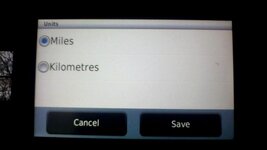
No. It will be in settings. Units.
 
The current speed limit / the bike's current speed (permanently displayed on the dash board) will automatically correct. It will remain in mph but for example a road with a 80km limit will display as 50 mph, whilst a road with a 50 kph will display as 32 mph, all automatically.
 
The current speed limit / the bike's current speed (permanently displayed on the dash board) will automatically correct. It will remain in mph but for example a road with a 80km limit will display as 50 mph, whilst a road with a 50 kph will display as 32 mph, all automatically.

Lovely, I was hoping for something like that. Thanks for tip appreciated.
 
Change to Kms

Go to Settings, scroll down to "Units and Time" choose Kilometres
 

Attachments

  • Nav V.jpg
    Nav V.jpg
    20.4 KB · Views: 334
The current speed limit / the bike's current speed (permanently displayed on the dash board) will automatically correct. It will remain in mph but for example a road with a 80km limit will display as 50 mph, whilst a road with a 50 kph will display as 32 mph, all automatically.
Nope not automatically on my bike- RT LC.
The correct speed limit on the satnav will show as you say, in MPH or Kms depending what you have put in settings.
What you say is correct if you leave the Sat nav set to MPH. If you change the satnav to Kms then it should show your current speed in Kms.
If Dick T want to confuse things further, I believe you can change the digital readout(if you have that feature) on the bikes dash to read in Kms also but it doesn't do it automatically.
 
I have never touched the settings on my Nav V's I just leave it all in miles per hour. The conversion from kph to mph (80=50, 50=30 etc) is easy enough in your head, not least as the speed limits are not really so very different to ours, ie a town or village is probably always near enough 30 mph = 50 kph, unless signed otherwise. On the national limit roads, do just as you do here in the UK and ride at whatever speed you deem appropriate.

The vehicle's current speed versus the current road's speed limit is displayed by default on the dashboard and adjusts automatically. If anyone really must change ALL the settings and displayed speeds / distances from imperial to metric, then indeed they'll need to go into the device's settings screen.

 
I have never touched the settings on my Nav V's I just leave it all in miles per hour. The conversion from kph to mph (80=50, 50=30 etc) is easy enough in your head, not least as the speed limits are not really so very different to ours, ie a town or village is probably always near enough 30 mph = 50 kph, unless signed otherwise. On the national limit roads, do just as you do here in the UK and ride at whatever speed you deem appropriate.

The vehicle's current speed versus the current road's speed limit is displayed by default on the dashboard and adjusts automatically. If anyone really must change ALL the settings and displayed speeds / distances from imperial to metric, then indeed they'll need to go into the device's settings screen.

i'll try changing the settings and see what happens!


Back
Top Bottom