Motorway services Mapsource

Kritou

Well-known member
UKGSer Subscriber
Joined
Jan 3, 2005
Messages
3,127
Reaction score
280
Location
North West
Planning a route from the NW to Devon and want to plan a coffee break on the motorway - how do I find Services?
 
Kritou said:
Planning a route from the NW to Devon and want to plan a coffee break on the motorway - how do I find Services?

If it helps, but they are normally a very large sized building next to or very close to the side of the motorway. Adjacent to which is normally a very large car park with some petrol pumps sited towards the exit point.

As a rule there are normally feckin' big blue signs, again by the side of the carriageway, that inform road users well in advance when to expect to see the afore mentioned areas.

Hope this helps?

BTBR

 
Kritou said:
Planning a route from the NW to Devon and want to plan a coffee break on the motorway - how do I find Services?

It's difficult to do this using MapSource when you are planning the route on a personal computer. It is much easier to do this on the GPSR itself once you are riding the route.

The procedure for finding services using the GPSR varies a bit from model to model, but usually goes like this: Press the FIND button, then look for a general category that you think would contain petrol stations, once you get in there, find the specific category 'petrol stations', and specify that you want the GPSR to find stations along your route, rather than simply proximate to you. If you specify 'along your route', the GPSR will be smart enough to only pick ones that are ahead of you, and on your side of the road if you are on a divided highway. If you simply accept the default criteria of 'near here', you will get a display of service stations for 360 degrees all around you, listed in order of proximity. That's useful when you are down to running on fumes, but a PITA when you just want to find the next place coming up ahead of you.

Michael
 
It's difficult to do this using MapSource when you are planning the route on a personal computer. It is much easier to do this on the GPSR itself once you are riding the route

Thanks Michael - I'm surprised that there is no Services overlay for the UK motorway network or just symbols on the map itself
 
Kritou said:
Planning a route from the NW to Devon and want to plan a coffee break on the motorway - how do I find Services?


I hope you find this important information because i'd hate you to cancell your trip because of this missing startegic detail :)

Sorry...it's monday morning :)

PS: I just have to ask, you would'nt happen to own a 1200GS by chance :D
 
Kritou said:
Thanks Michael - I'm surprised that there is no Services overlay for the UK motorway network or just symbols on the map itself

Ermm, there are, you can also search for 'fuel' and give a location and mapsource will return a list of petrol stations in that general location.

If you have planned the route on your mapsource, then have a look at roughly where you'd like to stop then 'find', 'find places', 'feature', 'place category = fuel', put the town or village name in the 'city' field then fill your boots with the returned list. Select each of the fuel locations in turn to find the one that best suits your planned route.

Having said all that I tend to do it as Pan European says and select my fuel stop along my current route.

P.S. Motorway??? I presume Sir will be travelling by car :eek: :nono
 
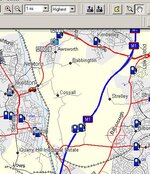
In Mapsource click on "Edit"

Select "Preferences"

Select "View" tab

Select "On" in the services drop down box

You should then see Services if you set detail to "Highest" with a map scale of 1 mile.
 

Attachments

  • ScreenShot020.jpg
    ScreenShot020.jpg
    63.4 KB · Views: 207
bigtrailbikerider said:
If it helps, but they are normally a very large sized building next to or very close to the side of the motorway. Adjacent to which is normally a very large car park with some petrol pumps sited towards the exit point.

As a rule there are normally feckin' big blue signs, again by the side of the carriageway, that inform road users well in advance when to expect to see the afore mentioned areas.

Hope this helps?

BTBR

Al, oooooohhhhh! you sarky git! Having a bad morning were you mate! :D
 
Kritou said:
...I'm surprised that there is no Services overlay for the UK motorway network or just symbols on the map itself
Well, the same information (same points of interest data) is present on the maps, whether you are working with them on your computer or on your GPSR, but the computer application that works with the maps (MapSource) does not perform exactly the same way as the GPSR software (the GPSR operating software, e.g. "2610 Software 4.30") does. This is not an oversight or a deficiency, it is because folks are generally trying to accomplish different tasks with MapSource than they are trying to accomplish with the GPSR.

The GPSR software has been optomized to allow you to easily look for a POI of a certain category that is ahead of you on an active route. The MapSource software doesn't allow you to do this (at least, not to the best of my knowledge). On the other hand - you can 'pick up' a route line on MapSource, and drag it anywhere to create an instant intermediate waypoint (a via point) - none of the GPSRs allow you to do this.

I guess you could think of the GPSR and MapSource as being different tools for working with the same data.

Judge's suggestion above seems to be a pretty well thought out idea, though - that's probably what I would do if I wanted to accomplish what you asked about.

Michael
 
Whatton said:
In Mapsource click on "Edit"

Select "Preferences"

Select "View" tab

Select "On" in the services drop down box

You should then see Services if you set detail to "Highest" with a map scale of 1 mile.

Thanks Whatton - I guess we are using a different Mapsource version as my "Preferences " has no "View" tab. Anyway I did locate the "Sevices" drop down menu and now have the data displayed - in fact your solution even tells you in which direction (northbound/southbound etc) the Services are available - drop the scale to 0.5mi and bi-directional ones are individually shown

Looking for a motorway coffee stop was just a polite way of planning a p*ss stop!


Back
Top Bottom