MRA handmade / bespoke routes - Some help and advice, please - How many points, 1.1 or 1.2, instal the track or a route?

MAR.600

Active member
UKGSer Subscriber
Joined
Jun 9, 2012
Messages
270
Reaction score
61
Location
GLASGOW
Hi
Looking for some info regarding routes on the MRA.
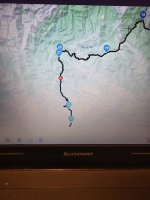
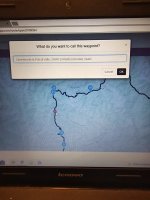
The route looks fine , how accurate is this ?
does have enough waypoints etc .
Better to transfer 1.1 or 1.2. ?
When it transfer's via garmin drive .
It transfers track and and a route .
Go to trip planner the route loads up.
Am I better to load up the track as well .
Sorry for the q''s bit of a coconut when it comes to computers and stuff lol
Will the track route appear below with the route above .
Thanks for any pointers
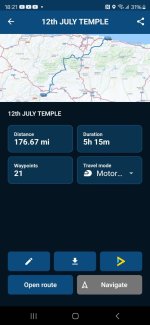
1000010502.jpg

=====

Title edited.

Richard
 
Last edited by a moderator:
1. We can’t see the route. Only your somewhat grainy / small picture. If you share it from MyRoute, we’ll all be able see it.

2. MyRoute’s advice is to place a shaping point every 5km / 3 miles. See post below on the subject. You have one roughly every 10 miles.


3. For transferring into a Garmin device, MyRoute suggests using 1.2. I now actually prefer 1.1, as it brings the warm nappy feeling of the little blue dots of the shaping points with it. This might be helpful:


4. If you load up the track, the device will convert it into a route. This is fine but you will lose all and any of the intermediate shaping points. Me, I’d use 1.1 until you know what you are doing, as it’s safest.

5. Always check what you have created, against what is imported into the device and then displayed. Do they match:

A. Shape

B. Distance

C. Time

If there is a slight variation, don’t worry too much. If there is a big variation, find out why and mend it. It is much easier to mend things now, rather than when you roll off the ferry. Trust me.
 
Last edited:
I use the 1.1 file, and then convert the track to a route.

Note - turn off your satnavs auto re-calculation otherwise it'll create its own route based on your waypoints but using its own 'thinking'.
 
Note - turn off your satnavs auto re-calculation otherwise it'll create its own route based on your waypoints but using its own 'thinking'.

The consequences of this happening are lessened considerably, if you have sufficient shaping points to force the recalculation along the roads you wanted to take, prior to the recalculation.

….. I use the 1.1 file, and then convert the track to a route.

That means you’ll probably have lost any shaping points you might have had. So, yes, any subsequent recalculation will probably then be A to B, which the device will perform according to its algorithms aided (or not) by your preference settings. The recalculated route the device then offers up might (or might not) match the route you created and intended to ride.


Recalculation and whether to have it on / off / prompted is a very personal thing. Some love it, some hate it, some understand it, some don’t, some devices play up, some don’t. It’s a whole world of topics on its own.

:beerjug:
 
Hi
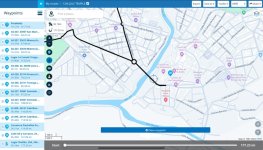
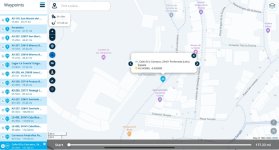
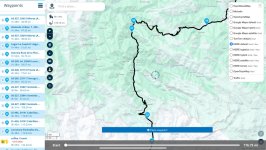
Here's the route that I have planned.
I will redo and add more points to keep me on the route as you say.
 

Attachments

Comment:

You have the Start (point 1) at the same place as point 2. I’d move point 2 to say, where the cross is and then:

1. Change it from a shaping point (tear drop) into a hand (via point) and give it a name, yiu’ll remember. I use START. That way, when you fire up your device (which one are you using?) you’ll hopefully be given that as a destination.

2. Chose it. The rest of the route should run normally thereafter, ie. You won’t need to stop and restart again.
 
Comment 2.

I haven’t checked them all but…. Some of your points are badly positioned. Remember a conversion between MyRoute and Garmin is going to take place, two very different softwares. Give the dumb device all the help it can get.

Examples:

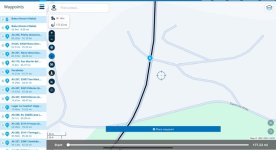
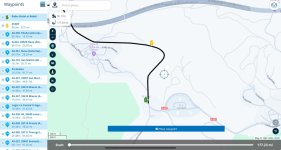
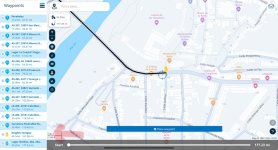
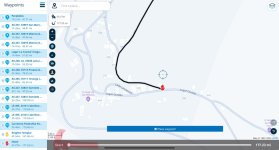
Perilously close to a junction of some sort. Move it an inch or so on the map. Either direction along the black line will do.

IMG_5621.jpeg


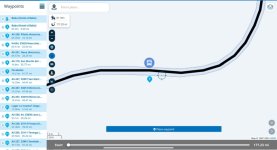
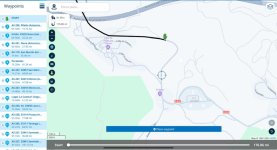
Just badly placed. In a field? Possibly heading towards some other road?


IMG_5622.jpegIMG_5623.jpeg


Zoom in on the map and tap on EACH of the points in the list in turn, dragging them as you see fit. This is particularly important if you use the ‘expand’ function.

Two minutes spent now is potentially an hour saved fiddling about in the blazing sun or pouring rain.
 
Last edited:
Comment 3.

Forgive me if this was intentional but….

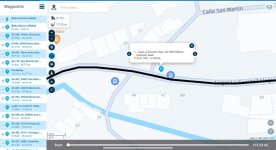
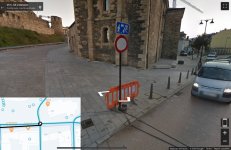
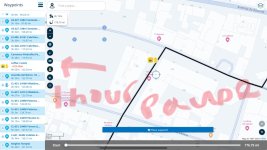
I have no idea what point 20 is doing? It appears to be up some sort of inner town unnavigable road, you having (possibly) taken the wrong turn off the roundabout, due to a badly positioned point, perhaps?.…. But if you intend just to stop at the no entry sign and see the sights, crack on :D

IMG_5625.jpeg

IMG_5624.jpeg


IMG_5626.jpeg


PS If point 20 is intentional, there is a best practice way of doing it.
 
Last edited:
Comment 3.

Forgive me if this was intentional but….

I have no idea what point 20 is doing? It appears to be up some sort of inner town unnavigable road, you having taken the wrong turn off the roundabout…. But if you intend just to stop at the no entry sign and see the sights, crack on :D

View attachment 321309

View attachment 321308


View attachment 321310
Hi
It's the templar knight's castle in Ponferrada
Thanks again for the heads up and pointers.
Much appreciated 👏
 
Hahaha, I was guessing to myself that it was, as I looked to see what was at point 20. It was just an excuse to emphasise the importance of well placed points, in case it really was just a mistake on your part.

Best precatice:

1. Bar the start, the proceeding 19 points are all shaping points. Point 20 is somewhere you definitely want to stop and for an excellent reason.

2. Change the teardrop into a hand. That way, no matter how often or how yiur device might recalculate ove the day, yiu will always end up there.

3. MyRoute has colour conventions for its points:

Green beginning.

Red end.

Blue (default) shaping points.

Yellow, for hands at ‘must stop here’ points.

It’s sometimes an idea to give the hand points a name, too.


There is no point in placing point 20 up the closed road. Drag it back.


Here are examples:

IMG_5627.jpegIMG_5628.jpegIMG_5629.jpeg


You could actually dispense with point 1 entirely, and simply start the route at point 2. Why?

A. You know where you are starting from. You do not need to tell the dumb device. It too will know where you are, just as soon as you turn it on and it picks up three satellites.

B. Some people, get very confused by the new Garmin devices and think they must start any route from the equivalent of your point 1. This sometimes causes mayhem and is (invariably) down to nothing than human operating error.

C. You know that you know want to leave the hotel via point 2. Make it easy for the very clever but incredibly stupid modern device. Dispense with point 1. Tell it to take you to what was point 2 and it will then do the rest.

In other words, just like this:

IMG_5630.jpeg
 
Last edited:
The consequences of this happening are lessened considerably, if you have sufficient shaping points to force the recalculation along the roads you wanted to take, prior to the recalculation.


That means you’ll probably have lost any shaping points you might have had. So, yes, any subsequent recalculation will probably then be A to B, which the device will perform according to its algorithms aided (or not) by your preference settings. The recalculated route the device then offers up might (or might not) match the route you created and intended to ride.


Recalculation and whether to have it on / off / prompted is a very personal thing. Some love it, some hate it, some understand it, some don’t, some devices play up, some don’t. It’s a whole world of topics on its own.

:beerjug:

i don't use shaping points- way points only. It's always calculated correctly the routes i've created without issues! When converting to a route it always asks if i want to re-calculate, to which i decline.

I set my re-calculation to prompt if i go off route.
 
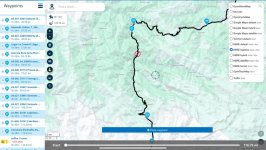
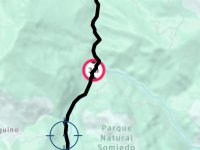
For the life of me the red dot in the route ?
Don't know what done to produce that lol
 
i don't use shaping points- way points only. It's always calculated correctly the routes i've created without issues! When converting to a route it always asks if i want to re-calculate, to which i decline.

I set my re-calculation to prompt if i go off route.

Thank you for clarifying that you use waypoints, as opposed to shaping points, as the device will bring these across into the track. Use enough of them and a recalculation should be near enough flawless, there being only so many possible ways between say, A to B to C to D to E, if each of the five points are properly spaced.

Indeed, the use of waypoints will often help immensely when recalculating, as you have told the dumb device you must go through that point, irrespective of what happens by way of recalculation before it. That being said, if the waypoint happens to be on a road that is shut, then the skip function is also handy. But that’s an entirely separate subject.

:beerjug:
 
Hi Richard
Thanks for your help and patience.
Added a few more points 👉 on the just by juctions etc

Looking good, Houston.

The names you have given them, along with any notes, may well (if you have sound to your helmet) announce themselves and / or run along on a banner on your navigation device.

Don’t forget the colours, but that is a personal thing. You can also start to have fun by adding a further clue as to what the hand is for and time pauses….

IMG_5632.jpeg

The time pauses are useful only in as much as they correct the timings for all subsequent points thereafter. You can see the day vanish :D
 
Last edited:
Hi Richard.
As requested red dot .
When transferring, is it better to load as a track and recalculate to a route ?
Or str to to planner
Thanks again
Martin
 

Attachments

  • 17150286267833926033024762216350.jpg
    17150286267833926033024762216350.jpg
    118.5 KB · Views: 9
  • 17150286438288719449162407793619.jpg
    17150286438288719449162407793619.jpg
    106.8 KB · Views: 8
🔴…..

No red dot….

IMG_5635.jpeg


Red dot…. As if by magic…..

IMG_5636.jpeg


You’ll maybe need to duck…..

IMG_5637.jpeg


You had inadvertently used HERE’s logistics map, used I guess by lorry drivers.
 
When transferring, is it better to load as a track and recalculate to a route ?
Or str to to planner
Thanks again
Martin

That is a very good question. There is no right or wrong answer, though MyRoute says that Garmin owners should use 1.2 and convert from a track. In the main though I think this advice maybe centres around people who either:

1. Simply have app generated A to B routes

2. Have insufficient shaping / waypoints in their routes, to nail it into shape.

Load both, perhaps, giving each a separate name? See which one you prefer. Likewise try 1.1 and 1.2. Everyone has their favourites, for all sorts of reasons.

Above all, enjoy your holiday. You have put in a lot of effort to plot the routes; the reward will come in riding them and seeing the sites.

PS Don’t forget that with an iPhone or similar, you can always amend a MyRoute route or create a new one when you are away. Not least, if it all goes wrong (which, touch wood it won’t) you can always ask the dumb but very clever device to…. “Take me to my hotel, please” and it will…. Just be careful about your preference settings, just in case you told it to avoid all motorways and you could really do with taking one, in order to be in time for cocoa before bed.

:beerjug:
 
Last edited:


Back
Top Bottom