MRA Planner waypoint weirdness

Orinoco

Well-known member
UKGSer Subscriber
Joined
Jun 1, 2010
Messages
2,000
Reaction score
564
Location
The Bride Valley
I'm planning a route for a short jaunt, I know the roads and don't need the Sat Nav, but bemused by this as if on a trip to somewhere I don't know it would be a pain.

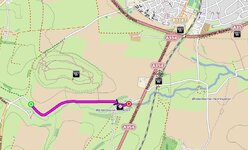
Part of the route goes south of Dorchester, but MRA refuses to use the road, works fine in OpenStreetMap, but I'm trying to make the route with HERE as will transfer to a Garmin XT. Maps showed using Here routing and maps,.

Any ideas why?
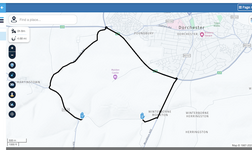


Screenshot 2025-05-02 at 07.47.45.png

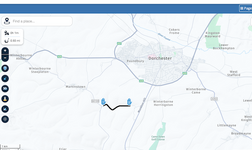
Screenshot 2025-05-02 at 07.38.22.png
 
I’ve experienced that before and one of my thoughts is that the route you want perhaps passes over a permissive path/private land rather than a public road, or another thought is that MRA for some reason thinks there is a road closure - perhaps there was a closure and it hasn’t been updated. Frustrating
 
I’ve experienced that before and one of my thoughts is that the route you want perhaps passes over a permissive path/private land rather than a public road, or another thought is that MRA for some reason thinks there is a road closure - perhaps there was a closure and it hasn’t been updated. Frustrating
My thoughts are same.

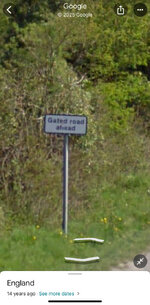
A Quick Look on Google Maps (street view) does explain why MRA is refusing to route that way

IMG_5834.jpeg
Edited to add:
As a side note.
Beware, that MRA sometimes will restrict road usage (such as mountain passes) due to seasonal closures. In order to avoid this, I found that setting the actual trip date, did prevent this from happening.
 
I’ve experienced that before and one of my thoughts is that the route you want perhaps passes over a permissive path/private land rather than a public road, or another thought is that MRA for some reason thinks there is a road closure - perhaps there was a closure and it hasn’t been updated. Frustrating
If it were a permissive issue the OSM data should show as pink dashed, but using PocketEarth (OSM data) it routes just fine

IMG_5922.jpeg,

I don’t know if MRA uses it’s own or a third party routing engine but in the latter case there is sometimes an unresolved legacy contractual issue with data
 
If you want to stay in Here maps (which is advisable if you intend to export to your XT) you can force the route along the gated road, using the off-road tool.

Or just turn off recalculate (or set it to prompted) and ride to the point, then carry on. Your XT will pick up the route again at the end.
 
I don’t know if MRA uses it’s own or a third party routing engine but in the latter case there is sometimes an unresolved legacy contractual issue with data

the screenshots are both MRA, using different mapping data that MRA subscribes to

I saw the "gated road" thing Ev has posted, then followed the route on Streetview. The gate does not seem to be in use as it covered by overgrowth and the Google car went all the way to the other end by the cricket club.

I suspect Here has the road erroneously categorised as a private road.

Seems my hypothesis is right, to get from Monkton Hill to the cricket club, my Zumo 390 wants to route me into Dorchester not along this short road. It does not recognise it with "off road" allowed.
 
I'm planning a route for a short jaunt, I know the roads and don't need the Sat Nav, but bemused by this as if on a trip to somewhere I don't know it would be a pain.

Part of the route goes south of Dorchester, but MRA refuses to use the road, works fine in OpenStreetMap, but I'm trying to make the route with HERE as will transfer to a Garmin XT. Maps showed using Here routing and maps,.

Any ideas why?
I know this track well as a mate used to live down there. It can be shut if the farmer decides to use it to move cattle and there used to be a gate at one end. It also tends to flood, it's a real one track road with no passing places (so meeting someone along it can mean a bit of a reversal as there's not even room to get a bike past in places) and although tarmac'd the road surface used to be very dodgy (didn't stop the local cricket club building a new clubhouse down there though). I've used it with care many a time with no problem but I can see why some mapping companies might avoid it especially if you've got "avoid unpaved roads" ticked.
 
My thoughts are same.

A Quick Look on Google Maps (street view) does explain why MRA is refusing to route that way

View attachment 405728
Edited to add:
As a side note.
Beware, that MRA sometimes will restrict road usage (such as mountain passes) due to seasonal closures. In order to avoid this, I found that setting the actual trip date, did prevent this from happening.

Just for info. You can also turn off the seasonal closures in the options. Its a great way of pre planning for example an Alps trip.
 
I suspect Here has the road erroneously categorised as a private road.
Another possible reason might be to stop people getting directed along the track if the A35 is closed between Winterbourne Abbas and Dorchester (usually due to an accident at the Monkey's Jump roundabout).
 
the screenshots are both MRA, using different mapping data that MRA subscribes to

I saw the "gated road" thing Ev has posted, then followed the route on Streetview. The gate does not seem to be in use as it covered by overgrowth and the Google car went all the way to the other end by the cricket club.

I suspect Here has the road erroneously categorised as a private road.

Seems my hypothesis is right, to get from Monkton Hill to the cricket club, my Zumo 390 wants to route me into Dorchester not along this short road. It does not recognise it with "off road" allowed.
It appears that MRA uses HERE Technologies for its core routing engine but is engineered to accept data from various other providers as well. So if HERE believes there is a gate that would block through traffic then it would only allow routing between, or up to, the applicable gates, as displayed on the above screenshots, regardless of the mapping data in use

I suspect there are other examples (we found this quite common in Spain) but if this were raised on the MRA forum I suspect the developers would look into it
 
I had this a while back, I changed the vehicle type from motorcycle to car and it worked perfectly.
 
Thank you all, I've used the road a lot and never noticed the heated road sign :blast I expect that's the issue, interestingly I exported this as gpx 1.1 and when on the route the Garmin worked fine, just carried on along the road with no issue, no off route notice



Back
Top Bottom