MyRoute route ( anywhere) in gpx 1.1

Deleted account 250722001

Registered user
Joined
Aug 2, 2019
Messages
1,052
Reaction score
415
Would anyone be willing to pm me with a few routes of +100kms if possible ACTUALLY RIDDEN PLEASE and recoded by the MyRoute app ?
( as against one just made in the app)
It doesn't matter where as long as it was recorded on the gound off road or on road- as you rode/drove along
Many thanks
 
Would anyone be willing to pm me with a few routes of +100kms if possible ACTUALLY RIDDEN PLEASE and recoded by the MyRoute app ?
( as against one just made in the app)
It doesn't matter where as long as it was recorded on the gound off road or on road- as you rode/drove along
Many thanks

View 'Route_Jun02_gpx' in MyRoute-app!


Sent from my iPhone using Tapatalk
 
Would anyone be willing to pm me with a few routes of +100kms if possible ACTUALLY RIDDEN PLEASE and recoded by the MyRoute app ?
( as against one just made in the app)
It doesn't matter where as long as it was recorded on the gound off road or on road- as you rode/drove along
Many thanks
Is it tracklogs recorded by the MyRoute app that you are after or routes that someone has ridden? It's not clear from your question.
 
I am reading the opening post as it’s rides that have been recorded in MyRoute’s app, whilst someone rode or drove along. In other words, they’ll be a track recording.

Assuming I am correct, here’s one of mine, which includes the detour I had to make coming up to Fruges, when the road was closed.

https://www.myrouteapp.com/en/social/track/623788?mode=share

289 miles.

I can’t work out why it says it took me 25 hours and 48 minutes. I can’t only assume that I saved the track the next day. The distance though is correct and I certainly rode it in one day.

I have several more, should the OP want some.

One question…. Why does the fellow want other bods’ track recordings?
 
Last edited:
@Treb
Just go into the library and download from there

Are you sure those are tracks (ie. recordings) as opposed to bespoke routes, created by hand?

I read the opening post as saying that the OP is looking for recordings. There again, who knows?

:beerjug:
 
Are you sure those are tracks (ie. recordings) as opposed to bespoke routes, created by hand?

I read the opening post as saying that the OP is looking for recordings. There again, who knows?

:beerjug:
I don’t know, but I would think they’ve been ridden, then uploaded 👍
 
Are you sure those are tracks (ie. recordings) as opposed to bespoke routes, created by hand?

I read the opening post as saying that the OP is looking for recordings. There again, who knows?

:beerjug:
That's what I was trying to figure out. The track recorded by MyRoute app is just a breadcrumb trail of points, distances, direction, and WGS location information. From what I've looked at the MRA tracklog only differs from those taken from a Garmin Zumo as Elevation and speed does not seem to be recorded.
 
I don’t know, but I would think they’ve been ridden, then uploaded 👍

I agree but….

If we took my original bespoke route for my journey between St Omer and Winterspelt in Germany, it wouldn’t have the deviation at Fruges, nor the journey I took through the town which was dug up. If I then put the route onto the MyRoute library, it would differ from the track recording, made when I rode the bespoke route.

Likewise, the route in the library would have all the shaping points and waypoints, used when I created the bespoke route. The track recording, would have none.

What we really need is for the OP to tell us what he wants, as I am only assuming he wants tracks recorded in the MyRoute app. It’d also be at least interesting to know why he wanted bods’ track recordings. My only guess is that he maybe wants to experiment, tyurning them into routes and seeing how the route created might differ from the track version.

:beerjug:
 
Last edited:
clarity:
I would like to see what data is actually recorded from using the myroute app as you ride along.
One assumption I am making is that the app is able ( is it?) a record as it goes along
NOT interested in routes or anything created by hand.
makes sense?
and sorry, no idea what the library is!
 
Last edited:
I am reading the opening post as it’s rides that have been recorded in MyRoute’s app, whilst someone rode or drove along. In other words, they’ll be a track recording.

Assuming I am correct, here’s one of mine, which includes the detour I had to make coming up to Fruges, when the road was closed.

https://www.myrouteapp.com/en/social/track/623788?mode=share

289 miles.

I can’t work out why it says it took me 25 hours and 48 minutes. I can’t only assume that I saved the track the next day. The distance though is correct and I certainly rode it in one day.

I have several more, should the OP want some.

One question…. Why does the fellow want other bods’ track recordings?
thanks Richard but I am not registered on myroute site, hence cannot download anything- if you can pin a file exported here or by pm that would be useful - tks
 
One assumption I am making is that the app is able ( is ir?) a record as it goes along

The MyRoute Navigation app is fully capable of recording, whilst you just ride along.

To record a track with the MyRoute app, you can:

  1. Click the red button to start tracking
  2. Click the button again to open track options
  3. Click Save to save the track
  4. Enter a name for the track
Here are some other things you can do with a track in the MyRoute app:
  • View statistics: See live statistics like distance and average speed

  • Add photos: Add photos from your gallery or take a photo directly

  • Pause or restart: Pause the track without affecting its stats

  • Change travel mode: If the track was recorded in a different mode than the app's default, you can change it

  • Add photos later: Add photos taken along the way that weren't added to the track when it was recorded

  • Save as: Save the track to your computer

  • Use as route: Use the track as a route, and name it

  • Share: Share the tracklog outside of the app

You can find your recorded tracklogs in your personal tracklog list, which is accessible from the Routelab or under your Profile. You can also create folders to organize your tracklogs.
 
Last edited:
thanks Richard but I am not registered on myroute site, hence cannot download anything- if you can pin a file exported here or by pm that would be useful - tks

If you can’t see the MyRoute track recordings, then there would seem little purpose in sending them?

You should be able to take up the free MyRoute app, upload the track recording to it and then view it.

You should then be able to see something that looks, just like this:

IMG_0307.jpeg

You can see the data it displays down the column on the left. I don’t know why it says a journey time of 25 hours 48 minutes. I can only assume that I didn’t close the app (the end time is all kaput) and only saved the track the next day. The distance etc is otherwise all spot on.
 
Last edited:
If you can’t see the MyRoute track recordings, then there would seem little purpose in sending them?

You should be able to take up the free MyRoute app, upload the track recording to it and then view it.

You should then be able to see something that looks, just like this:

View attachment 376973

You can see the data it displays down the column on the left. I don’t know why it says a journey time of 25 hours 48 minutes. I can only assume that I didn’t close the app (the end time is all kaput) and only saved the track the next day. The distance etc is otherwise all spot on.
If you send Treb the track he wants, he could easily view it in Basecamp or any other GPS app, though
 
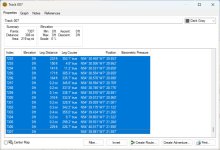
I only turned the tracklog on a couple of times when using MRA as it does not record much that I'm interested in apart from the actual track taken v's the planned route. So a line on the map.

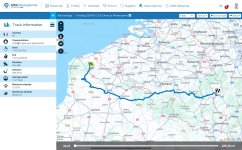
This is what MRA records

MRATRK.jpg

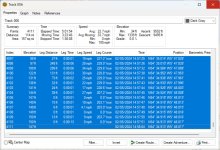
This is what Garmin Devices record.

GARTRK1.jpg

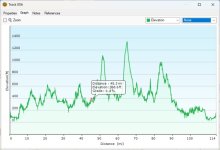
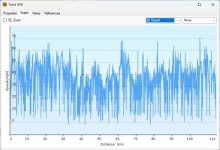
You can make speed and elevation Graphs with the collected data from Garmin devices.

GARTRK2.jpg

GARTRK3.jpg
 
Here is the track, recorded by MyRoute’s Navigation app (see posts #4 and #13) hosted on Dropbox:


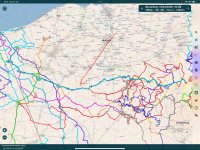
As it’s a GPX file, I have opened it in Pocket Earth Pro, where it displays perfectly. The distance is correct, though the time taken shows the same 25 hours nonsense.

It’s the bold pale blue’ish colour line, you can ignore all the others, which a just routes I have dumped into Pocket Earth.

IMG_0309.jpeg

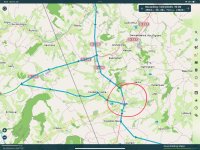
You can tell it’s a faithful recording, as it has me riding towards Fruges, before hitting the ‘Road closed’ barrier. Then me riding back (see how the black track direction reverses) to to then ride two sides of a triangle to get to Fruges:

IMG_0310.jpeg

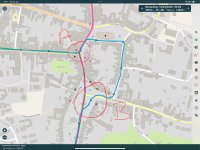
It also shows the track of me being unable to turn right in Fruges at point A, as the road in the centre of town was also dug up. We (me, two articulated lorries, umpteen cars and a farm tractor) had to fight our way through Fruges - on roads most unsuitable for anything larger than a 2CV - and exit via a car park at point B. It was chaos:

IMG_0311.jpeg
 
Last edited:
OP, what data is it that you want the recording to record?

As some sort of bonus, you can use the MyRoute Navigation app to take pictures, which will then appear on the track recording.
 
Thank you Mzook- spot on- I know what my garmins do but I was curious to see what the Myroute app would record. I appreciate your time in putting up screenshots :okay


Back
Top Bottom