The unit has never had an sd card fitted before. After splitting my original route into two parts I loaded them directly onto the sat nav ok. So I will delete the added routes as well and download the 2nd route again from myroute planner Web. Install the 32gb card (fat32) install the latest garmin map sets north and south. Test to see if I can do a simple local route plan, and then reinstall my 2nd route. Then get a thank you present for the chap!I suspect - guess - the maps (or whatever it was you loaded, presumably at home) are held on the SD card. As soon as you take the card out of the device, whatever is on the card will I assume, vanish with it.
Put the new card into your device and follow the instructions. If you want to check how to install maps to your device, Google: How do I install maps to my Garmin Navigator V?
Once Garmin has done its thing. Check that the maps are installed correctly and activated. How to do that is in this thread or ask Google: How do I check which maps are installed and active on my Garmin Navigator V?
To check again, go to say London on the Nav V’s screen and zoom in? Are all the streets there? Do the same in say, Helsinki, Rome, Paris, Berlin and Lisbon, along with any towns and villages inbetween. All there? Looking good, Houston. Then try asking the device to take you from where you are standing, to say 50 miles away. Does it work? Yes? Looking good, still. Then try to load and run one of your (possibly) rediculously long routes….. if it works, job done.
If it doesn’t work, you’ll have to amend the route(s) and find a way to send it / them to your device. Or, amend the route on the device itself.
You might well be wise to do all this, while you are at the hotel and able to use the bikerfriendly hotelier’s PC. The good news is that you apparently created your X thousand mile long routes(s) in MyRoute, which you should be able to access from the hotelier’s PC. Had you created them in BaseCamp or MapSource, you might well be stuffed, unless you saved a copy somewhere accessible.
Good luck!
View attachment 537995
Have fun!
Let us know how yiu get on, please.
PS I’d buy the hotelier a decent bottle of wine, before I left. Or, if not possible, I’d send him one from home on my return. He might well have saved your hide.


You are using an out of date browser. It may not display this or other websites correctly.
You should upgrade or use an alternative browser.
You should upgrade or use an alternative browser.
Nav 5 just messing about Help!
- Thread starter RJM123
- Start date

This is proving quite an adventure that will make a bloody good Ride Report for UKGSer….
An oldish nav device loaded with a 5,000 mile route across Europe on an out-of-date, seven year old mapset.
No up-to-date device software.
No memory card.
A brown screen event with no more inward route guidance.
No mention of a paper backup map, but at least a mobile phone by the sounds of things.
Hunting down, and sourcing a phone mount midway across Europe
A faltering bike battery.
A detour round Serbia into North Macedonia and Bulgaria, before arriving at the Black Sea.
Planning a route across a regionally and politically unstable Kosovo, probably against UK gov advice.
Wessie worrying about the whereabouts of the OPs device, while he’s finished the Muscadet and downing the Mirabeau Rose….
I’ve put Russell, the OP, on follow, and bookmarked him.
He has all the makings of an exciting fellow on these pages..
One of Russ’s organised and well-planned rides could beat the fucking pants off a random trip to Morocco or the High Andes.
An oldish nav device loaded with a 5,000 mile route across Europe on an out-of-date, seven year old mapset.
No up-to-date device software.
No memory card.
A brown screen event with no more inward route guidance.
No mention of a paper backup map, but at least a mobile phone by the sounds of things.
Hunting down, and sourcing a phone mount midway across Europe
A faltering bike battery.
A detour round Serbia into North Macedonia and Bulgaria, before arriving at the Black Sea.
Planning a route across a regionally and politically unstable Kosovo, probably against UK gov advice.
Wessie worrying about the whereabouts of the OPs device, while he’s finished the Muscadet and downing the Mirabeau Rose….
I’ve put Russell, the OP, on follow, and bookmarked him.
He has all the makings of an exciting fellow on these pages..
One of Russ’s organised and well-planned rides could beat the fucking pants off a random trip to Morocco or the High Andes.

The unit has never had an sd card fitted before. After splitting my original route into two parts I loaded them directly onto the sat nav ok. So I will delete the added routes as well and download the 2nd route again from myroute planner Web. Install the 32gb card (fat32) install the latest garmin map sets north and south. Test to see if I can do a simple local route plan, and then reinstall my 2nd route. Then get a thank you present for the chap!
Great. Thank you for clarifying that the device has never had an SD card in it. That possibly (probably) explains why you (possibly) do not have a full set of European maps installed.
From memory, when you’ve put the new decent quality, correctly formatted SD card into the device, plugged it into the PC and started the map instal, you may see a message asking if it should install the maps to the card. If you do, say yes. The installation will overwrite any maps that were there before.
If when you plug the device in, you get a message asking you if you’d like to update the device, say yes. I’d normally hesitate advising a software update when away. But, as we do not know what software version your device is running, I think it’s maybe best to pull the pin.
Your original route was several thousand miles long. You split it into two. There is a very good chance that the two routes were still too long. Break the routes into bite sized chunks. I’d suggest a route for each day, logically somewhere in the region of say, 300 miles each. Number them consecutively, for example Friday 01, Saturday 02, Sunday 03. Or just 01, 02, 03…. Delete the routes from the device, after you’ve used them.
If you don’t know exactly how far along each route you’ll go each day, it doesn’t matter. Just follow the route until it ends and then start the next one. In short, don’t overburden the device with routes so long that it cannot process them.
The Navigator V is still a very good device. If we assume that there is nothing else wrong with it (or user error isn’t taking over) it should be able to cope. If it’s then still not working, come back to us, please.
Last edited:
One or more tips, if it’s not too late.
As you are creating routes in MyRoute for use on a Garmin device, create them in Here maps, available to Gold users.
MyRoute suggests a shaping point every 5 km / 3 miles. This helps to nail the route down.
Export the routes in version 1.1.
Don’t make any route much above 300 miles in length.
In your device’s preference settings, limit the exclusions to ‘Avoid goat tracks’, ‘Avoid U-turns’ and ‘Avoid car share lanes’.
As you are creating routes in MyRoute for use on a Garmin device, create them in Here maps, available to Gold users.
MyRoute suggests a shaping point every 5 km / 3 miles. This helps to nail the route down.
Export the routes in version 1.1.
Don’t make any route much above 300 miles in length.
In your device’s preference settings, limit the exclusions to ‘Avoid goat tracks’, ‘Avoid U-turns’ and ‘Avoid car share lanes’.
Last edited:

Reminds me of settling down the ferry to Spain to create some routes on my NAV V only to discover that after the most recent map update I only had Europe North installed.
So I could plot SLovenia but SPain did not exist.
Ended up navigating with a laggy google maps on the phone, quite frustrating. Hope OP overcomes.
So I could plot SLovenia but SPain did not exist.
Ended up navigating with a laggy google maps on the phone, quite frustrating. Hope OP overcomes.
Hi guys, yes this is certainly an adventure! So sd card (32GB decent) arrived as fat32 formatted. I can see the extra drive capacity for the satnav now on the PC as two drives , original and new 32GB drive. So unit plugged in to PC but message says not enough space on computer. WTF! So good chap Gabriel (angel for sure) tried again and it's now "preparing device for map updates.. After several minutes this has now failed again with the message "not enough space on the computer! May try reformatting new sd card. Any other suggestions appreciated.
Eventually I'll add this to a proper adventure post on UKGSER but for now here is bhudludzha!

Last edited by a moderator:

thread on here about not enough PC space
it seems that Garmin Express creates a working folder on the PC for a complete download. Once the download is complete, it sends it to the Nav 5. For my last update that was nearly 8GB in size. Does your helper have enough free space on his PC for the download?
As in the thread I mention above, this can be a problem where people have created a separate C drive for programs and a D drive for Data. Garmin does not seem to like this arrangement if you read the last posts in the thread.
I have been trying to update the maps on my Nav V to the latest version. I've had it a few years and not had a problem in the past but Garmin Express throws up an error report that there is 'insufficient memory on the computer it needs 18Gb free space'. I last updated it to V 2024.10 in June 2023 with no issues.
I have set the options to 'Device and Computer' and pointed the installation on the PC to a drive with 500 Gb free plus there is a 16Gb SD card in the Nav. I've also tried a new 32Gb SD card formatted to FAT32 but still no joy.
Any pointers would be welcomed.
I have set the options to 'Device and Computer' and pointed the installation on the PC to a drive with 500 Gb free plus there is a 16Gb SD card in the Nav. I've also tried a new 32Gb SD card formatted to FAT32 but still no joy.
Any pointers would be welcomed.
- MacJ
- 16 gb insufficient memory map updates
- Replies: 13
- Forum: Computer Help
it seems that Garmin Express creates a working folder on the PC for a complete download. Once the download is complete, it sends it to the Nav 5. For my last update that was nearly 8GB in size. Does your helper have enough free space on his PC for the download?
As in the thread I mention above, this can be a problem where people have created a separate C drive for programs and a D drive for Data. Garmin does not seem to like this arrangement if you read the last posts in the thread.
Yes I think that was the issue. Somehow he's forced it to use the d drive on the PC not the c which was full with all of the other PC stuff. Apparently its downloading now, so I've just been told !
All done! Apologies for the photo being on its side. All maps installed, device is much faster loading. I've also loaded a new route across northern Greece to the ferry. Ferry to Italy on Sunday. The hotel guy has had drink problems and suffers with his mental health and is happy to talk about it. I decided on no booze and gave him my hearty thanks and a hug. I send a virtual hand shake and hug to you guys too! Let's see what tomorrow brings.....
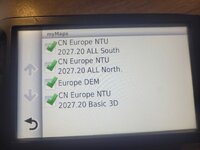
Last edited by a moderator:
It looks very much like you now have the full set of maps (north and south of Europe) and that they are both active.
Providing your preplanned routes are now of a sensible and workable length, all should be well.
PS I have straightened your picture for you.
Providing your preplanned routes are now of a sensible and workable length, all should be well.
PS I have straightened your picture for you.
If nothing else, this thread confirms the wisdom of:
A. Updating the maps and software before going away.
B. Checking that the maps have installed and are all active.
C. Not creating routes many hundreds (or more) miles long.
D. Checking that any imported routes that are installed, can be opened and can be run properly.
E. Having access to a reliable laptop or computer, if the device cannot be ‘mended’ on the hoof whilst away. This should not be necessary if stages A through D are complied with.
F. Not undertaking items A thro’ D, two minutes before you step out of your front door, nor in the queue for the ferry. Then, it might well be all too late.
G. Having a fallback position for navigation, should A through F not been complied with.

PS Knowing how to use one’s chosen navigation device / method, helps too. As does having UKGSer’s GPS section to hand 24/7.
A. Updating the maps and software before going away.
B. Checking that the maps have installed and are all active.
C. Not creating routes many hundreds (or more) miles long.
D. Checking that any imported routes that are installed, can be opened and can be run properly.
E. Having access to a reliable laptop or computer, if the device cannot be ‘mended’ on the hoof whilst away. This should not be necessary if stages A through D are complied with.
F. Not undertaking items A thro’ D, two minutes before you step out of your front door, nor in the queue for the ferry. Then, it might well be all too late.
G. Having a fallback position for navigation, should A through F not been complied with.
PS Knowing how to use one’s chosen navigation device / method, helps too. As does having UKGSer’s GPS section to hand 24/7.
Last edited:
There is certainly something to be said for not updating before going away, IF you know and are a sure the device works. That though might depend on, when the device was last updated, if at all, what maps are installed (and active) and the owner’s familiarity with the device.
Certainly, a few years ago, there was an update which prevented some devices loading European ‘South’ maps. Nutty fell foul of this, I recall. Of course he could have checked that ‘South’ was loaded and active before he waltzed out of the door, but that’s very dull.
If it was a second hand device I’d bought I’d certainly try to update it, well before departure, as Lord knows what the last ‘Little used, careful owner’ had done to it.
Certainly, a few years ago, there was an update which prevented some devices loading European ‘South’ maps. Nutty fell foul of this, I recall. Of course he could have checked that ‘South’ was loaded and active before he waltzed out of the door, but that’s very dull.
If it was a second hand device I’d bought I’d certainly try to update it, well before departure, as Lord knows what the last ‘Little used, careful owner’ had done to it.
Last edited:
What can I say? I've learnt from the experience! It is an adventure... that's for sure. In Greece now ferry to Italy tomorrow. And just to add, over and above what's been said already, I got a message on the satnav ten mins into starting this morning that my 2027.20 map set is out of date and I need to dowoad the new version!
that my 2027.20 map set is out of date and I need to dowoad the new version!
At least you now know the lifetime map updates function works. I’d just leave it alone until you come back.
