Navigator VI and Garmin Virb XE Camera

No worries, I'm glad others find this thread interesting as I feel like I'm talking to myself sometimes ha.. :)
 
No worries, I'm glad others find this thread interesting as I feel like I'm talking to myself sometimes ha.. :)

Threads like this are brilliant and keep up the great work mate. Nothing worse than a lot of threads about the same subject but this has all the info needed.
 
Threads like this are brilliant and keep up the great work mate. Nothing worse than a lot of threads about the same subject but this has all the info needed.

The next part of the plan is to add helmet audio.

I can only connect one Bluetooth Device per Virb Camera.

So Front Camera currently has the OBD2 connected to it.

So Rear Camera could have a Scala Rider Bluetooth Device with helmet audio overlay.

In theory... I should then be able to use both OBD2 data and Audio on Picture in Picture.

Question is.... if my Scala Rider headset can connect to my Virb Camera for voice overlay AND connect to my Garmin Sat Nav for nav instructions AND will the voice overlay include pillion Voice chat?

Thats a lot of connectivity....

OBD2 Device to Garmin Virb XE via Bluetooth (Telemetry Data)

Garmin Virb XE to Garmin Virb X (Wifi) Master/Slave link

Garmin Nav VI Sat Nav connected to Garmin Virb XE (Master Remote Control)

Samsung Galaxy S7 Edge Smartphone connected to both Virb XE and Virb X for remote view.

Samsung Galaxy S7 Edge smartphone connected to Garmin Nav VI for phone calls, music and data services (live traffic & live weather updates)

Garmin Nav VI sat nav connected to Scala Rider bluetooth headset for Nav Instructions, Music and Phone Call audio.

Scala Rider headset connected to Garmin Virb X camera for voice overlay on video.

Scala rider headset connected to pillion rider headset for chat communications.
 
So I think the Scala Rider headset (or whatever bluetooth headset I buy for this project has to cope with multiple bluetooth connectivity)

Rider to pillion chat
Rider to pack chat (multiple riders)
Rider to Garmin Camera voice overlay
Rider to Sat Nav for route instructions, music and phone calls.

I'd better get looking
 
Ok, time for an update.

Firstly sorry for the delay, its been a busy month.

I finally ended up getting a couple of second hand Garmin Virb camera's. One being a Virb XE and one being a Virb X.

The main reason I wanted the Virb XE and X are that they are WATERPROOF and they can be HARD WIRED TO POWER.

I ride in all weather so waterproof is mission critical.

I never remember to charge batteries, so hard wired is also critical.

I'm not bothered with 4K video quality as I don't want Terrabytes of data on my laptop.

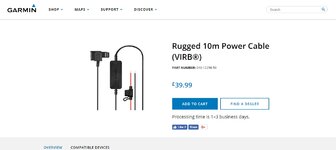
So here it is fitted and hard wired using a 10M Garmin Rugged Cable. I've connected it directly to my HEX EZCAN power controller.

What mount are you using here ?

Awesome thread
 
Right onto the next phase with the Helmet Voice Chat.

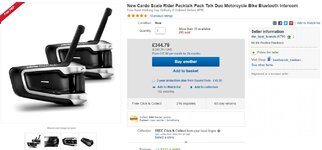
I've just ordered the latest Scala Rider PackTalk Duo headsets for myself and my partner Louise.

http://cardosystems.com/portfolio-item/scala-rider-packtalk-duo/

I'm hoping it'll be compatible with the Virb XE Camera's and it'll all work beautifully. haha, BIG fingers crossed.

It should arrive tomorrow so with a bit of tweaking I'll have it set up for the weekend and post a short video showing what it all does and doesn't do. :augie
 
What mount are you using here ?

Awesome thread

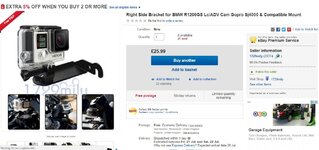
not sure which mount you are refering to... so here are the mounts I've used (all of them).

Front Camera Mount

Rear Camera Mount

Camera Power Mount to battery (Or Hex EZCAN Device as I'm using)
 

Attachments

  • Front Mount.jpg
    Front Mount.jpg
    92.5 KB · Views: 492
  • Rear Mount.jpg
    Rear Mount.jpg
    106.5 KB · Views: 458
  • Rugged Cable.jpg
    Rugged Cable.jpg
    125.4 KB · Views: 467
I tried the mount that goes on the indicator but I found it bounced a little too much.

Yeah weirdly mine doesn't bounce? Not that I've noticed anyways.

I've also activated the 'image stabiliser' on the camera as well, maybe that's made a big difference. But rear view looks great to me.

It might also be because I've hard wired the camera and routed the cables underneath the Camera Mount (Cable Tied).

So maybe the wires are helping stability of the camera itself by providing some movement resistance?
 
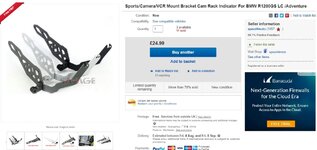
I was referring to the front mount above the headlight ?

Seen it on eBay now and ordered !

Your thread has inspired me, I only really want a front setup but I might add a rear camera as your videos look so good !

Keep the updates coming !
 
Last edited:
Memory Cards

What memory cars are you using ?

I have tired a sandisk ultra that works fine in other action cameras I have.

But in the virb on 1080p it stutters really badly, 720p seems better but still not faultless.

Any advice ?

I have ordered a Sandisk Extreme 128gb for the camera but I can always return this.
 
What memory cars are you using ?

I have tired a sandisk ultra that works fine in other action cameras I have.

But in the virb on 1080p it stutters really badly, 720p seems better but still not faultless.

Any advice ?

I have ordered a Sandisk Extreme 128gb for the camera but I can always return this.

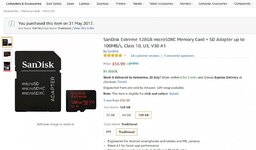
I purchased two of these off Amazon.co.uk

SanDisk Extreme 128GB microSDXC Memory Card CLASS 10 + SD Adapter up to 100MB/s, Class 10, U3, V30 A1

Model Number : SDSQXAF-128G-GN6MA
 

Attachments

  • Sandisk.jpg
    Sandisk.jpg
    65.8 KB · Views: 422
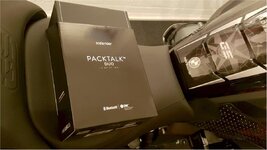
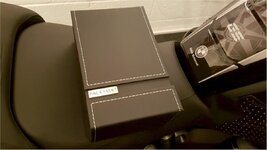
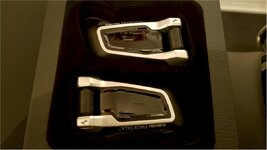
Scala Rider Packtalk Duo Bluetooth Headsets

My Scala Rider Packtalk Duo Bluetooth Headsets arrived today.

Spent a bit of time unpacking everything, doing firmware updates on both headsets, setting up the microphones in the helmets and sorting out all the connectivity on the bike. This is getting complicated :bounce1

Each Garmin Virb Camera has Bluetooth Connectivity.

You can search for Bluetooth devices and have as many as you want 'paired' with the camera. But you can only use ONE Bluetooth device at a time, per camera. So if you are connected to one Bluetooth device, when you select another Bluetooth paired device and ask it to connect..... it disconnects from one it was already connected to. So it can't connect to two devices at the same time.

So.... I've changed my plan a little bit.

I've set up the Front Camera as Virb XE. This is the Master Control Camera. I've connected my new Scala Rider Packtalk Bluetooth headset to it for voice over audio on the video footage.

I've set up the Rear Camera as Virb X. This is the Slave Controlled Camera. I've connected my OBD2 ELM 327 Bluetooth Data Device to that.

This means when I do my final video, I can select picture in picture for visuals. I can select G-Metrix data from Rear Camera. I can select Audio from front camera.

This is also ideal for any reason I don't want my Voice-Chat audio on tape, I can then select audio from rear camera (which has less wind noise, and is close to the exhaust so sounds nicer. Best of both world options.
 

Attachments

  • Scala0.jpg
    Scala0.jpg
    80.7 KB · Views: 446
  • Scala1.jpg
    Scala1.jpg
    77.5 KB · Views: 351
  • Scala2.jpg
    Scala2.jpg
    71.8 KB · Views: 350
  • Scala3.jpg
    Scala3.jpg
    68.7 KB · Views: 391
What this means now...

- Rider and Pillion can talk to each other
- Rider and Pillion can talk to other 'pack' riders in the group
- Pillion can listen to Music AND talk to the rider
- Rider can hear Sat Nav Instructions and Take phone calls (not that I want to, but occasionally a lost soul in the group needs to make contact its a life saver).

What I don't know is

?) Is all this chat picked up on video audio?
?) Are sat nav instructions picked up on video audio?
?) Is rider and pillion music picked up on video audio?
?) Because the Video audio is Bluetooth, and not hardwired, I don't know what the quality or reliability is going to be like. We shall see

When I test connected it all earlier the Scala Rider PackTalk Due headset has TWO Bluetooth Channels each headset. Which is ideal.

This means I've paired mine to Bluetooth Channel One for Sat Nav, and Bluetooth Channel Two for Garmin Virb XE Camera.

As the Headsets are automatically paired to each other, I'm assuming you can have chat, nav instructions and voice overlay onto camera footage all at the same time.

The Sat Nav Navigator VI would then control volumes for incoming calls, music, nav instructions etc.

:blast Think I've got it. Just got to test it now :augie
 
Now, when I go to my bike.

I power the bike up.

The Sat Nav Connects to my SmartPhone and downloads Live Weather Updates and Traffic News.
The Sat Nav Connects to my Garmin Virb XE Camera and behaves as a touchscreen remote control
The Sat Nav Connects to my Scala Rider Headset and provides Nav instructions and phone calls

The Garmin Virb XE Connects to the Garmin Virb X as a master unit and sends instructions automatically (record on, off etc)
The Garmin Virb XE Connects to my Scala Rider Headset for Video Audio
The Garmin Virb X Connects to the OBD2 ELM Bluetooth for on board Data Metrics

The Scala Rider Headsets Connect to each other (Pillion)
The Scala Pillion Headset connects to her Smartphone for Music

My Smartphone Connects to the Garmin Virb XE and Garmin Virb X for remote playback and live remote surveillance.

All automatically, all hardwired to the bike (except the Scala headsets), NO WIRES between rider and bike, I don't have to do anything more.... and off we go..... :D#

Sat Nav Routing, Live Traffic, Weather, Music, Phone Calls, Chat, Front and Rear View Video, Telemetry.

IF you want it. Or it can all be silent just doing it's thing in the background (which is my preference)
 
Now, when I go to my bike.

I power the bike up.

The Sat Nav Connects to my SmartPhone and downloads Live Weather Updates and Traffic News.
The Sat Nav Connects to my Garmin Virb XE Camera and behaves as a touchscreen remote control
The Sat Nav Connects to my Scala Rider Headset and provides Nav instructions and phone calls

The Garmin Virb XE Connects to the Garmin Virb X as a master unit and sends instructions automatically (record on, off etc)
The Garmin Virb XE Connects to my Scala Rider Headset for Video Audio
The Garmin Virb X Connects to the OBD2 ELM Bluetooth for on board Data Metrics

The Scala Rider Headsets Connect to each other (Pillion)
The Scala Pillion Headset connects to her Smartphone for Music

My Smartphone Connects to the Garmin Virb XE and Garmin Virb X for remote playback and live remote surveillance.

All automatically, all hardwired to the bike (except the Scala headsets), NO WIRES between rider and bike, I don't have to do anything more.... and off we go..... :D#

Sat Nav Routing, Live Traffic, Weather, Music, Phone Calls, Chat, Front and Rear View Video, Telemetry.

IF you want it. Or it can all be silent just doing it's thing in the background (which is my preference)


This sounds awesome !

I may have missed this point earlier in the thread but how long does the camera take to turn off once the ignition is switched off ?
 
I purchased two of these off Amazon.co.uk

SanDisk Extreme 128GB microSDXC Memory Card CLASS 10 + SD Adapter up to 100MB/s, Class 10, U3, V30 A1

Model Number : SDSQXAF-128G-GN6MA


Perfect these are exactly what I have coming tomorrow.
 
This sounds awesome !

I may have missed this point earlier in the thread but how long does the camera take to turn off once the ignition is switched off ?

When the bike ignition is ON the cameras are powered directly from the bike, and they both come on automatically and immediately.

When you turn the bike ignition off, my EZ CAN device remains in control of the power. So....

A) It can turn off bike power to accessories immediately. If you set it up that way

or

B) Wait for a timed period like 3 minutes before it turns off the power to the accessories.

Eventually, when the bikes power is stopped, the cameras will automatically switch over to internal battery power (as they are always fully charged because the bike is charging them when on bike power) the cameras will then be live for another 1 hour or so before they run out of internal power.

Then they'll just shut down until power is turned on again.

Its very slick and easy because its all automated. The only manual part would be to physically turn off both camera's if you don't want them running or recording while you are away from the bike. They'll just automatically turn on again when you turn ignition on next time (so you don't have to worry about reversing a 'hard' turned off state).

 
When the bike ignition is ON the cameras are powered directly from the bike, and they both come on automatically and immediately.

When you turn the bike ignition off, my EZ CAN device remains in control of the power. So....

A) It can turn off bike power to accessories immediately. If you set it up that way

or

B) Wait for a timed period like 3 minutes before it turns off the power to the accessories.

Eventually, when the bikes power is stopped, the cameras will automatically switch over to internal battery power (as they are always fully charged because the bike is charging them when on bike power) the cameras will then be live for another 1 hour or so before they run out of internal power.

Then they'll just shut down until power is turned on again.

Its very slick and easy because its all automated. The only manual part would be to physically turn off both camera's if you don't want them running or recording while you are away from the bike. They'll just automatically turn on again when you turn ignition on next time (so you don't have to worry about reversing a 'hard' turned off state).


Warlord do you know if they will operate without the battery installed so they turn off once the ezcan powers down ?


Back
Top Bottom