Navigator VI and Garmin Virb XE Camera

Warlord do you know if they will operate without the battery installed so they turn off once the ezcan powers down ?

Somewhere in the camera menu is an Auto-Off. I haven't used that part. So I would presume that once external power is shut off, it'll shut down.

I also think it's like a standby mode, where it appears to be shut down, but will still have bluetooth readiness? Don't know.

Also don't know if the camera will work at all by removing battery and just having the External Power lead attached?
 
Somewhere in the camera menu is an Auto-Off. I haven't used that part. So I would presume that once external power is shut off, it'll shut down.

I also think it's like a standby mode, where it appears to be shut down, but will still have bluetooth readiness? Don't know.

Also don't know if the camera will work at all by removing battery and just having the External Power lead attached?

Thanks I'll have to give it ago.

Do you know if I'll be able to use the obd2 tool and a garmin virb remote at the same time with my XE?

I'd like to be able to control the camera but only have nav v.
 
Thanks I'll have to give it ago.

Do you know if I'll be able to use the obd2 tool and a garmin virb remote at the same time with my XE?

I'd like to be able to control the camera but only have nav v.

Yes mine worked that way.

I had my Garmin Virb X remote controlled via BMW NAV VI screen and it was connected to OBD2 device via bluetooth. That all worked fine.

I'm therefore assuming that the Garmin Virb Remote Control device would work similarly? But it is an assumption, so I could be wrong.
 
Excellent setup Warlord, I am inspired.:thumb2 Quick Question, do you use the GPS in the Camera or switch it off and take the GPS info from the (presumably better) Nav VI's GPS?
Regarding ODB2 dongle, I'm thinking it might be worth paying more for the higher quality ODBlink LX device which has auto-power off and secure Bluetooth Pairing.

http://www.obdlink.com/lxbt/

UK prices are a bit of a rip-off mind, $50 from the US, over £100 from UK sellers!:mad:
 
Excellent setup Warlord, I am inspired.:thumb2 Quick Question, do you use the GPS in the Camera or switch it off and take the GPS info from the (presumably better) Nav VI's GPS?
Regarding ODB2 dongle, I'm thinking it might be worth paying more for the higher quality ODBlink LX device which has auto-power off and secure Bluetooth Pairing.

http://www.obdlink.com/lxbt/

UK prices are a bit of a rip-off mind, $50 from the US, over £100 from UK sellers!:mad:

For the Telemetric Data its all taken from the Garmin Virb Camera's own built in GPS data. It doesn't need or rely on the Sat Nav for anything.

The ODB2 device is a cheap one without security. However, I'm not sure if the ODBLink LX or MX would work with the Garmin Camera? I would need to test it (or some other kind soul on here test it for us and report back with their findings).

I am interested in the other ODB2 devices purely to see if they offer any more (or less) data than I can get with a cheap £11 device.
 
Warlord do you know if they will operate without the battery installed so they turn off once the ezcan powers down ?

I noted something today.

If the Garmin Cameras are on 'Record' when the bike ignition is turned off... they will continue to record on internal battery power.

If they are just in standby mode when the ignition is turned off, a screen appears on a 5 second countdown timer. In other words if you DONT intervene in the 5 seconds, the cameras will just turn off themselves.
 
I noted something today.

If the Garmin Cameras are on 'Record' when the bike ignition is turned off... they will continue to record on internal battery power.

If they are just in standby mode when the ignition is turned off, a screen appears on a 5 second countdown timer. In other words if you DONT intervene in the 5 seconds, the cameras will just turn off themselves.

Thanks for the info....

I've turned the auto off function on on my XE so I'll see what happens when it's hooked up.

My ezcan should be here next Tuesday so I'll be trying to set it all out then.

This thread is the best thing I've seen for years.... Totally inspired keep up the updates !
 
Problems with Virb X Bluetooth

Ok got some problems, maybe with the Virb X Bluetooth

I set up the Scala Rider Bluetooth Headset yesterday and went out for a ride.

The setup was

- Virb XE Front Camera was connected via Bluetooth to Scala Rider Headset for voice overlay

- Virb X Rear Camera was connected via Bluetooth to OBD2 Data Reader

However, when I got home the Virb X Rear Camera had not collected any data from the OBD2 Device. It was blank.

So I messed about with it this morning and although Garmin say the Virb X will accept OBD2 Data, and indeed the device will show the OBD2 unit on its Bluetooth Scan. And you can connect to it. It then drops the connection and won't reconnect.

This MIGHT be the location on the OBD2 device, but honestly I moved it around and in clear sight of the Virb X and it still wouldn't connect, even after several unpair, hard power off, reboot, repair, mess around from every angle. Nothing.

So I reverted back to PLAN A

- Virb XE Front Camera connected via Bluetooth to OBD2 Data Reader (for some reason this gives a stable and constant connection)

- Virb X Rear Camera connected via Bluetooth to Scala Rider Headset for video voice overlay (I'll have to test this to see if it works).
 
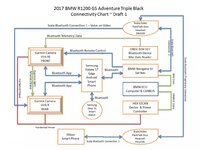
Here's a Technical Diagram showing the Connectivity and where it's connected to.

It may make more sense when your setting yours up.

NOTE: The Scala Rider Packtalk Headset only has TWO Bluetooth Device Connection channels.

This means I'm using Channel 1 for my Voice on Video and Channel 2 for my Sat Nav. That's it, no more connections allowed.

This means I can't connect my Smartphone to the Scala Headset directly once I've paired the other two devices.

Without the Scala App paired I can't easily access settings on the headset device.

So I simply set up the headset first, unpaired my phone, and then connected the other two devices.

My phone is already paired to my Sat Nav directly anyways, so incoming calls, music and such are already managed via my sat nav. So I shouldn't lose any features except the use of the Scala Phone App
 

Attachments

  • Tech diagram.jpg
    Tech diagram.jpg
    85.2 KB · Views: 258
The second and very minor issue.

I'm a bit of a gadget freak (as you can see).

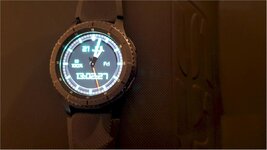
I also use a Samsung Gear S3 Smartwatch which is connected to my Samsung Smart Phone. I can take voice calls on my watch (Very nerdy James Bond). However, if I don't turn this feature OFF, it won't route calls through to my Sat Nav (in turn through to my headset).

So if you have a Smart Watch, turn off Voice Calls feature when on the bike :bow

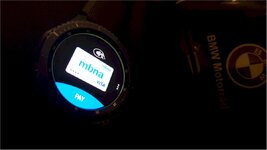
Oh... and Samsung Pay is now available on the Gear S3 Smart Watch as of yesterday. So I can now just unzip my leather sleeve and pay for Petrol on my Watch. It then immediately texts through a full receipt of the transaction so I don't even need to pick up a receipt, just zip sleeve back up, put on glove and ride off

How frickin cool is that haha

All waterproof and rugged, job done.
 

Attachments

  • Pay1.jpg
    Pay1.jpg
    44.7 KB · Views: 243
  • Pay2.jpg
    Pay2.jpg
    76 KB · Views: 258
Warlord did you trim down the 10m rugged garmin cable down ?

I've just got mine and I was thinking of shortening it.
 
Good News and Bad News

Well I've got some good news and bad news.

I'd love everything to just work, and it sort of does. But doesn't all at the same time.

Problems

I tested the new Scala Rider Packtalk Headset out the other day, connected via Bluetooth to my front Garmin Virb XE Camera (which is mounted directly to the front of my R1200 GSA).

Firstly, on video playback there is absolutely no ambient noise. It's all quiet. Only when I actually speak can you then hear anything. For some people this would be perfect maybe?

Secondly, because the Scala Headset is connected to my Garmin Camera, for some absolute unknown reason my Nav VI will freeze and stop working if I attempt to use it's media player? It just won't do it, every time just freezes.

Sat Nav instructions through to helmet speakers still work though.

So I disconnected my Scala Headset from my Garmin Camera. Which then allowed my media player to work in my helmet speakers.

It appears you can have one or the other, but not both. Music? Or Video Voiceover?
 
Scala Rider and Garmin Virb XE Voice Over

Anyways, here is a short clip of the audio quality, which I don't think is great. Not sure where the issue is here.

Is it the Scala Microphone quality? Or the Bluetooth Packet Signal quality? Or the Garmin Camera audio rendering?

Either way it isn't great.

Remember though this camera is attached directly to the bike, and I'm using a helmet mounted headset connection via Bluetooth to it for audio.

When I've had Helmet Camera's in the past, the audio is very good, and you can hear the ambient background noise. This is because the helmet camera has a hardwired microphone attached to it, not on a bluetooth connection.

So I'm wondering if you really want voice over on video. Helmet Camera is the way to go for best results.

Anyways, excuse the ramblings on the video, I'm not a trained presenter so it's just an audio test

<iframe width="560" height="315" src="https://www.youtube.com/embed/tp9Lewin1R8" frameborder="0" allowfullscreen></iframe>
 
It sounds like the Bluetooth is having to reestablish connection each time you speak hence the stuttering.Is it set to voice ativated ,see if there are alternate settings that allow continuous recording which will cut out the stuttering?
 
So I'm at a connectivity crossroads now.

Do I want Front camera with OBD2 data and Scala Headset for Music Media Player from Nav VI

or

Do I want Front camera with Video Voice Overlay and Rear camera with OBD2 data (which still has issues of its own to resolve)

or

Do I want Front camera with OBD2 data and rear camera with Voice Overlay (and no music Media Player from Nav VI in headset)

Or do I want to just give up and go home :augie
 
It sounds like the Bluetooth is having to reestablish connection each time you speak hence the stuttering.Is it set to voice ativated ,see if there are alternate settings that allow continuous recording which will cut out the stuttering?

Yeah it is on voice activation which is doing my head in. Every time I try and chat to my mates (when they are alongside) it activates a menu or radio or something unwanted. So I might need to turn that off.
 
I've been reading this thread with great interest, until this week I've been a GoPro user for years and really like them but when I bought my LC with nav6 I thought I would try a virb elite I am yet to purchase one but it will happen now I've sold my GoPro. All I want to do is control it with the nav but looking at this you can do a lot more.


Back
Top Bottom