Norton Anti-Virus

nick

Registered user
Joined
Aug 27, 2004
Messages
739
Reaction score
0
Location
SE London, England
Our home PC picked up some virus recently - lots of unwanted Ads etc..

Manually running Norton Anti Virus says the system is clean too, but I cannot get Norton to run all the tme now !

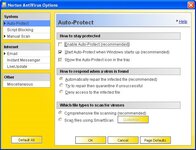
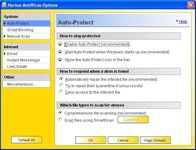
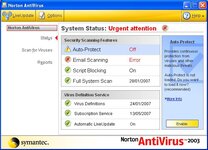
The status screen shows Auto Protect is OFF. I switch it ON in Options, save the new settings, but it is still OFF, even after a re-boot.

Running a scan manually says the PC is OK, but I don't want to leave it like this.

Any ideas ?
 

Attachments

  • Image1.jpg
    Image1.jpg
    70.7 KB · Views: 186
  • Image2.jpg
    Image2.jpg
    75.7 KB · Views: 185
  • Image3.jpg
    Image3.jpg
    75.9 KB · Views: 183
Best advice.... Get Rid!!!!

Best advice i can give you is to get rid of Norton!!!

It places massive strain on your pc system and has a significant impact on the speed of your machine....

As with previous thread if you go to http://www.free.grisoft.com you can download a genuinely free anti-virus program that scores 100% on the AV Bulletin tests each month, updates itself over the net daily and places very little strain on the system!

It's a no brainer....

Usual caveat applies, I have no links to company etc, just a very happy longterm customer.

Good luck!!
 
Seriously seriously "non expert" answer....

Exactly the same thing happened to my PC. I simply ran "System restore" from a restore date,that was just before everything went t**s up.
Everything then worked fine.........Obviously back up your most recent work, before you do it......:)

Question for the experts...........This solution worked for me, any reason why I shouldn't have done it?.....:nenau
 
Same as Swebb,
Don'tdo a system restore because some adware and spyware can be restored as well. Before you do anything run one of the free online virus scans, Panda or Trend. And then install AVG free version. Once your happy the machine is clean set a new restore point.
 
Advice taken - Norton removed (even though I still have an active subscription).

It seems the registry was stuffed and I could not repair it without re-installing - problem was that it was pre-installed on the PC and I don't have a CD and could not find a download anywhere.

Taking the advice offered, I installed AVG. Looks good. Found 4 Trojan Horses that Norton did not.

I also installed their Anti-Spyware software - this found several Malware and Adware applications, and more than 700 tracking cookies !

PC is now clean and running well. :thumb
 
Advice taken - Norton removed (even though I still have an active subscription).

It seems the registry was stuffed and I could not repair it without re-installing - problem was that it was pre-installed on the PC and I don't have a CD and could not find a download anywhere.

Taking the advice offered, I installed AVG. Looks good. Found 4 Trojan Horses that Norton did not.

I also installed their Anti-Spyware software - this found several Malware and Adware applications, and more than 700 tracking cookies !

PC is now clean and running well. :thumb

Nick don't be too worried about 'cookies' every website you visit leaves a cookie, if your running IE7 to get rid of them go into control panel -internet options- in the browsing history
section press delete and a list of choices of what to delete will appear as a matter of course just delete the temp. internet files and cookies.

Whilst your at it go into the settings (under the browsing history) and reduce the amount of disc space windows uses to store the temporary files from the default setting which is over a Gig. to around about 100 Mb it will not affect your browsing and will clear some disc space for you.
If there is more than one user account take the same action for each account, 4 user accounts means that 4Gig of disc space is set aside for temp. internet files.

Dick
 
I don't like cookies !!

At work I use a package called "IE Privacy Keeper" - this allows me to control the cookies I keep (UKGSER for example) and purge the rest along with ALL temporary files and history everytime I exit IE. Keeps my work PC nice and clean.

At home I leave the PC to the kids, probably a mistake as they get in a real mess which I then have to fix !


Back
Top Bottom