Odd routing on XT

Keith Chapman

Well-known member
UKGSer Subscriber
Joined
May 3, 2002
Messages
4,358
Reaction score
132
Location
North Hertfordshire
I created a circular route via MRA starting and ending near my home. loaded to XT using Drive. All looked good, map showing the whole route. But on starting the route it just went to nearest roundabout to the end point and brought me to the finish. Tried using the converted track, same issue. tried using different start point rather than closest point all the same. up to roundabout and back. I can see nothing amiss when looking at MRA, plenty of points every 3 miles or so. no points off the road.

I restarted the route a few miles down the road and all was well. but back home starting close to both beginning and end points it all goes screwy.

Any ideas?
 
I created a circular route via MRA starting and ending near my home. loaded to XT using Drive. All looked good, map showing the whole route. But on starting the route it just went to nearest roundabout to the end point and brought me to the finish. Tried using the converted track, same issue. tried using different start point rather than closest point all the same. up to roundabout and back. I can see nothing amiss when looking at MRA, plenty of points every 3 miles or so. no points off the road.

I restarted the route a few miles down the road and all was well. but back home starting close to both beginning and end points it all goes screwy.

Any ideas?

On your configured route, is the end point past the start point? EG, on the map it goes; way point 1, way point 2, end point
 
If you create an out and back or circular route in MRA (or basecamp for that matter) put at least one Waypoint/Via point (Hand MRA, announced Flag Basecamp) at the farthest extent of the circular/out and back route. If you don't and recalculation is switched on, on the XT, then if the "return" road shaping points are closer than the "Outward" shaping points on the "Circular" route the unit will take you straight back to your finish point.

If you have a Waypoint/Via point at the farthest extent of the route then the XT is compelled to navigate to/through that point (unless you manually skip it).

Its a handy feature if you have designed routes with optional excursions, as if you skip a via/waypoint (for example up and down a river valley in mountains) it can be used to cut lumps off your journey, if you have been delayed, or have bitten off more than you can chew on a day's ride.
 
If you can share the route, before you amend it, it might well help people to help you.

:beerjug:
 
Sorry Richard, fiddled about with the route a bit before posting.

Never mind.

Whilst MyRoute and modern GPS devices are more than capable of handling truly circular routes, I always do three things:

1. I end the route say a mile or two short of my start point. In other words, the route is not a complete circle.

2. I always create any route (not just circular or figure of eight routes) to start from a point a few hundred yards (or even a mile or so away) from where I’ll be standing that morning. This gives the device somewhere to aim for. The device doesn’t need to be told where you’ll be standing at the start; it’ll know with pinpoint accuracy, just as soon as you turn it on. Thereafter the route should run normally, with no additional input from myself.

3. For all routes, I label the first point ‘START’ and the end point ‘END’, these then display clearly on my modern Garmin device and on my phone, running MyRoute’s Navigation app.

That said, everyone has their own way of doing things. Mzokk places a ‘hand’ at the furthest point. I don’t. But that’s fine, what works for him, might well work for you, too.

:beerjug:
 
Thanks for the reply. I will keep playing with the XT. I am sure I have done similar routes that have worked ok. Oh, the joys of Garmin that keep navigation fun.
 
My “Home” point is round the corner from my house and I use it as a route Start point. When I start the Route it aims at the start then carries on happily.

My Finish point is always a Tesco filling station less than 1/2 a mile from my door.
Never the same as Start point.

I ran a 400 mile loop on Friday without any snags.

And I tell it not to recalculate most days. Recalc works fine when simply going from A to B, especially in unfamiliar towns. Handy when hitting a road closure diversion for example.

Adding a point during journey will Recalc the route and screw things up, like adding a fuel stop.
So stop the route. Find the fuel stop.

Then open the original route and carry on merrily - accessing the route at nearest point.


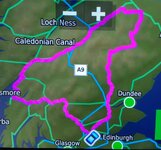
IMG_6713.jpeg
 
I have finally got round to trying another circular route, success! start and end points are not placed close to each other. Use start from X location not nearest point when initialising the route. Took me to my START point no problem. XT ran the route perfectly.

Thanks for the input in how to solve my issues. More user error than unit fault.
 
I have finally got round to trying another circular route, success! start and end points are not placed close to each other. Use start from X location not nearest point when initialising the route. Took me to my START point no problem. XT ran the route perfectly.

Thanks for the input in how to solve my issues. More user error than unit fault.

Excellent news and thanks for at least trying.

The simple method should now work reliably each time you use the device. It does for me and I’m no genius.

As an experiment, now that you’ve spaced the start and end points out, try the same route or similar and try selecting ‘Nearest entry’ point. If nothing else, you’ll find out how the device works. The great thing is, you can’t break it…. Unless you throw it at a wall!

The XT and before that the Nav VI (or its Garmin equivalent) are not as ‘plug and play’ as older devices. They do take a bit of learning, best done by USING the device, rather than keeping it in a cupboard.
 
As an experiment, now that you’ve spaced the start and end points out, try the same route or similar and try selecting ‘Nearest entry’ point. If nothing else, you’ll find out how the device works. The great thing is, you can’t break it…. Unless you throw it at a wall!
I did discover that my END point was closer than my START point and using Nearest Entry would take me straight to the END point. Hence me selecting go to my START option.
 
I did discover that my END point was closer than my START point and using Nearest Entry would take me straight to the END point. Hence me selecting go to my START option.

I thought you might find that :D

This is not necessarily a fault with the device. I can only imagine the fuss bods would make if, when hoping to go to the end point, the device routed them first around a 200 mile route the owner had created, when the end point was just a few miles away.

That said, once you get to know how the ‘Join at nearest entry point’ works and, to a degree, how the bespoke route was created in the first place, It can (and does) work very well. The same can apply to altering a route to include a deviation to a petrol station. But that’s another matter entirely. For now, great that you’ve solved one mysterious problem.

:beerjug:
 
I always use the "start point" as the first via point, and this seems to reduce the problems with strange routes. And do it a couple of miles down the road(s) you want to go along to reduce the "unusual" routes that it can produce.


Back
Top Bottom