Off-road mode ?

Arsey

I identify as a Donkey. My pronouns are He/Haw
UKGSer Subscriber
Joined
Mar 5, 2008
Messages
38,215
Reaction score
20,194
Location
Guernsey or Plessala
I’m planning a couple of routes using off-road mode to plan some of the TET routes near my place in Brittany.

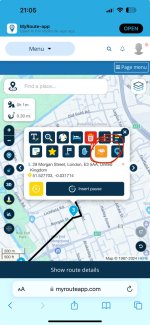
Never used off-road mode but it’s good in that you can follow tracks shown in OpenStreet Map such as highlighted below in red.

45442f987a81b746a7d9fc34b4643648.png


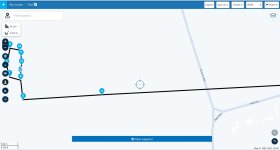
The only annoying thing is that if you add waypoints, it just straight lines between them like this

937e120fef1b38475a99d9f8c9c1f5bb.png


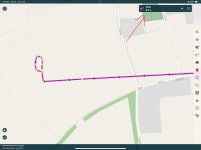
So you’d need to add many waypoints to more accurately follow a track :

b95b4a6936dcae0d29efe18de291f3c5.png


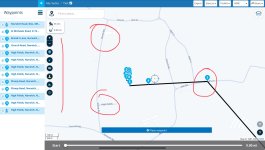
But the most annoying thing about off-road is that it doesn’t show you a distance or time for a route :

9e3d4011a96312d6da4f89b6c49baa91.png


Has anybody used it on bike and were there any other issues ?

Ta
 
That’s new! Looks a good feature.

As to time, much longer than you think!


Sent from my iPhone using Tapatalk
 
Thank you.

I think that is new.

It does indeed mean that MyRoute can now create very good ‘Off road’ routes.
 
Last edited:
If you ‘Save as’ and then import the track into something like Pocket Earth, it’ll give you the mileage.


IMG_5876.jpeg

IMG_5875.jpeg

It’s (vaguely) interesting that the off-road waypoints are named, according to the nearest proper road that the algorithm can find.

IMG_5877.jpeg
 
Last edited:
What happens if these tracks end up being just footpaths?
Spinning through and ripping up turf as you go past hikers isn't going to be popular 🤣
 
If you ‘Save as’ and then import the track into something like Pocket Earth, it’ll give you the mileage.


View attachment 334682

View attachment 334680

It’s (vaguely) interesting that the off-road waypoints are named, according to the nearest proper road that the algorithm can find.

View attachment 334683

Will have a look at Pocket Earth.

So, I made up a very short route down a track liver here that is shown on OSM map but not on Google etc.

This was the route :

547f5acfdccd09e835ce68c3545dd4cc.png

Waypoints 3 to 6 is a track .

Took the cage, natch and headed off to the track,
viewed from waypoint 3 which should be a left turn

305aeae722c9543846b1c79016ed9078.jpg


BUT it recalculates and stays on road and tries to get as near as possible to each waypoint .

f60e797a961dfb402135446d6c04728d.png


Waypoint 4 has even disappeared.

I checked settings and saw that ‘allow track navigation for routes’ wasnt selected. So I selected it but still no better.

95a5f11aed62b747db1312838d2a16d5.jpg


So , the question is how do you navigate an off-road route ? I can’t see anyway to change the default map in the app to OSM.
 
We always navigate them as tracks (never as routes with voice/arrow prompts) off-road & just follow the magenta line on the screen and sometimes at a junction in the track you have to use manual zoom
That’s on a Garmin Montana
 
I made a track with unpaved roads, and I do remember I tried this before and gave it up as it’s very tedious to click to confirm each way point - the track creation in Basecamp or memory map etc is much better. MRA will be ok for creating very short tracks only.

However. I saved it as GPX 1.1, switched back from route lab (web) to the MRA app and found the test.

I didn’t actually navigate the track but did skip through each waypoint and it worked fine. Points 9-16 are unpaved.

Note it gave me both distance and time, though the time is unrealistic.

I used the osm maps.

8594dd9945e11745e8aa64b5f24fc0c4.jpg


Sent from my iPad using Tapatalk


Back
Top Bottom