On the verge of buying a 24inch iMac

Walowiz

Well-known member
UKGSer Subscriber
Joined
Jan 31, 2005
Messages
1,177
Reaction score
1
Location
Surrey, England
And just a quick question for all you macfanboys about how easy it is to replace / upgrade components in the new iMac.

I have heard it is now only 1 screw to undo to get to the ram.
4gb ram from Crucial is cheaper than from Apple. £65 vs £120.

But the video card and HDD.
Is it easy / advisable to replace the HDD, for when 1Tb drives come down in price ?

If I want the higher spec video card - am I best to spec it at point of purchase ?
ATI Radeon HD 2600 PRO w/256MB GDDR3
NVIDIA GeForce 8800 GS w/512MB GDDR3 [+ £90.01]

And what is the view on the std keyboard mouse/keyboard versus the wireless Apple kit ? Is it worth getting the bluetooth kit.

I do think that it is a fantastic bit of kit and the software knocks all windows versions into the weeds.

thanks
Aaron
 
Had my 24 inch :eek: Aluminium iMac for almost a year now. Extremely happy with the performance (2.4Mhz) and graphics quality.

RAM upgrade is indeed 1 screw but as for other component upgrades, I'm led to believe that access to the hard drive, graphics card etc. is via the screen which has to be lifted out with special tools.

The unit itself has no screws (other than the RAM slot access) so I would guess that the above would be correct. Apparently this process should be performed in a sealed area to prevent dust getting to the inside of the screen!

That said I have found no need to upgrade, I currently run 2Gb of RAM so when I feel it's slowing down I'll pop another 2Gb in.

I just love the whole machine and it oozes quality and still has unsuspecting peeps hunting for the base unit under the desk! :thumb2
 
really happy with my 24" iMac, had it for about a year and a half now.....just beautiful to use and I recently put a little bit of evil inside the box because I'm still on Tiger (Parallels with XP)

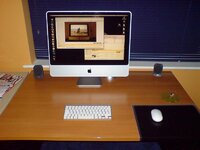
I also use the bluetooth keyboard and mouse set up which saves on USB ports and keeps the desk looking pretty

<img src="http://i230.photobucket.com/albums/ee148/biker_garfield/pc.jpg">

here's some basics on the spec, more than up to the job for what I need and am happy that in a few year's time if I need more, upgrading should be pretty straightforward.....

Processor Name: Intel Core 2 Duo
Processor Speed: 2.33 GHz
Number Of Processors: 1
Total Number Of Cores: 2
L2 Cache (per processor): 4 MB
Memory: 3 GB
Bus Speed: 667 MHz

Chipset Model: NVIDIA GeForce 7600 GT
 
Switched from the "PC" to a 20" 2.016 ghz Imac last June, must admit I hld back a bit as I was concerned about it being up to the job of handling my work requirements but not a bit of it.

Totally converted so much so that this morning I bought a 24" 2.8 for decent money new on Ebay.

Can't see it being easy to upgrade the video card or other bits but the RAM is a piece of piss and Crucial have excellent customer service and value for money.:aidan
 
had a 24" iMac for almost 12 months. superb bit of kit.

never been concerned about upgrading graphics as i don't use it for games. i am considering a 1TB Time Capsule though.

mine also has 4GB of Crucial RAM in it. in hindsight, i'd say 2GB is more than enough for most things, but it's great for the occasions i run Festa in VMware Fusion, giving them a handy 2GB each :)

bluetooth mouse is a must. keyboard seems ridiculously small at first. but i went to work on one for someone, and was so impressed i bought one on the way home :o
i think you get them cheaper if you order with the iMac. ditto MobileMe.
 

Attachments

  • desk.jpg
    desk.jpg
    54.9 KB · Views: 178
That office desktop is suspiciously too clean from clutter.

no right minded individual can possibly work like that ;)
 
Love my 20 inch mac to bits - one screw for ram upgrade no problem. I would get any vid cards you need when you buy it. Also prefer standard keyboard and mouse as wireless mouse is heavy and eats batteries and the wireless keyboard has a load of useful buttons missing
 
That office desktop is suspiciously too clean from clutter.

no right minded individual can possibly work like that ;)

desk right now :o

344433586_cct4Z-L.jpg


that old photo was used to illustrate my "no wires" policy :P

whatever happened to that? :rolleyes:
 
desk right now :o

344433586_cct4Z-L.jpg


that old photo was used to illustrate my "no wires" policy :P

whatever happened to that? :rolleyes:

What a shocking mess - shocking in that it still makes mine look tidy :D

As others have said memory is a piece of pish to install, bought the 4GB kit from Crucial. Hard drive can be extended with external drives and video is ample for my needs, no gaming just graphics based programs and its happy with that as am I.

:beerjug:
 
i can install memory in my PC without undoing any screws...same as the hard drive :nenau

Also - the 'oh so cool' mac keyboard works perfectly well on a PC :thumb

The PC case is hidden under the desk...so I don't care if its mac or PC..it works perfectly well


( but thats not to say i may not investigate macs a bit more in the future ;) )
 
i can install memory in my PC without undoing any screws...same as the hard drive :nenau

Also - the 'oh so cool' mac keyboard works perfectly well on a PC :thumb

The PC case is hidden under the desk...so I don't care if its mac or PC..it works perfectly well


( but thats not to say i may not investigate macs a bit more in the future ;) )


that's it....Geek is the new Cool......:D
 
I have a 24" iMac -- about 6 months old now.

It's huge, but it's beautiful!

Great piece of kit, and RAM is a snap to install, currently have 4GB on my machine.

For other bits you're stuck with the standard stuff, not really a good idea to do a DIY upgrade.

For extra hard drive space just get an external hard drive or 3, you can get 500GB ones for less than 100 euro each. I've got 4 of them here which i have almost full of music and videos.
 
Thanks guys

Now all I have to do is see whether it is worth buying direct from the Apple Store, or from eBay. As Apple don't do discounts, like Dell :(

Regarding the external HDD, I asume that if the drive is an ethernet based NAS (formatted to FAT32), that the iMac will see it on the network - just like a Windows PC would ?

What is the general opinion regarding what additional software to get for the Mac - as I'm guessing it is (slightly) cheaper to buy it all when I buy the iMac ?
Or is it just ok to stick with what it comes with as standard.

cheers
Aaron
 
i've had about 6 macs on the trot, and they are a pleasure to use. i would say that they have atrocious aftersales service, compared to dell for example, but on the upside, you'll probably not have to call that in. as for software, it depends what you need the computer for? i always buy at apple online, not least because if there's a chance they bring out a new computer in 2 weeks (always unannounced although macrumours is generally a good place to check), they'll swap your just bought unit into a new one...not so on fleabay.
 
Thanks guys

Regarding the external HDD, I asume that if the drive is an ethernet based NAS (formatted to FAT32), that the iMac will see it on the network - just like a Windows PC would ?

What is the general opinion regarding what additional software to get for the Mac - as I'm guessing it is (slightly) cheaper to buy it all when I buy the iMac ?
Or is it just ok to stick with what it comes with as standard.

cheers
Aaron

The beauty of Macs are they are true plug and play so it's a piece of piss adding external hard drives just connect and off you go. I have 3 external drives chained to the Imac, a 1tb, and 2 250mb drives as I've far too much crap on here and do regular backups for security purposes. Found it cheaper to buy drives from 3rd party suppliers rather than direct from Apple.

On the software front it depends on what you need it to do, as I came from a Windows Office Environment and also use the Mac for work I went for Mac Office 2004 which gives me all the functionality I need. Was going to upgrade to 2008 but have read some reviews which indicate it has a few problems so will stick with what I know works for now.
 
Direct from Apple is the cheapest AFAIK......:nenau

who does them cheaper on eBlag:nenau do you get the warranty

Saved £214 buying one through an Ebay store, had confirmation from seller that it's a UK unit new with Apple warranty and can have Apple's extended warranty added.

Seller has a history of Mac sales and excellent feedback.

Should be here today or tomorrow. :D


Back
Top Bottom