OSM Adventure Riding Maps for Garmin, Free

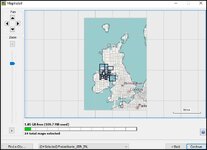
Well I got as far as downloading the map to my MacBook from early posts in this thread and now have to figure out how to view it in Base Camp and on the NAV V.

Thanks for all the effort though. I just follow the lads on our off road adventures, if I tuned up with some mapping and routes they would be blown away 🤣
 
Maybe some Apple chaps can help.
You don't need to install them per se. Use a micro sd, create a folder called Garmin and put the maps in there THEN start Basecamp. Watch the left hand side of BC as the maps need to load.
If you have more than 1, you need select the one you want from the map pull down menu.

Can't help with Nav V as I have never used one.
 
Just looked at specs of Nav5.
  • Micro-SD card slot for SDXC cards up to 64 GB
So I guess you can transfer your micro card to it.
 
Does anyone have any constructive comments / thoughts / new ideas / observations / suggestions / etc to help the O.P improve the maps for all to use? :nenau
Bump
 
Just looked at specs of Nav5.
  • Micro-SD card slot for SDXC cards up to 64 GB
So I guess you can transfer your micro card to it.
For any Garmin device if you use a >32gb you have to make sure that its formatted to Fat32. By default (in windows anyway) anything larger than 32gb gets formatted as exFat which won't be recognised by the Garmin device so if you are using a larger card make sure its formatted as Fat32 or you'll be frustrated.

Fat32 limits you to a largest file size of 4gb so any mapset that you download can't exceed this limit so the >Garmin>gmapsupp file that you make for the area you want cannot exceed the 4gb value. This is also the reason that the Garmin Zumo 660 and Nav IV with only 4gb of internal storage (1.5gb taken up by the OS) could not download the whole of europe using Garmin express when the last few NT mapsets for europe exceeded 6.5gb.

In practical terms you are unlikely to need more than 4gb even for a tour of europe as you can transfer a "corridor" of map blocks using map install that cover the roads you have planned to be on. I suspect that many on here myself included toured much of europe this way when a Garmin 2610 came with a 256mb CF card and we thought we were jolly clever when we bought 2gb CF cards which you could get most of europe on :D


1792406406397.jpg
 
New garmins like H1 and I think the XT3 now have virtually unlimited storage determined by storage media of unit and sd card. (which is nice) as sd cards are formatted as ex-fat so can handle north of 1GB!
How things have changed but the software...
 
For any Garmin device if you use a >32gb you have to make sure that its formatted to Fat32. By default (in windows anyway) anything larger than 32gb gets formatted as exFat which won't be recognised by the Garmin device so if you are using a larger card make sure its formatted as Fat32 or you'll be frustrated.

Fat32 limits you to a largest file size of 4gb so any mapset that you download can't exceed this limit so the >Garmin>gmapsupp file that you make for the area you want cannot exceed the 4gb value. This is also the reason that the Garmin Zumo 660 and Nav IV with only 4gb of internal storage (1.5gb taken up by the OS) could not download the whole of europe using Garmin express when the last few NT mapsets for europe exceeded 6.5gb.

In practical terms you are unlikely to need more than 4gb even for a tour of europe as you can transfer a "corridor" of map blocks using map install that cover the roads you have planned to be on. I suspect that many on here myself included toured much of europe this way when a Garmin 2610 came with a 256mb CF card and we thought we were jolly clever when we bought 2gb CF cards which you could get most of europe on :D


View attachment 547257
Or just make several maps of the regions that you need then you can get all of Europe on a card easily
 
New garmins like H1 and I think the XT3 now have virtually unlimited storage determined by storage media of unit and sd card. (which is nice) as sd cards are formatted as ex-fat so can handle north of 1GB!
How things have changed but the software...
My experience of garmin devices finished with the Zumo XT. I can't see anything that the garmin currently produces changing that :D
 
There is that indeed Berin.

I don't like the way garmin are now insisting users to do most things via their Explore app with their new units. I had an H1 but that brought back headaches of bygone days.
Maybe I had a friday unit...

Imagine trying to sort things out in the middle of nowhere without internet or telephone signal...

But I do like the move to using Ex-fat.
 
Yep thanks for doing this, any chance of rolling the imagery out for other devices or is it Garmin only. I make my own simple maps for OziExplorer, this must be ten times the effort and work.
@Snaf
Contact the developer for answer here
 
@Snaf
Response from developer:

All OSM maps rendered for Garmins only work on
(1) Garmin hardware.
(2) PCs in Garmin Basecamp, Open-source GPXSee, and open-source QMapShack, but only Basecamp can route.
(3) cellphones in Oruxmaps and GPXSee, but only Oruxmaps can route. My maps look quite good on my Android phone in free GPXSee. It won't route but it will follow your current location (and speed, altitude, etc) as you move around on the map.
 
Last edited:
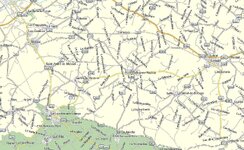
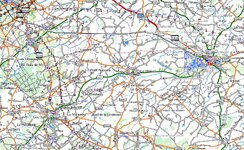
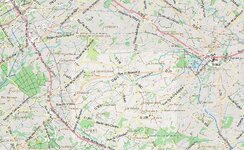
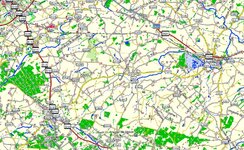
It is interesting to compare these which are for the same area in France.
Example 48.67632,-0.45793 France AdvOSM.jpg
 

Attachments

  • Example 48.67632,-0.45793 France Open Mountain Bike with 20m Contours.jpg
    Example 48.67632,-0.45793 France Open Mountain Bike with 20m Contours.jpg
    377.5 KB · Views: 17
  • Example 48.67632,-0.45793 France Garmin Topo Pro (Not Routable On Road).jpg
    Example 48.67632,-0.45793 France Garmin Topo Pro (Not Routable On Road).jpg
    438.3 KB · Views: 15
  • Example 48.67632,-0.45793 France Garmin City Navigator (Not Routable Off Road).jpg
    Example 48.67632,-0.45793 France Garmin City Navigator (Not Routable Off Road).jpg
    263.7 KB · Views: 13
  • Example 48.67632,-0.45793 France AlternativasLibres.jpg
    Example 48.67632,-0.45793 France AlternativasLibres.jpg
    384.8 KB · Views: 12
  • Example 48.67632,-0.45793 France FreizeitKarte.jpg
    Example 48.67632,-0.45793 France FreizeitKarte.jpg
    279.9 KB · Views: 14
  • Example 48.67632,-0.45793 France BBBIke.jpg
    Example 48.67632,-0.45793 France BBBIke.jpg
    373 KB · Views: 18
Last edited:
so which do you prefer and why?

Map 1

example-48-67632-0-45793-france-advosm-jpg.547798


Why? I don’t like the other maps.

It’s less fussy and closer to a traditional Michelin map.
 
Thank you- it would help the developer endlessly if you could elaborate on what you like/dislike/would like to see/whats missing and so on.
 
I don’t need or value contour lines. I like the simplicity of map 1.

When using MyRoute Routeplanner app I toggle between the Here map (quite good) and the Michelin map layer, with a toggle into the street view / satellite view layers, too.

Maps (like spreadsheets) are personal things. What makes sense to one person, might well be garbage to another.
 
Last edited:
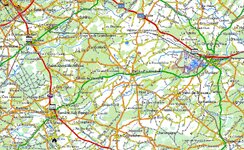
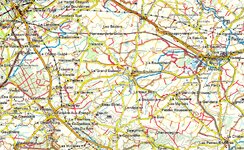
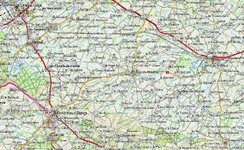
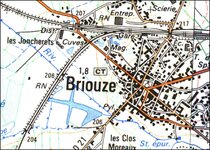
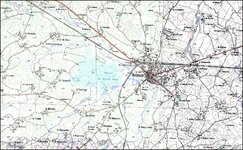
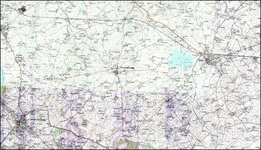
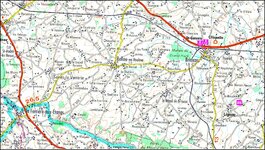
What's it like zoomed in, these are home made for Memory map. I suspect they are 20 years out of date but we're using the green lanes that don't change much.
First three are 1:25k the last one is 1:100k
Briouze 3.jpgBriouze 2.jpgBriouze 1.jpgBriouze 4.jpg
 
I agree with Wapping. Map 1 style is familiar as it's similar to Michelin. Though it doesn't include the Michelin green road border indicating scenic which I like. Map 1 seems to have forest areas which might influence the local route I'd select.

Map 2 looks usable too.
Map 3 difficult to read. Includes irrelevant details (irrelevant to me)
Map 5, 6, 7. A definite no. It's difficult to imagine the feasibility of using the back roads


PS Snaf's last example above looks familiar and clear too. Familiar as IGN's local map series.


Back
Top Bottom