Paradors Waypoints

Berin

Well-known member
UKGSer Subscriber
Joined
May 29, 2006
Messages
7,884
Reaction score
3,769
Location
South Oxfordshire
Before I embark on a manual task, does any one have the Parador waypoints as a GPX file? I'll happily accept the whole of Spain but really it's the Cantabria/Galicia/Asturias NW region I'm after
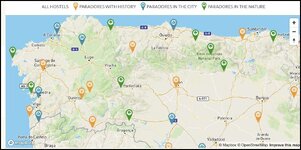

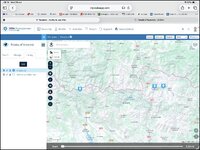
Screenshot 2026-07-28 at 17.18.25.jpg
 
  • Like
Reactions: G&T
Are they listed (GPS coded) under hotels in MyRoute or Garmin devices?

OK you’d have to do it manually, but how many do you need for your tour?
 
Are they listed (GPS coded) under hotels in MyRoute or Garmin devices?

they are certainly listed in my Garmin Zumo 390. In the Trip Planner, if I have hotel search set to a place in Spain then Parador Nacional is presented as one of 3 options as a preset along with Logis and NH Collection. If I hit that button it will list the Paradors closest to my search criteria.
Search criteria: Ainsa and it offers me the Parador in Bielsa 19 miles north, Vielha 39 miles NE and so on.

For some reason, that preset is not present on the main screen search dialogue of you are just picking a simple A to B trip, just in the trip planner utility.
 
Are they listed (GPS coded) under hotels in MyRoute or Garmin devices?

OK you’d have to do it manually, but how many do you need for your tour?
I will check. The answer as to how many, is I don’t know- it depends on which in the right area have availability. But good point. They might be listed in Basecamp.
If they are in a Garmin device I’m not sure it helps with my planning, but in MRA it wouldn’t as we have tarmac roads only this trip.
 
they are certainly listed in my Garmin Zumo 390. In the Trip Planner, if I have hotel search set to a place in Spain then Parador Nacional is presented as one of 3 options as a preset along with Logis and NH Collection. If I hit that button it will list the Paradors closest to my search criteria.
Search criteria: Ainsa and it offers me the Parador in Bielsa 19 miles north, Vielha 39 miles NE and so on.

For some reason, that preset is not present on the main screen search dialogue of you are just picking a simple A to B trip, just in the trip planner utility.
I will check that in my Zumo XT and Montana. Ideally I’d then export them, I’ll see if I can find a way to do that
 
There you go. Freshly built,
Place both files in your My Poi folder and use POI Loader to send to your satnav.
Caveat
If you already have a .gpi file in your satnav from a previous file send , it WILL erase erase and replace it.

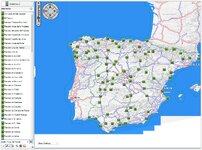
Before doing anything: rename the icon Paradors-ES-JPG.jpg TO Paradors-ES.bmp (I use Paint) (as the site does not allow bitmap files to be attached.) Don't change its size or details- each Parador will have this icon and show on your screen.

To specifically find them, I would suggest you create a folder called Spain as a sub folder to the My Poi one and place those two files in the new Spain folder there. They will be then easily be found in Favourites. See the structure I suggest in black screen shot. Doing so helps you find specific listings per country.
NB there is a MAX number of 32 folders within one main one- i.e if subfolder is called 'Spain' you can only have a max of effectively 32 databases [either in .csv or .gpx format or a mix of] with their corresponding icons- over cook it and 'puter says 'no'
As for Paradors attached - where they were listed- you will find their telephone number under 'Notes' amongst other junk which you can clean up if you are so inclined.
92 Paradors in Spain and 5 in Canarias- that should keep you in bed awhile!
 

Attachments

  • Paradors-ES.gpx
    Paradors-ES.gpx
    129.7 KB · Views: 12
  • Paradors-ES - JPG.jpg
    Paradors-ES - JPG.jpg
    1.2 KB · Views: 11
  • My POI.JPG
    My POI.JPG
    16.9 KB · Views: 13
  • Paradors-map.JPG
    Paradors-map.JPG
    256.1 KB · Views: 12
Last edited:
That’s great, thank you.

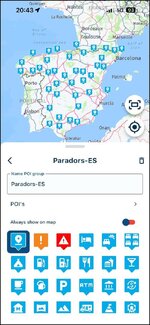
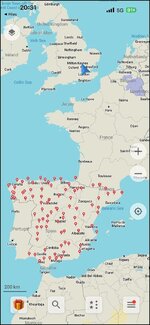
It works too!

IMG_0688.jpg

It loads straigt into one’s own POI library in MyRoute, too:

IMG_0690.jpg

PS It assumes they are all in the correct location.

:beerjug:
 
as to 'it works too!'.... ahem ....:augie

I have never downloaded a mass Points of Interest file. Whilst sat outside, I tapped around on my phone (safe in the knowledge that you can’t break anything) and Bingo! My expression of surprise was tongue in cheek.

:beerjug:

======

I have stickied the thread.

Richard
 
FWIW Richard, you don't 'just' download a 'mass points of interest file' - actually I am mistaken here- you do if it is one which has been made by someone else.
Otherwise it has to be built bespoke like this one to suit Berins' need.
 
There you go. Freshly built,
Place both files in your My Poi folder and use POI Loader to send to your satnav.
Caveat
If you already have a .gpi file in your satnav from a previous file send , it WILL erase erase and replace it.

Before doing anything: rename the icon Paradors-ES-JPG.jpg TO Paradors-ES.bmp (I use Paint) (as the site does not allow bitmap files to be attached.) Don't change its size or details- each Parador will have this icon and show on your screen.

To specifically find them, I would suggest you create a folder called Spain as a sub folder to the My Poi one and place those two files in the new Spain folder there. They will be then easily be found in Favourites. See the structure I suggest in black screen shot. Doing so helps you find specific listings per country.
NB there is a MAX number of 32 folders within one main one- i.e if subfolder is called 'Spain' you can only have a max of effectively 32 databases [either in .csv or .gpx format or a mix of] with their corresponding icons- over cook it and 'puter says 'no'
As for Paradors attached - where they were listed- you will find their telephone number under 'Notes' amongst other junk which you can clean up if you are so inclined.
92 Paradors in Spain and 5 in Canarias- that should keep you in bed awhile!
Fab! Thanks. This trip is another route around the Templar sites, this time in nw Spain so very much appreciated for both sets of poi’s
 
Thank you, again.

In MyRoute, it’s important to get the level of zooming in and out right, to get the parador Points of Interest to appear on the map. I was wondering why I couldn’t see them this morning. Now I think about it, it’s the same with the POI points that are preloaded into the MyRoute app.

IMG_0530.jpg


PS I had forgotten that, at some point, I had downloaded a mass POI file of UNESCO world heritage sites.
 
Last edited:
I have them all as waypoints on Basecamp, in my silly attempt to stay at them all. I expect I could export them as a file, but it seems someone has beaten me to it.
 
Richard i believe you downloaded my complete points of interest for unesco sites if memory serves me right


Back
Top Bottom