Pause at waypoints?

Bob Jeffries

It's good to be back ..
UKGSer Subscriber
Joined
Jan 3, 2002
Messages
1,269
Reaction score
140
Location
Griffithstown, South Wales
Is it possible to add a "pause" at a waypoint on the XT2.

I do my routes using MRA and put in "pauses" at via points, perhaps 45min for a coffee stop or 60 min for a lunch stop. When I then export that route to the XT2 using GPX1.1 all the pauses dissappear.

Is there anyway to add them manually on the XT2?
 
No idea about the XT- However, perhaps look in the XTs' settings where you may find that there is an Auto-Pause (as well as an Auto start) function in the Tracks 'Recording' option. This stops the track recording when you have set the speed you wish the recording to stop. 1.5mph or 2.5kph or less is the lowest. Maybe that would save you a job of having to plan stops in advance which with the 'best laid plans' will change on the ground. Stop whenever you want to and the satnav will pause- when you get going again, it begins recording again- well, mine does at any rate.
No evil thoughts towards MRA :green gri were entertained in the production of this post.
No idea if this is of any use to you
 
Last edited:
I don’t own an XT2 but I’ll play around with my XT to see if it’ll do it.

Just so it’s clear, I guess you are asking:

A. Create an A to C route of five hours in MyRoute.

B. At halfway, insert a lunch stop (B) for one hour, with a one hour pause.

C. Total estimated time shown in MyRoute, six hours (ie. the original 5 plus one hour of pause)

You would like the XT2 to display an estimated journey time of six hours and the lunch stop (B) to show a one hour pause.

Is that correct?

To be honest, I don’t think it is possible. But hey, let’s see.

The method I use is to display the estimated arrival time at C. Say you start at 10:00 for your five hour journey. This will show an ETA of 15:00. When you arrive at B, it will still show 15:00. When you get back onto your bike after your one hour lunch, it will show an ETA of 16:00, the one hour having been lost eating.
 
Last edited:
In the XT open the route go to the spanner (Trip options) go to the bottom (Edit Schedule) select edit Schedule and pick the waypoint you want a stopover at select the time for arrival at the the layover, How long the stop. and hit done. The stop time will be added to your trip time. You can also do it in Basecamp but you may not use it with your XT2. Sorry for jumping in Richard its a feature I use ocassionally.
 
Its a feature thats also in all of the older units so I doubt that they would have removed it.
 
I have just done it. I didn’t know you could.

Overjoyed, I rushed to post…….. I then found the posts above waiting for me :blast

Hats off to Mzokk :clap
 
Last edited:
All my hopes have been dashed 😪 I'm afraid none of the above suggestion works on the XT2 - there is no "edit schedule" option.

I can't even find a way to set a start time for a route!
 
All my hopes have been dashed 😪 I'm afraid none of the above suggestion works on the XT2 - there is no "edit schedule" option.

I can't even find a way to set a start time for a route!
I am happy to take your XT2 in part X for my XT plus let’s say £50 to enable you to be able to use this feature should you so desire. 😉😉
 
All my hopes have been dashed 😪 I'm afraid none of the above suggestion works on the XT2 - there is no "edit schedule" option.

I can't even find a way to set a start time for a route!

I don’t have an XT2. It’s hard to imagine that Garmin (besides dropping route sharing via Bluetooth) have dropped it.

Can you make sure we are all looking at the same thing, please.

Select the route you wish to set stop over times for. Here is one I created for an A to B to C test.
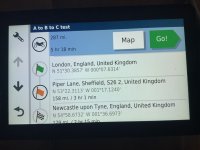
IMG_5606.jpeg


Green flag = Start

Orange flag = Midway stop over point

Chequered flag = End


Touch the spanner top left

You should see:
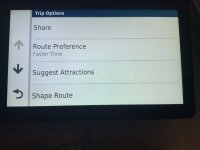
IMG_5607.jpeg


Scroll down, until you see Edit Schedule

Touch Edit Schedule

You should see:
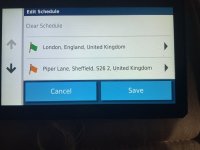
IMG_5608.jpeg

Tap on the green flag. You should see:
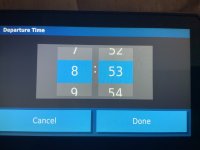
IMG_5609.jpeg

Set the departure time you’d like. I set 12:00 noon.

Touch Done.

You should now see:
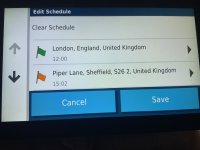
IMG_5610.jpeg

The screen now shows the green start flag as having a 12:00 noon start and the next two flags’ arrival times have been updated.

Now touch on the point you wish to create a stop over period for. In my example, there is only the midway point (B) in my A, to B to C route.

Tap on the point. You should see:
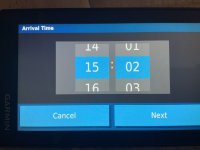
IMG_5611.jpeg

There is no reason for you to change the arrival time. So, choose Next.

Set the stop-over period. I chose five hours, just to be extreme.

Touch Done.

You should now see:
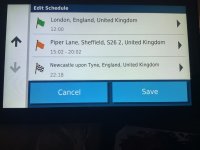
IMG_5612.jpeg


As you can see in the picture above:

The start is now at noon.

The estimated arrival time at B is 15:02

The stop over time at B is five hours, departing at 20:02

The estimated arrival time at the end is 22:18

Touch Save

Next time you summon up the route you should see:
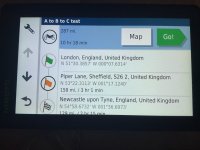
IMG_5613.jpeg


The same 287 mile distance as you started with. That should not have altered at all.

An estimated journey time of 10 hours 18 minutes, not the five hours, 18 minutes that you started with. The extra five hours having been allocated to point B’s stop over.


Hopefully, the XT2 can do all this? Unless Garmin have altered something either by deleting the ability to change things (possibly moving it to an app) or altering the screens you see.


If nothing else, I hope it’s useful for someone!


PS

I then shut down my XT and fired it up again, just to make sure it had saved all the changes. It had.

I then tested it by starting to run the route, starting now. It showed an estimated journey time of five hours longer, which is correct.

All seems to work.


PPS

I am pretty sure you used to be able set the departure date for the route. But that seems to have vanished?

 
Last edited:
PPS

I am pretty sure you used to be able set the departure date for the route. But that seems to have vanished?
You are Correct. 340-90 series Garmins and 5XX series. These are screen shots of my 390. Useful little feature for multi day tours.

79692[1].jpg

And in the Routes list.

74305[1].jpg

There is some oddness in ordering Routes for the XT as well, for which I will start a thread in appropriate section
 
Sorry for taking so long to respond, I've been away from home without my XT2.

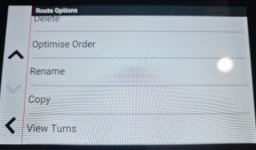
As far as I can determine the route start time and any other time related info has disappeared from the XT2!

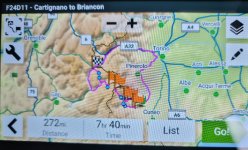
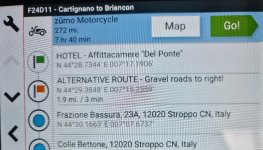
From one of my upcoming routes -

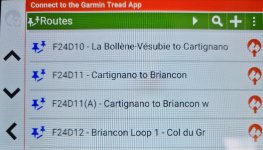
The list of routes exported from MRA (I dont use the tread app)

20240506_141452.jpg
 
Thank you for the update and screen shots.

Uuuuum, that is indeed different from the XT and earlier devices.

It’s an odd thing to drop. But there again, Garmin have got good at dropping useful things, in exchange for including such junk as lean angles, whether it’s raining and how often you use main beam. The latter, I confess to making up. Insert, applied brakes, instead.

If you get a response from Garmin, let us know, please.
 
Thats a shame. I didn't use the option often except on days when there was a ferry to catch and I wanted to ensure that the route mileage and stops were reasonable to ensure said ferry wasn't missed :D
 
Both Treads and XT2 route planner , do not have ability to add timings (starts or delays) in routes created .
Basecamp is not supported but nevertheless will export to XT2 ( if you have enough time faffing during file transfer mode waits ). I haven’t tried a timed route from Basecamp
 
Last edited:
I’ve heard Gary France , Tour 1, say that he regularly creates many timed spots and say that he needs to or his rides get out of control .
For him it’ll be a missing feature
For me not necessary


Back
Top Bottom