Peed off - Garmin 660 & Basecamp

itspilsbury

Registered user
Joined
Apr 18, 2009
Messages
342
Reaction score
0
Location
Ashbourne, Derbyshire
Hi,

I know its probably mentioned on here somewhere but I am tripping my hair out !

For some reason today when I create a route in Basecamp on my iMac and send it to the 660 the mileage is much different, instead of 170 its 525. I have the latest 2016 maps on the computer and on the device. I do notice that when I go into the 660 settings and press Map info it shows both as 2016.2 and thats what I have on the MAC. When I connect the 660, once it has connected on the top left column it shows the device andd 2014. something, it shows the micro sd card as 2016.2.
Help !
It normally works fine!
I have rung Garmin twice and on their advice uninstalled Basecamp and re downloaded it reinstalled it. Now I have reset the 660 and still it don't work, now Im reinstalling the 2016 maps onto my device.
Help
 
it's a minefield... is Basecamp using the same version of maps as the 660.

Aside of that i would recommend MotoGoLoco for route planning, maps are better uploading to sat Nav is easier, sharing routes is easier - i have basecamp on a Mac - it's awful...

http://www.motogoloco.com
 
+1 for motogoloco far far easier than basecamp plus there is some good route suggestions on there as well
 
By any chance have you got the settings in basecamp different to your 660, as in avoid motorways and Tolls and such like, although i doubt it would make a difference of 350 mile , also check road closures as well, with reference to your maps if you go into tools, settings on the 660 and view map then map info, ensure just the NT 2016.20 and if its there the NT 2016.20 3d are ticked and no other.
 
Peed off with BaseCamp? Why? From what you tell us, BaseCamp is plotting your route and calculating its 170 mile distance accurately.

The problem you are encountering is with the device - or more accurately the device's displaying / calculation of the route - not with BaseCamp itself, apparently.

Start with the really simple things first:

1. Does the route 525 mile route displayed on your device look anything like the 170 mile route displayed on your PC?

2. Are the maps on your computer the same as those on your device? Apparently, yes.

3. Are the maps on your device installed correctly?

4. What default settings have you asked your device to hold by default? For instance, have you set your device to always avoid motorways or to always take 'Twisty roads', when calculating a route?

5. Do the default settings on your PC match those on your device?

6. If you import the 525 mile route from your device into your PC and display / compare it against the 170 mile route, what differs between the two?

Lastly, how did you plot your route on your PC in the first place? Did you ask it to take you from A to B? In other words, do you have just a start and end point, with no shaping or waypoints in between?
 
Hi everyone, thanks for your help. Been onto Garmin again and they don't know had to email them various things. What I have found works, although very laborious is that if I create on basecamp say 30 actual waypoints along my route, send them to the 660, then manually create a new route in the 660 using all those waypoints it calculates and does the route. as I say bloody laborious, can't image doing long continental routes. but it has worked for my 170 mile route exactly.
 
Peed off with BaseCamp? Why? From what you tell us, BaseCamp is plotting your route and calculating its 170 mile distance accurately.

The problem you are encountering is with the device - or more accurately the device's displaying / calculation of the route - not with BaseCamp itself, apparently.

Start with the really simple things first:

1. Does the route 525 mile route displayed on your device look anything like the 170 mile route displayed on your PC?

2. Are the maps on your computer the same as those on your device? Apparently, yes.

3. Are the maps on your device installed correctly?

4. What default settings have you asked your device to hold by default? For instance, have you set your device to always avoid motorways or to always take 'Twisty roads', when calculating a route?

5. Do the default settings on your PC match those on your device?

6. If you import the 525 mile route from your device into your PC and display / compare it against the 170 mile route, what differs between the two?

Lastly, how did you plot your route on your PC in the first place? Did you ask it to take you from A to B? In other words, do you have just a start and end point, with no shaping or waypoints in between?

The route was similar but lots of lines as if it was using the wrong map, I reinstalled the map on my device last night to double check. setting are the same on the mac as on the device, if I import the route its allover the place. I normally use 2 or 3 waypoints and then grab the route and move it to where I want it creating shaping points so that I can go on what country roads etc I want. As I said in my last post, I have just tried it a long hand way by creating lots of 'Waypoints' sending them to the device and manually creating a route with them, the route then is good as per what I wanted, but takes ages.
 
Can you post the 170 mile route here as an attachment, please.

We can then run it through a 660 or some other Garmin device to see what happens.

Clearly your 660 is altering the route, greatly increasing its mileage. Lots of lines generally means the device cannot match the route to any roads that it knows of ie. it's often a mapping problem. The reasons why? Who knows.
 
It's a bit of a coincidence that 3 times 170 is almost 525. I don't suppose you have inadvertently inserted your starting point again just prior to your destination after shaping the route - a quick look at the route properties might be worthwhile
 
It's a bit of a coincidence that 3 times 170 is almost 525. I don't suppose you have inadvertently inserted your starting point again just prior to your destination after shaping the route - a quick look at the route properties might be worthwhile
Some smart people on these forums!
 
file attached

Thanks Wapping I have attached it. Ian

Oops I can't its slightly too big, its telling me.

Do you want to PM me your email address and I will email it.

Ian

Tried it as a GDB file and that is a few kb too big also.
 
start point is the same as finish point, but the route looks different on the device.

A circular route, now we are getting somewhere.

Your 660 is struggling to recreate it. Later devices can manage much better. Try plotting it out a little differently on your PC, leaving say a quarter mile gap between the start and end points of your circle. Then send it to your device and see what happens.
 
I know you have already said you have checked but it realy does sound like the settings and avoidances are not matched up on device and Mac

The maps should not have changed the roads to the extent you are experiencing but worth another check all the same

I would suggest ( if you have not done already) deleting the route from device and mac and starting again ( rather than just altering bits) and report back
Can you upload to drop box and i could have a shufty

Have a look at this it may or may not help http://www.ukgser.com/forums/showthread.php/396216-Basecamp-and-Nav-5-My-way
 
Hi Redrick, Yes already tried that and even went through the settings of both with Garmin on the phone. If you PM me your email address I can email you screenshots and the GPX file.
 
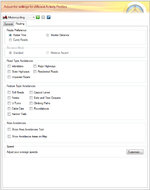
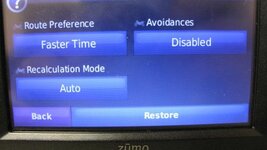
your settings should be set as below pics, for base camp and 660, this should give you a like for like transfer, you do not say how garmin advised you to set these, i am using a pc not a mac so the settings image of base camp may not be identical.
 

Attachments

  • 16-03-2016 18-23-40.jpg
    16-03-2016 18-23-40.jpg
    104.3 KB · Views: 121
  • IMG_9232.jpg
    IMG_9232.jpg
    27.5 KB · Views: 117


Back
Top Bottom