Peed off - Garmin 660 & Basecamp

I have now received the route from Ian and have fired it up on my Mac, using BaseCamp with 2016.2 maps installed.

It is 170 miles, completely circular, starting and finishing at his house's front door. To add bit of spice, it is a figure of 8 with two little branches off to cafes.

The route is created from shaping points (won't alert) whilst the cafe stops are created as waypoints, ie. alerted as points you must go through. There doesn't seem to be any obvious glitches in it.

Simple enough on the face of it but enough in it to possibly cause some confusion. From experience, I know that some Garmin devices can struggle with fully circular and / or figure of 8 routes. The batteries on my Nav V's are flat, so I'll have to wait whilst they get some charge in them before transferring the route over to a GPS device.

Richard
 
Battery charged.

I've imported the route into a Nav V, also running 2016.2 maps.

The route displayed on the device is 170 miles, this is the same as the original version on my Mac and matches the route Ian sent to me.

The three 'must do' waypoints are all displayed properly

All the 'do not announce' shaping points are displayed properly

Conclusions:

1. There is nothing wrong with Ian's use of BaseCamp, nor with the software itself

2. There is nothing wrong with the way BaseCamp has transferred the route to my Nav V GPS device

3. My Nav V, whose settings match those on my Mac and are turned off, guaranteeing as far as is possible that the device will not alter any route I send it on import, will run the route correctly in simulation.

4. This means that the glitches that Ian is encountering can only be occurring within his 660 itself

5. We can guess that the possible causes are:

A. The circular / figure of eight nature of the route married to 'must do' waypoints is perhaps beyond the device's capabilities

B. The maps are not properly installed or activated on Ian's device

C. The device has some differences in its preference settings, triggering a significant recalculation on import

D. The device has some other fault, leading to significant recalculation....


Ian can maybe find out out the answer to D by creating a route from A to B of say 200 miles, where A and B are completely separate (ie the route is not circular) and with no figure of eight in it. Create it without any 'must do' waypoints. Then see what happens. If it's perfect on the device, great, we'll know the 660 works. If it doesn't I'd suggest starting at the maps and preferences settings.

If this simple 200 mile A to B route displays and calculates properly on the device, he can then throw in some deliberate alterations, for example making it circular, making it figure of eight, adding in 'must do' waypoints. I would do this in stages, seeing at what point the 660 could not cope.

Report back, please.

Richard

PS The Nav V is a generation above the 660, capable of running fully circular routes and other complications, like figures of eight. If someone would like to help Ian by running his route through a 660 (you can't break it) to see what happens, it would be handy. Do though turn your route preferences off, or you might be tampering with Ian's route, moulding it to YOUR preferences.
 
I think this investigation is going to need sandwiches ......
 
Battery charged.

I've imported the route into a Nav V, also running 2016.2 maps.

The route displayed on the device is 170 miles, this is the same as the original version on my Mac and matches the route Ian sent to me.

The three 'must do' waypoints are all displayed properly

All the 'do not announce' shaping points are displayed properly

Conclusions:

1. There is nothing wrong with Ian's use of BaseCamp, nor with the software itself

2. There is nothing wrong with the way BaseCamp has transferred the route to my Nav V GPS device

3. My Nav V, whose settings match those on my Mac and are turned off, guaranteeing as far as is possible that the device will not alter any route I send it on import, will run the route correctly in simulation.

4. This means that the glitches that Ian is encountering can only be occurring within his 660 itself

5. We can guess that the possible causes are:

A. The circular / figure of eight nature of the route married to 'must do' waypoints is perhaps beyond the device's capabilities

B. The maps are not properly installed or activated on Ian's device

C. The device has some differences in its preference settings, triggering a significant recalculation on import

D. The device has some other fault, leading to significant recalculation....


Ian can maybe find out out the answer to D by creating a route from A to B of say 200 miles, where A and B are completely separate (ie the route is not circular) and with no figure of eight in it. Create it without any 'must do' waypoints. Then see what happens. If it's perfect on the device, great, we'll know the 660 works. If it doesn't I'd suggest starting at the maps and preferences settings.

If this simple 200 mile A to B route displays and calculates properly on the device, he can then throw in some deliberate alterations, for example making it circular, making it figure of eight, adding in 'must do' waypoints. I would do this in stages, seeing at what point the 660 could not cope.

Report back, please.

Richard

PS The Nav V is a generation above the 660, capable of running fully circular routes and other complications, like figures of eight. If someone would like to help Ian by running his route through a 660 (you can't break it) to see what happens, it would be handy. Do though turn your route preferences off, or you might be tampering with Ian's route, moulding it to YOUR preferences.
Richard

I believe the issue lays within the unit itself somewhere

I also had the route e mailed to me and did as you did but without loading it to my Nav 5 which was at home on the bike.

I took the liberty of recreating the route myself or a very close aproximation of it and e mailed that to the OP along with the settings i used in its creation so he could replicate them, whilst it showed up shorter than his version it was still way out of bed

I'm stumped
 
I agree, logically in the device itself is the only place for the huge miscalculation to happen.
 
Could the op post up a screen shot of your settings in basecamp and also the settings on the 660. this may help to diagnose the issue.
 
Hi, just had a reply from Garmin themselves:

Thank you for contacting Garmin Europe.

I am very sorry about this issue.

Looking into this further I am afraid we limited on any further assistance we can offer as the zumo 660 is not compatible to routing in Basecamp.

I can only apologise if conflicting information has been given in a previous contact.

Shit! What they are saying is that Basecamp no longer supports routing for the 660, thats great !

I will have a go at what Wapping has suggested later, I have done two other routes yesterday but they were also circular and there were issues. I will report back when done. If it doesnt work I assume I am going to end up having to use something like 'Tyre' if that still exists and works or Mapsource on my old laptop if I can find mapource to install. Is this somehing they do on purpose to make you consider updating your gps with a newer model.
Ian
 
My settings are as per your image that you posted lee, just faster time and nil avoidences in both basecamp and on the device.


Thank you for that, Wapping is sending me your route via email at some point tonight so i can have a gander at it. with ref to what garmin have said i can only say that i and more than likely most others on this forum do not have any issue with routing using basecamp or mapsource with the zumo 660 at this point, what they do with basecamp in the future i can not say, but using the latest version as of now there are no problems. infact i have only today used it to plot a route from potes in spain to santiago de compostela using waypoints and shaping points with no problems.
 
Richard,

I have tried a simple A-B route just 281 miles 5hrs 35mins no route points or waypoints, when sent to device it was similar, slightly different route, 292 miles 4hrs 35mins, did a few shaping points, not many, 429 miles, 8hrs 22mins, on device 466 miles 7hrs 12 mins, routes similar but obviously a bit different. Ian
 
Just for info the Basecamp version I am using is 4.6.2

I have just read on another forum whereby Garmin are saying that Basecamp doesn't support the 660 or 665 and has has issues with routing. They are saying Garmin have told them to go back to using the older unsupported Mapsource software (which doesn't run on MAC of course). If this is the case in the end its crap ! I suppose if all else fails I would have to do what a mate of mine does and he simply creates waypoints that he send to the device and just clicks GOTO the waypoint and when he's there to the next one that way he gets to the passes or Cols that he wants to ride on. I always liked to plan my route meticulously before going away, it was all part of the excitement of the trip.
 
Just for info the Basecamp version I am using is 4.6.2

I have just read on another forum whereby Garmin are saying that Basecamp doesn't support the 660 or 665 and has has issues with routing. They are saying Garmin have told them to go back to using the older unsupported Mapsource software (which doesn't run on MAC of course). If this is the case in the end its crap ! I suppose if all else fails I would have to do what a mate of mine does and he simply creates waypoints that he send to the device and just clicks GOTO the waypoint and when he's there to the next one that way he gets to the passes or Cols that he wants to ride on. I always liked to plan my route meticulously before going away, it was all part of the excitement of the trip.

itspilsbury that is the version of basecamp that i have, but on browsing the garmin forum i did find this quote from Garmin themselves.

The following devices are NOT compatible with routing in BaseCamp:

zumo 400 series
zumo 500 and 550
zumo 660 and 665

These devices may appear to take a route without issue; however, when navigating the route, an error message may appear. An alternate program to use is MapSource. First, download the map to your computer, then use MapSource to create and transfer routes to your zumo.

I dont understand this quote as i know it does work.
 
Here's the route in question, hosted on DropBox.

https://www.dropbox.com/s/8ltijkecli0pkvd/Shropshire Rideout.GPX?dl=0

I sent it from my Mac, which sometimes alters the file extension to .txt

If it is, delete the .txt extension and all should be well.

Like leedude03, I am not sure why BaseCamp does not support 660's. Why can't owners save and export the file as a .gpx which should be readable in any suitable device? What i think Garmin might be saying is that they no longer support questions relating to the 660, perhaps?
 
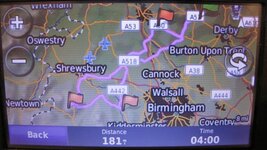
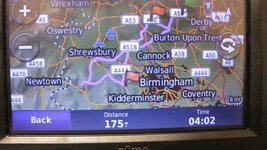
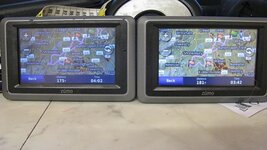
Ok have had a look at itspilbury's route, nothing wrong with the actual route as others have said. transfer it to a zumo 660 without letting the unit recalculate the route, i end up with the route near perfect but with a difference of 11 miles. orig route is 170 transfered route 181, i then let the zumo do its import and recalculate and it then leaves me with a route distance of 175 miles and pretty much spot on. I then import the two routes out of the zumo and compare them to the orig route and find a couple of very minor differences between the three routes and one has lost a waypoint marker. I then repeated the exercise on my other 660 and got the same results.
So to sum it up there is nothing wrong with the route, and you can indeed use a 660 with basecamp. as for the op issue if the settings are indeed correct it has to be a faulty unit or map on the unit or fault in the basecamp map
 

Attachments

  • IMG_9234.jpg
    IMG_9234.jpg
    42.6 KB · Views: 89
  • IMG_9235.jpg
    IMG_9235.jpg
    45.1 KB · Views: 89
  • IMG_9236.jpg
    IMG_9236.jpg
    37.5 KB · Views: 105
Itspilsbury if you are in ashbourne you are about 20 minutes away from me i could always pop over and have a look.
 
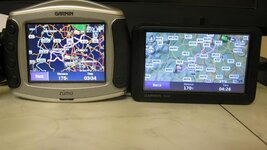
Ok i have played with this a little more using 2 of my older satnavs zumo 550 and nuvi675 zumo gives same results as the 660 when route is recalculated inside the unit after transfer thats 175 miles, but the older nuvi675 gets it bang on at 170 dead most odd, so heaven knows why the milage discrepancy for the same route, i would guess there are slight differences in the way they calculate distance. Also notice the zumo has the far left way point missing, it still routes to the point it just has no marker.
Note all units have identical maps and the route was sent from the same prog off the same machine using the same map and route.
 

Attachments

  • IMG_9237.jpg
    IMG_9237.jpg
    34.3 KB · Views: 84
Thanks for that.

I was reasonably sure the 660 and most other devices would work with BaseCamp, your post confirms it.

I have three outwardly identical Nav V's, each sometimes calculates the mileage of identical routes differently. I have no idea why.

So, what have we learnt?

That the route is OK

That it will run and display on assorted devices, with only minor differences and nothing anywhere as extreme as the OP's differences, which are unique. Logically, everything points at Ian's device (or the way it is set up) but time will tell.


Back
Top Bottom