photoshop help

hops

Well-known member
UKGSer Subscriber
Joined
May 21, 2003
Messages
3,235
Reaction score
153
Location
Wirral
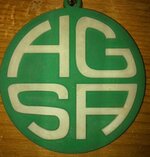
I know there are a few graphics guru's here so hopefully you can assist me. I want to make a logo similar to the one shown where the text bends at the edges to fit into a circle. I can make the text flow in an arc but this is a bit different. The image shown is of the letters HGSA and I need to change it RKGS with the 'GS' sitting under the 'RK'. Hope that makes sense, any tips etc. gratefully received.
 

Attachments

  • stacey_logo2.jpg
    stacey_logo2.jpg
    42.9 KB · Views: 100
Photoshop

Hi, Photoshop is the wrong tool for what you want to do. Ideally use Adobe Illustrator where you can make any shape you like and edit the shape to your hearts content. It can be done in Photoshop but nowhere near as easily. Think of Photoshop as painting and Ilustrator as drawing editable shapes. When you've created your logo in Illustrator you can take it into Photoshop and add lighting, textures etc.
 
okay

I'll download that & give it a bash, thanks Mike.
 
still struggling

am not too clever with this techy stuff, now got hold of illustrator but would appreciate more in-depth guide.:nenau
 
something like this. as Mike says PS is a image editing program and Illustrator is a vector drawing program. sorry this example is poor, fonts colours etc... but it was knocked up in Illustrator in about 10 mins just as an example.
 

Attachments

  • rkgs.jpg
    rkgs.jpg
    58.9 KB · Views: 61
yes

that's along the right lines. Did you use the 'warp' tool to create it?


Back
Top Bottom