POI's - what am I doing wrong?

Berin

Well-known member
UKGSer Subscriber
Joined
May 29, 2006
Messages
8,038
Reaction score
3,964
Location
South Oxfordshire
For the forthcoming Part 2 of the Castles and Templars trip, I've created 3 GPX files, containing POI's - one is the templar sites, one is the paradors we are using and one is a few other waypoints.

I've uploaded these into MRA, via the Routeplanner website>poi's.

But, they either haven't uploaded, or I can't find them.

what am I doing wrong?
 
Sat in a B&B near Calais, using an iPhone:

Within the MyRoute Navigation app, create a route with a start point.

IMG_2089.jpg

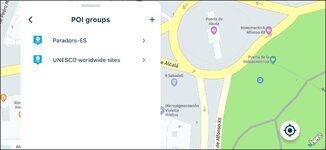
Scroll down on the left to ‘POI groups’

IMG_2090.jpg

Select paradors:

IMG_2091.jpg

Bingo!

IMG_2092.jpg
 
Nope. Lost it again. How do I create a route between 2 waypoints (POI's that I have uploaded)?
 
Create a route with a start point.

Display the parador points of interest that you’ve uploaded.

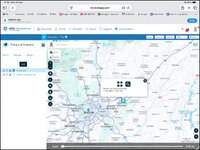
Tap on the parador’s icon on the map.

Tap on the cross thing, which looks like the Cornish flag.

Tap on ‘waypoint’

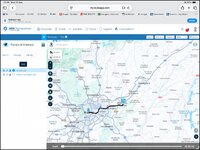
Bingo!

The adjust the offered up route to suit.

IMG_2165.jpg

IMG_2166.jpg
 
Last edited:
Thanks Wapping - clunky but it works.

I can't seem to do the same in the MRA app, though - I can start a route, show the POI's, but the POI's are not active and not named. Does this work only on the website?
 
Answered my own question - the Routeplanner website is required to create a route from POI's,
 
To create a route from POI's, waypoints or favourites:

1) Open app
2) >MRA Routeplanner
3)>Find (magnifying glass)
>select POI, favourite, etc
4)> Add to route
5) >find

Repeat, then set the route parameters - avoidances, and additional way points etc.
6) Save the route.

Top tip - if you add extra waypoints, it will name the waypoint waypoint x where x = the number of sequence you created it in. It will always add the waypoint to the end, so to re-order, go to waypoints and drag the waypoints to the correct order.

At this point it can get confusing because the second waypoint could be Waypoint 3, because you created it 3rd. Change the name to read Waypoint 2, so the waypoint order makes sense!


Back
Top Bottom