QR Codes - App update 4.3.0

Wapping

Well-known member
Moderator
Joined
Oct 21, 2005
Messages
90,829
Reaction score
15,589
Location
Wapping, London
I noticed that there is now (I think it’s possibly new) a method to share routes via a QR code.
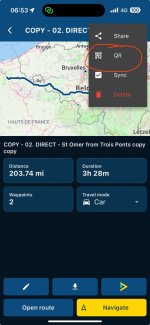
IMG_6370.jpeg

I have tested it out, and it works. The only pre-condition seems to be that the route needs to be made ‘public’ in order to share it.
 
Last edited:
The only thing I haven’t yet worked out, is how the person who receives the route, gets it into their own MyRoute library for future use.
 
Yes, the feature is new to v4.3.0. However, sharing routes in the old fashion, required these to be made public or for sharing with (MRA) friends.
The QR code minimises the necessity for entering multiple steps when sharing routes the “old way”, then the need to enter recipients telephone number, email, etc. Essentially you are letting your bikermate to scan the QR code on your phone, he then gains access to your shared route(s) that are made public.
Why Public you may ask?

Well, said biker mate might be somebody that let’s say came on one of your “Wapping’s Wanders” tours. You just met the fellow for the first time, he certainly not your friend just yet. Just another bod astride his awesome steed. Do you want said bod to have a full access to all your routes? Perhaps not, and rightly so. You wouldn’t share your joint bank account details or grant a full to a stranger…

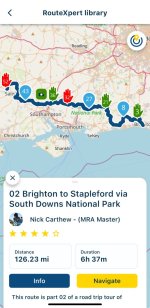
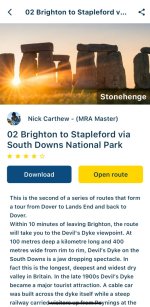
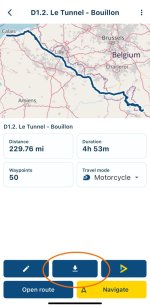
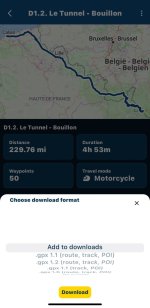
As for saving the route, I would imagine it is no different to let’s say using/downloading a route from the MRA Library. You either tap on Navigate to ride/drive the route once, or you tap on Info

IMG_4159.jpeg


… then you are presented with the following window…

IMG_4160.jpeg

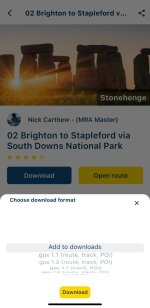
Tap on Download and tap on Add to downloads or download it as a .gpx file for exporting to a conventional nav device such as Garmin XT or TomTom.

IMG_4158.jpeg

Once you’ve shared the route with a said bikermate, you can then make it private once again if you wish to do so.

At least this is how I understand the curent system and how it works for now.

:beerjug:
 
@Wapping

So I’ve played about with my iPhone and iPad.

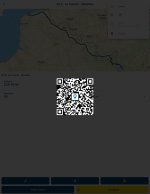
I’ve opened a particular route from my library on my iPad and shared it via QR Code.

IMG_0340.jpeg

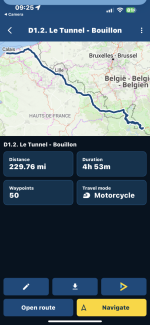
I’ve used my iPhone (camera) to scan it and it indeed open the route once I made it the QR share public.

IMG_4162.jpeg

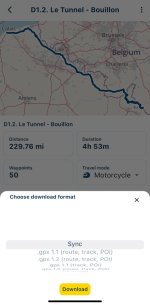
Once I’ve tapped onto the Download (downward pointing arrow) button, I was presented with the following menu. Please note since I’ve shared my own route from my own library, it does not show the Add to downloads option, instead I am presented with Sync and .gpx download options.

IMG_4163.jpeg


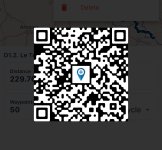
Feel free to scan the following QR code for the route above, and see for your self what happens…

IMG_4164.jpeg

Let us know if it worked as we both think it should do.

:beerjug:
 
@Wapping

So I’ve played about with my iPhone and iPad.

I’ve opened a particular route from my library on my iPad and shared it via QR Code.

View attachment 347542

I’ve used my iPhone (camera) to scan it and it indeed open the route once I made it the QR share public.

View attachment 347544

Once I’ve tapped onto the Download (downward pointing arrow) button, I was presented with the following menu. Please note since I’ve shared my own route from my own library, it does not show the Add to downloads option, instead I am presented with Sync and .gpx download options.

View attachment 347545


Feel free to scan the following QR code for the route above, and see for your self what happens…

View attachment 347546

Let us know if it worked as we both think it should do.

:beerjug:
I can see the route

IMG_1794.png

Then save it to Downloads

IMG_1795.jpeg

But then can’t find Downloads anywhere
 
I can see the route

View attachment 347566

Then save it to Downloads

View attachment 347567

But then can’t find Downloads anywhere

Click the 3 line menu (top left), profile icon (top right) and then you’ll find downloads

b5fee24850b7baddfc5c44f083627c58.jpg

bf589df27b44b2f25cdf851b9bf95a68.jpg

293de062dfaf384a3003f49a66a40485.jpg
 
Click the 3 line menu (top left), profile icon (top right) and then you’ll find downloads

b5fee24850b7baddfc5c44f083627c58.jpg

bf589df27b44b2f25cdf851b9bf95a68.jpg

293de062dfaf384a3003f49a66a40485.jpg

Well done! A mutual resolution. :beerjug:
 
Last edited by a moderator:
@Wapping

So I’ve played about with my iPhone and iPad.

I’ve opened a particular route from my library on my iPad and shared it via QR Code.

View attachment 347542

I’ve used my iPhone (camera) to scan it and it indeed open the route once I made it the QR share public.

View attachment 347544

Once I’ve tapped onto the Download (downward pointing arrow) button, I was presented with the following menu. Please note since I’ve shared my own route from my own library, it does not show the Add to downloads option, instead I am presented with Sync and .gpx download options.

View attachment 347545


Feel free to scan the following QR code for the route above, and see for your self what happens…

View attachment 347546

Let us know if it worked as we both think it should do.

:beerjug:
Works fine on my iPhone


Back
Top Bottom