
Question on OS Maps (Ordnance Survey) - File download problem - ‘Area is too big’

:blast the clue was there all along...and I missed it :giggle:

As I thought, you're battling with the maps not the .gpx file. It loads fine in BC & in GPX viewer on my Android dog-'n-bone
(Same as the potential issue choosing too many map tiles in Birdseye map imagery BTW)
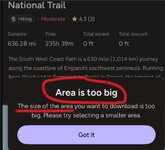
ScreenShot001.jpg
You did press 'got it' didn't you? :ROFLMAO:
That was good for a giggle- great way to start a bank holiday- thank you.
A straight forward workaround is to use OSM topographical maps if you cannot use the OS ones and load up the tracks or routes via the .gpx file.
Problem solved. Donations to Paul G (BHT)
 
Last edited:
Added note:
I am going to guess you triedto download most of cornwall.
Try again JUST selecting the coast.
You may be lucky.
And how do you do that, I’m literally just clicking on the link which OS provided to download the file?
 
1- I've no idea what device you are using, its settings etc etc some which may be prevent your downloading
2- I've also do not know the OS app and as it is a paying version- I cannot teach myself
3- Your problem has been identified as two fold:
i) downloading the .gpx file which contains the tracks and routes ( and here is a clue- that file exists FOC elsewhere but due to its owners' copyright issues about uploading onto different sites- I will not do so.
ii) downloading mapping - free topography maps from OSM (and other sources but $$) are available.

Due to the high level of detail contained (in Garmin terms) in map tiles (which is how maps are made up of) , you may need to download a great deal of data possibly taking up a large amount of storage AND exceeding what the OS site allows you too- evidence of that is in the screenshot you provided and I reposted above #21.
The issue is the same for Birdseye imagery- wonderful if you are exploring a small area BUT for a walk/bicycle ride as long as yours it would be FAR simpler to use a topography map of Cornwall selecting only the tiles you need.
Looking at the track, the sea will be either on your left or your right depending where you start.

There are simply too many options out there for me to go through (and know!) them all.
If you are using a bespoke Garmin satnav, it is easier to put a solution in place.
If you are using a phone, it is trickier but still do-able.
It takes time, patience, and learning.
 
Last edited:
Not sure why the ':ROFLMAO:' ... but hey ho! Why not buy a Zumo? there are plenty on here!

p.s
the Montanas are not sh*te, so now we're down to operator error and ...why do I bother, never mind, ... I'll get my coat!
:101
 
Last edited:
Not sure why the ':ROFLMAO:' ... but hey ho! Why not buy a Zumo? there are plenty on here!

p.s
the Montanas are not sh*te, so now we're down to operator error and ...why do I bother, never mind, ... I'll get my coat!
:101
Just revisiting this thread as the problem has been explained to me by the OS bods.

Firstly Montanas, in particular the 700 series are shite as they keep shutting down, I’ve had four and they’ve all suffered the same fault.

I rang the folk at OS Maps and they confirmed that currently with a track as large as 800 miles or so, Waypoints cannot be removed to reduce the file size, their advice was to simply recreate the route from scratch of the section I wanted which is what I now intend to do.

👍
 
I rang the folk at OS Maps…. their advice was to simply recreate the route from scratch of the section I wanted…..

To make the 800 mile file smaller, no doubt, by selecting only the section you wanted to use.

Which is probably what this meant:

screenshot001-jpg.413189
 
To make the 800 mile file smaller, no doubt, by selecting only the section you wanted to use.

Which is probably what this meant:

screenshot001-jpg.413189
Eh?
Perhaps you didn’t understand what I said or maybe I didn’t explain it clearly.
The solution is to recreate the route from scratch only including the portion I require.
Easy enough to do and as I mentioned that is what I intend to do. 👍
 
Eh?
Perhaps you didn’t understand what I said or maybe I didn’t explain it clearly.
The solution is to recreate the route from scratch only including the portion I require.
Easy enough to do and as I mentioned that is what I intend to do. 👍

Probably saying the same thing.

Anyway, great that you’ve solved your problem.

:beerjug:
 
Probably saying the same thing.

Anyway, great that you’ve solved your problem.

:beerjug:
I doubt it.
It is not the gpx file but the mapping where the issues are.
My posts #20 and 21
Maybe the OP would be best served using a paper map and a compass.
 
Last edited:
No you haven't but hey!
I really tried to help you Pepsi but...
As I said before, so now we're down to operator error and ...why do I bother, never mind, ... I'll get my coat!


Back
Top Bottom
