Questions will surely be asked of MRA

adventuredon

Well-known member
UKGSer Subscriber
Joined
May 13, 2010
Messages
7,448
Reaction score
861
Location
Wandsworth, London
So on Tuesday I took my bike and Zumo 595 to T Tech. Sat Nav hung on me. I had to unclip the battery to reset it. Anyhow, collected bike today and the Sat Nav hung again. So, I pushed and held the power button in...nothing happened. I stopped for an inspection..the rubber housing the power switch depress button had sheared off leaving the internals exposed, luckily it was still inside. I dug it out for later repair. Got home and sat nav was still hung. So I opened the case to remove the battery. Bodgey hands and over zealous impatience not only pulled the battery cable out, I pulled the f tiny switch housing right off its mounts @5pm....I leave at 6am for France...Sat Nav is totally Fubar. No time to purchase new, send off for repairs or buy new and re wire (let alone the 2 month internal review of whats best to get, cheapest, fits my bike etc..lol). So I have subscribed to MRA next and will HAVE to use my i phone. I am learning at PACE tonight how to import, ride offline, create and use MRA Next..So please be gentle when the stupid "how Do I" questions come in. Been making extensive use of AI to ask MRA questions already...I have a 5GB data limit and cannot purchase an e-sim from my usual provider as they are out of stock (will possibly try others tomorrow, time allowing)
What I have learned so far -upgraded to MRA Next for a month to see if it works
  • create folder for routes
  • import routes made in basecamp and set all shaping points in BC to alert, so that the route imported looks the same
  • download offline areas
  • download all routes to be ridden in offline mode
  • start offline route from downloads folder to ensure route is ridden offline
Still to be decided:
  • whether to buy a gold/silver package- if i can create in BC and export and Ride with Nav, then no point
  • Do I need to replace my sat nav or am i headed the mirrored screen direction..
  • I guess the best way to see if \i can survive or whether to get a sat nav, will be using this week with no other option...
 
Have you looked at the Airalo app for e-sims to use overseas ?

thats the app i use...no e sims available..However the web shows they are...i'll do more looking when on my phone, otherwise ill get another provider. I'm back in france in 10 days after my return anyway
 
Last edited:
So on Tuesday I took my bike and Zumo 595 to T Tech. Sat Nav hung on me. I had to unclip the battery to reset it. Anyhow, collected bike today and the Sat Nav hung again. So, I pushed and held the power button in...nothing happened. I stopped for an inspection..the rubber housing the power switch depress button had sheared off leaving the internals exposed, luckily it was still inside. I dug it out for later repair. Got home and sat nav was still hung. So I opened the case to remove the battery. Bodgey hands and over zealous impatience not only pulled the battery cable out, I pulled the f tiny switch housing right off its mounts @5pm....I leave at 6am for France...Sat Nav is totally Fubar. No time to purchase new, send off for repairs or buy new and re wire (let alone the 2 month internal review of whats best to get, cheapest, fits my bike etc..lol). So I have subscribed to MRA next and will HAVE to use my i phone. I am learning at PACE tonight how to import, ride offline, create and use MRA Next..So please be gentle when the stupid "how Do I" questions come in. Been making extensive use of AI to ask MRA questions already...I have a 5GB data limit and cannot purchase an e-sim from my usual provider as they are out of stock (will possibly try others tomorrow, time allowing)
What I have learned so far -upgraded to MRA Next for a month to see if it works
  • create folder for routes
  • import routes made in basecamp and set all shaping points in BC to alert, so that the route imported looks the same
  • download offline areas
  • download all routes to be ridden in offline mode
  • start offline route from downloads folder to ensure route is ridden offline
Still to be decided:
  • whether to buy a gold/silver package- if i can create in BC and export and Ride with Nav, then no point
  • Do I need to replace my sat nav or am i headed the mirrored screen direction..
  • I guess the best way to see if \i can survive or whether to get a sat nav, will be using this week with no other option...
  • download all routes to be ridden in offline mode -- Just sync your phone with your library any changes you make on the web app or phone app to routes will sync. No need to download anything it will just sync if you have wifi or phone signal.
  • Make sure your phone is damped as you don't want to Fubar the camera
  • Make sure you use the "HERE" maps to create your routes on MRA if you use Open Street maps you might get peculiar results.
  • Don't panic too much about sorting all your routes. If you have one for tomorrow you can sort the rest out on the road. the route planner in the app is very good especially if you are just editing routes that are already created.
Good luck and enjoy your holiday.
 
So on Tuesday I took my bike and Zumo 595 to T Tech. Sat Nav hung on me. I had to unclip the battery to reset it. Anyhow, collected bike today and the Sat Nav hung again. So, I pushed and held the power button in...nothing happened. I stopped for an inspection..the rubber housing the power switch depress button had sheared off leaving the internals exposed, luckily it was still inside. I dug it out for later repair. Got home and sat nav was still hung. So I opened the case to remove the battery. Bodgey hands and over zealous impatience not only pulled the battery cable out, I pulled the f tiny switch housing right off its mounts @5pm....I leave at 6am for France...Sat Nav is totally Fubar. No time to purchase new, send off for repairs or buy new and re wire (let alone the 2 month internal review of whats best to get, cheapest, fits my bike etc..lol). So I have subscribed to MRA next and will HAVE to use my i phone. I am learning at PACE tonight how to import, ride offline, create and use MRA Next..So please be gentle when the stupid "how Do I" questions come in. Been making extensive use of AI to ask MRA questions already...I have a 5GB data limit and cannot purchase an e-sim from my usual provider as they are out of stock (will possibly try others tomorrow, time allowing)
What I have learned so far -upgraded to MRA Next for a month to see if it works
  • create folder for routes
  • import routes made in basecamp and set all shaping points in BC to alert, so that the route imported looks the same
  • download offline areas
  • download all routes to be ridden in offline mode
  • start offline route from downloads folder to ensure route is ridden offline
Still to be decided:
  • whether to buy a gold/silver package- if i can create in BC and export and Ride with Nav, then no point
  • Do I need to replace my sat nav or am i headed the mirrored screen direction..
  • I guess the best way to see if \i can survive or whether to get a sat nav, will be using this week with no other option...
5gb? Wow that's nothing. Can't you just upgrade your allowance?
 
i have a10gb allowance for data, i went to Sids and back just with mapping , less than 200mb of data used over 4 days
 
  • download all routes to be ridden in offline mode -- Just sync your phone with your library any changes you make on the web app or phone app to routes will sync. No need to download anything it will just sync if you have wifi or phone signal.
  • Make sure your phone is damped as you don't want to Fubar the camera
  • Make sure you use the "HERE" maps to create your routes on MRA if you use Open Street maps you might get peculiar results.
  • Don't panic too much about sorting all your routes. If you have one for tomorrow you can sort the rest out on the road. the route planner in the app is very good especially if you are just editing routes that are already created.
Good luck and enjoy your holid
do you have to re synch everytime you make a web change, or does it remember the setting?
If I make a web change, I guess I need to re download the route to offline to ride without data..Quite a few things to remember if you're stressing on a best option and mates waiting :)
 
If you have your library synced to the phone it will automatically sync every time it has WIFI or 4/5G signal. the routes don't use much data and if you have the maps required downloaded onto your phone and are routing offline you won't use data. I use an offline phone for navigation and connect it to wifi in hotels etc for syncing.
 
As Mzokk says:

1. Make sure you have the MyRoute Navigation app installed and active on your phone.

2. Download the maps to your phone.

3. Download the route(s) to your phone.

With steps 1,2 and 3 completed, you can put your phone into flight mode, which turns off all the data, though do turn Bluetooth back on, if you want to hear voice instructions through a headset, The MyRoute navigation app will work just fine. Need reassurance? I run the MyRoute navigation app on a sacrificial iPhone, which has no SIM card installed. It ran fine, for a full month away in June.
 
If you have your library synced to the phone it will automatically sync every time it has WIFI or 4/5G signal. the routes don't use much data and if you have the maps required downloaded onto your phone and are routing offline you won't use data. I use an offline phone for navigation and connect it to wifi in hotels etc for syncing.
But, before you make a change, I recommend to duplicate the route, in case you bigger up the changed route and want to revert to the original.

Easily done, since tapping the map adds a waypoint.
 
But, before you make a change, I recommend to duplicate the route, in case you bigger up the changed route and want to revert to the original.

Easily done, since tapping the map adds a waypoint.
Yep. Made a few changes last night and re synched. I think. Renamed it too. Used 39mb data in the app for 7 hours use so not bad. Most of that was not in offline mode so I am happy with that. Phone also charged up whilst in use so that’s another operational question solved. Problems I did have was
1. How to skip waypoints. Easier in the Zumo. From reading it seems you just long press the route?
2. For some reason after a while, voice instructions went to sleep and the distance and eta went walkabout.
3. On a phone it’s tough with gloves and tapping petrol icon did not bring up any add to route/ navigate anywhere option. Mmph
4. Editing a route on the ipad the app hung a few times last night. Wheel of doom. Restart solved it.
5. I phone works better with nav in landscape mode but apps on Home Screen in landscape is not supported. I guess a tablet is the way forward. But then that is 2 more wires as opposed to 1😀
 
Ok set the display option to full screen. Waypoints now visible. Easy to skip and view. And nice for it to give you an arrival time at your via point. As in our lunch stop was easy to see what time we had left to get there. Today I put phone into flight mode and navigated the route completely offline. Even adding in a fuel stop which caused a re route ( as needed and expected). Pretty impressed so far
 
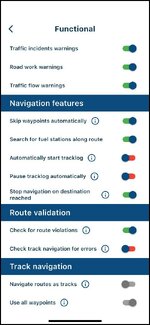
Now it’s getting frustrating! Riding a route. Needed petroleum click on fuel icon. Tells me this way point cannot be added to a track. It’s a route I created myself this am. I have re opened the route AND set all options to go online ( not that that should make any difference). I have re looked through functionality settings. Screenshot below. Routes are already set to NOT navigate as tracks. I logged out and back in again. Re opened the route and started to navigate. Again tried fuel option. Same result. What is going on
 

Attachments

  • IMG_0854.jpg
    IMG_0854.jpg
    71.5 KB · Views: 9
Now it’s getting frustrating! Riding a route. Needed petroleum click on fuel icon. Tells me this way point cannot be added to a track. It’s a route I created myself this am. I have re opened the route AND set all options to go online ( not that that should make any difference). I have re looked through functionality settings. Screenshot below. Routes are already set to NOT navigate as tracks. I logged out and back in again. Re opened the route and started to navigate. Again tried fuel option. Same result. What is going on
I think it is something to do with it being a track Don.

Have you converted track to a route? My understanding that when following a track*, it will not allow to add a waypoint. However when you have a GPX route, then adding and shifting waypoints does become possible.

* it is a bit like following a highlighted by you and desired to be ridden road on a paper map, say in fluorescent yellow highlighter.
 
A track is like a line on a map, you can follow it, but not much else. The track needs to be a route to be able to add waypoints to the route. Could be wrong of course.
 
Don, I am pretty sure the posts above will have answered your question. When exporting from MyRoute, it’s quite possible that a route AND a track are sent across. It looks very much like you are navigating along a track. If so, it very much limits what you can do. Pretty much, yiu are limited to following the line of tge track and that’s it.


Back
Top Bottom