Route does not match available maps ???? Quest question

  • Thread starter Thread starter guitarman
  • Start date Start date

guitarman

Guest
I planned out a few routes across France using Mapsource v7. I then loaded them to the Quest with all the map sections and checked them. One was fine but a route from the Loire to Provence came up with "Route does not match available maps. It will not follow the roads precisely. Do you want to recalculate?". I checked the route again on Mapsource and couldn't see a problem. I answered "NO" to recalculate and the route displayed matches the one I put in in Mapsource. All the relevant map sections are there so why am I getting the message and is it going to cause a problem when I do use it?

Cheers

Dick
 
I had the same problem Dick.

The cause of my error was that I missed one block of maps when selecting them and uploading them to the GPS. The route I planned in mapsource only crossed a small corner of the block but because of this I got the error message. :)
 
Exactly as Kevin says. Others have had the same problem - see THIS but its a problem that easily solved. Boils down to "human error" I'm afraid. ;)
 
Taff said:
Exactly as Kevin says. Others have had the same problem - see THIS but its a problem that easily solved. Boils down to "human error" I'm afraid. ;)


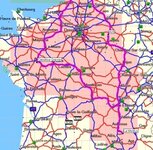
Nope, don't think it's the same issue. This is a new route on V7. I've never put it into v6. I've double checked the route and the selected maps. Can you see what part I've missed? It's the Carrefour Grevier to Le Miralys that is causing the problem. BTW I went a bit over the top with my selections after I got the error for the first time! And tbh the route generated is not even a good one anyway.

Cheers

Dick
 

Attachments

  • aroute.jpg
    aroute.jpg
    110.3 KB · Views: 149
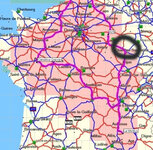
Looks like you're missing the map to the left of Nancy.
 
I would say its a safe bet that this is where you're problem is. When I had this problem, it turned out that the map I hadn't downloaded only held a mile or so of the route. Easiest thing to do, is to press the "Select Maps Around Route" button - but you can still add other maps to the automatically chosen maps. ;)
 

Attachments

  • aroute.jpg
    aroute.jpg
    78.3 KB · Views: 147
Twotter said:
Looks like you're missing the map to the left of Nancy.

I know but that's not on the route I'm dealing with :D

Wtf has Nancy got to do with a route between the Loire and Provence?

The northern route checks out fine btw.

Cheers
Dick
 
The map to the left of Nancy, not Nancy itself. The bit where Taff drew that black circle looks to me as though it goes through the 'missing' map bit I'm on about.

10 pfennigs says that's your problem. Try it and see.
 
guitarman said:
I know but that's not on the route I'm dealing with :D Wtf has Nancy got to do with a route between the Loire and Provence? The northern route checks out fine btw.
If you've still got a problem, can you attach the file?
 
I'll add the "Nancy" section and let you know if there is any difference.

Cheers

Dick
 
Well, I added the Nancy bit and it made no difference, I still got the same message. So I gave in and answered "recalculate" and ended up with a shorter route. Go figure (as the merkins would say......)

Cheers

Dick
 
Here's a hint for you, when you are selecting map segments to load on your chip:

Don't select the map segments by clicking individually on each one. If you do that, there is too great a chance that you might miss a single small segment. Instead, select segments by pressing the mouse button down, and dragging (to create a rectangle) in a diagonal direction across the screen. Then, click on any excess segments that you don't want to de-select them.

If the area you are going through happens to have an enclave or exclave in it - for example, there is a little German enclave just north of Zurich, about the size of a parking lot, and a couple of exclaves in Northern Italy - then you have a very high risk of missing the enclave or exclave if you click one at a time to select maps. Do your selection by dragging across the area, then deselect one by one if you want to get rid of excess segments.

Michael


Back
Top Bottom