
Sat Nav assistance request...?

AndyR34

Well-known member
UKGSer Subscriber
Joined
Oct 3, 2005
Messages
542
Reaction score
0
Location
Moray - Centre of the Universe...
As a bit of a buffoon on all matters of a Sat Nav nature, is there anyone in the locality (IV30 postcode, but I am also willing to travel a bit...) that could assist me with my updates for my Nav V/5?

I have tried and failed to complete my required update and am almost at the point of chucking it out the bl**dy window!

My SD card is empty and I have insufficient storage on the internal memory NOTE - people have given advice on this forum but it's a different language they are talking/writing to me...

Recompense in beer tokens or similar of course!!

Cheers - in anticipation :-) :thumb2

Andy
 
As a bit of a buffoon on all matters of a Sat Nav nature, is there anyone in the locality (IV30 postcode, but I am also willing to travel a bit...) that could assist me with my updates for my Nav V/5?

I have tried and failed to complete my required update and am almost at the point of chucking it out the bl**dy window!

My SD card is empty and I have insufficient storage on the internal memory NOTE - people have given advice on this forum but it's a different language they are talking/writing to me...

Recompense in beer tokens or similar of course!!

Cheers - in anticipation :-) :thumb2

Andy

Andy i have just updated my Satnav V with no problems. Can i ask if the mini sd card you are using is a class 10 and no greater than 32gb?

john
 
Ok a solution to the problem may well be

Providing the memory card is class 10 and less than 32GB as above try re formatting the card to FAT32 and then empty your recycle bin then give the card a name such as NAV1 or anything you like

If that fails to cure the issue report back

alternatively providing you haver the latest maps in BAsecamp use mapinstall
 
Me again, tried reformatting the card and I keep getting a message saying it's "write protected" and I can't figure out how to get round this so the card remains unformatted and unable to be renamed to NAv1 or otherwise.

The card is a 32Gb Sandisk Extreme SDHC1 and it has a 3 in a U which I believe (!) is a class 10 item, I assume this to be the correct item but I stand to be corrected. TBH it would be easier if it was the wrong one as it would then explain why I'm having issues!!!

https://www.amazon.co.uk/SanDisk-Ex...61496&sr=8-1&keywords=sandisk+sdhc+32gb+micro

This is identical to the one I bought.

Heeeeeellllllppppp! :-(

Andy
 
Me again, tried reformatting the card and I keep getting a message saying it's "write protected" and I can't figure out how to get round this so the card remains unformatted and unable to be renamed to NAv1 or otherwise.

The card is a 32Gb Sandisk Extreme SDHC1 and it has a 3 in a U which I believe (!) is a class 10 item, I assume this to be the correct item but I stand to be corrected. TBH it would be easier if it was the wrong one as it would then explain why I'm having issues!!!

https://www.amazon.co.uk/SanDisk-Ex...61496&sr=8-1&keywords=sandisk+sdhc+32gb+micro

This is identical to the one I bought.

Heeeeeellllllppppp! :-(

Andy

Is it in a full size SD card Adaptor? There's a switch on the side to make it write protected.
8d9644515b94b95fd78afcb8ac7f308b.jpg
 
It is in a full-size adapter Ian yes (and I've tried with the lock on and off), but I am beginning to suspect the adapter is faulty as it doesn't always seem to sit correctly in the laptop slot i.e. it's not always seen by the computer and my daughter's advice is, "take it out and re-insert it", "it does this every now and again...!".

My plan is this - buy/try a new adapter... then if this doesn't work - buy/try a new SDHC card... and if this doesn't work - THROW THE BL**DY THING REALLY HARD AT THE WALL!!

Having had my dram for the evening, I am walking away from the computer before I end up costing myself a lot of money...

Many thanks for the advice, I'll pick up where I left off tomorrow morning!

Andy :thumb2
 
When the card is plugged into your NavV,and NavV connected by USB to computer, can your computer file manager/finder see the SD card and if so can you copy any file to it? Do that as a test and report back
 
It is in a full-size adapter Ian yes (and I've tried with the lock on and off), but I am beginning to suspect the adapter is faulty as it doesn't always seem to sit correctly in the laptop slot i.e. it's not always seen by the computer and my daughter's advice is, "take it out and re-insert it", "it does this every now and again...!".

My plan is this - buy/try a new adapter... then if this doesn't work - buy/try a new SDHC card... and if this doesn't work - THROW THE BL**DY THING REALLY HARD AT THE WALL!!

Having had my dram for the evening, I am walking away from the computer before I end up costing myself a lot of money...

Many thanks for the advice, I'll pick up where I left off tomorrow morning!

Andy :thumb2

Better to buy a branded micro SD USB card reader/writer.
 
All this trouble seems strange to me, I'm no computer genius and just followed the prompts from garmin express and it went quite straightforward. I bought a discounted 32Gb micro SD card from tesco inserted it into the nav unit and plugged it in via the USB slot, I had to try one or two options for the drive it was labelled as, but it downloaded to the card OK. I'm running windows 10 if that makes any difference.
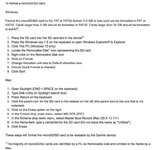
 
Andy are you mac or pc?
Follow the appropriate Garmin format instructions here ;

I wish you good luck , just be methodical!
 

Attachments

  • How_do_I_format_a_microSD_SD_card_.jpg
    How_do_I_format_a_microSD_SD_card_.jpg
    83.9 KB · Views: 96
Sd slots in your computer will be MUCH faster than USB connection to nav V, but you won't get firmware updates doing it that way ( and I'm not 100% sure but think I read that you won't get the the clever junction/ sign pics updated, perhaps someone can confirm that ?), so I always USB updates ,slower but little trouble nowadays. ( I do have 150meg downloads though)
 
Thank-You, one and all :-)

To all who contributed to answering my woes, I say Thank-You, I can now say my GPS and laptop have been updated and all is working as it should be.

I am convinced of a few things...:

1. My intermittent BT connectivity did not aid the attempt(s), nor my blood pressure;
2. My Laptop has a communication issue with a. my BT Hub, b. my GPS and c. my SD Card Adapter;
3. Garmin Express is better at updating my GPS than Basecamp...;
4. Knowledge is power in the greater scheme of things, but common sense and patience come a close second!

As mentioned - Cheers to all who helped, I am now complete :rolleyes:

Andy


Back
Top Bottom
