Searching in BaseCamp

adventuredon

Well-known member
UKGSer Subscriber
Joined
May 13, 2010
Messages
7,436
Reaction score
854
Location
Wandsworth, London
just acquired a nuvi 765T. Using base camp for now. Might be me but usually ok at figuring stuff out....
#
Version 4.1.2 installed. with NT Navigator 2010 maps.
I go to search for an address where I need to get to in France. No matter how I search, I cannot get the town, the street, nada. I have tried the global maps
nt navigator maps
Every time it just jumps straight from my last waypoint to the gulf of Oman! whats up with this? So I then find a bigger town manually (Troyes) draw a shape using the magnifying glass as some sites say, and then search again...Back to the gulf of Oman.
Oh and by the way, the garmin help tutorials are showing outdated software so that rules using those out for reference...)

Please someone find this place and tell me how you went about it?

PS Searching on my disconnected device finds it in 3 seconds...why oh why


straight from the mans e-mail...
8-10 rue Piverotte
10310 Longchamp sur Aujon
 
Last edited:
BaseCamp is the current incarnation of a long line of comedy software from Garmin. If its any comfort the GPS units have problems in finding sizable towns too.

My solution is to find the town on the mapan plonk a way point on it, then use that for your navigation/route planning.
 
On mine... You search/find and nothing seems to happen. However, it has put a teeny flag at the location which, most of the time is off the screen somewhere. Try zooming out and looking?
 
Its is comical. I can see where I am, I am just not anywhere near France! I am now playing with using ITN and exporting it. Yeah, I know it would be better to use the maps on the device to plan, but this is painful. Ill just take me chance till I figure it out!
 
Well, pretend route looks good in ITN, and in basecamp (which are my maps on my device i keep getting told) so why the f does it then not draw the exact route without messing my route up and waypoints all over the place! That was when it was saved as a gpx for nuvi type file. Then tried a old fashioned gpx exchange extension...that didn't work perfectly either. More playing!
 
Basecamp is just w*nk. Try Tyre. It's a huge improvement on Basecrap and is based on Google mapping.

Have used tyre previously and found it very slow to calculate. Also on my old TT I would often have to reduce number of track points created by a garmin route that was posted and I wanted to ride. My own planning worked okay. Just installed it on my laptop now and they have changed it to a lite version...old version is now a pay for one. Outta here...not the same free planning as I want so back to ITN and trying that again. B Camp just isn't cut out...
 
Basecamp is OK once you get the hang of it. Yes, it does lack any decent search functionality I'll admit.

Videos:
https://www.youtube.com/watch?v=797dbfr6xGM
https://www.youtube.com/watch?v=vnn0Uamy73Y

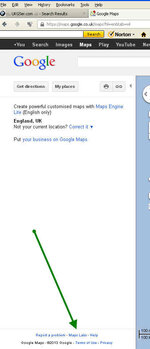
Use Google Maps to find any specific locations such as hotels etc. You can use Street View to confirm. Right click on the location and select 'drop lat/long marker'. You can the cut and paste the location into a randomly dropped way-point (red flag icon) in Basecamp, paste the lat/long into the properties for that and it'll be moved to that location and available to add to your routes.

ITN Converter is my alternative of choice, great for converting routes to other formats and you can use via Michelin maps for those green lines alongside scenic routes (AKA great biking roads). You can also use Google Street View along your route to check out the state of the road etc.
 
Use Google Maps to find any specific locations such as hotels etc. You can use Street View to confirm. Right click on the location and select 'drop lat/long marker'. You can the cut and paste the location into a randomly dropped way-point (red flag icon) in Basecamp, paste the lat/long into the properties for that and it'll be moved to that location and available to add to your routes.

So, how does the drop lat/long marker work? I've just tried that in Google maps, right click on a hotel, and I just get options to zoom and get directions. Is there another step I'm missing?
 
I am the same - only get options to zoom etc - Basecamp is driving me crazy!!!
 
Sorry, tend not to get to the PC at weekends. Spotted your post on Tapatalk but was waiting until I could get to a PC to answer. Thanks for explaining adventuredon. Also, if you sign in using your Google account the setting remains for future browsing sessions.
 
Thanks for the info but still cant see the Google maps Lab - could it be a Mac thing - I am using Mac.....

Ta
Rik
 
Top job - thanks for that - I have now added this feature and am sure it will be very useful.

Rik
 
Guys, need a question answered: explained. In basecamp, I have created loads of custom routes, transferred to my Nuvi. When I unplug, they are on the nuvi ready for importing. I wanted to change a route and noticed i have to move it back to basec amp to do so. All good so far. Then when I want to re transfer it to device, it renames with a 1 after the name on device to avoid duplicate etc. (as expected too). But when I go into my e drive\garmin and my removable memory card garmin\gpx folder to delete the actual gpx route, I see no such GPX route. Some routes show up, but not the collection i transferred. The device sees them on the Nuvi,but i want to clean some up, where do i do this?
 
GPX files can contain more than one route. If you're dragging the route across to your GPS in Basecamp then it will probably be buried in one of the GPX files on there and if imported also in the current.gpx ISTR. Try opening these in Mapsource if you have it installed, alternatively ITN Converter or TYRE.

I find it easier from a route management perspective to export either individual routes, or coherent sets such as a tour, as individual named GPX files and then transfer these to my Zumo. That way I can clear out far easier when the time comes.


Back
Top Bottom