Sending a gpx file to Zumo xt via Drive app

Berin

Well-known member
UKGSer Subscriber
Joined
May 29, 2006
Messages
8,111
Reaction score
4,004
Location
South Oxfordshire
Sigh.
I haven't done this for ages, and now it's either broken or I've forgotten.

To transfer a GPX file from my iPhone, I'm pretty sure this is the method I used to follow;

1) Locate the file on the iPhone.
2) Share button
3) Select Drive app
4) Send file

However, when I do this now, Drive doesn't appear as an option (although the stupid Explore app does)

What's going wrong?
 
Try deleting the Explore and Drive apps.

Then reload the Drive app.

Which phone are you using?
 
It's an iPhone 15. I've already un-paired the Zumo and the phone, deleted and reinstalled the Drive app, re-paired the phone
 
I can send a location to the Zumo from Drive, by entering an address or postcode in Drive app, so the phone is talking to the device
 
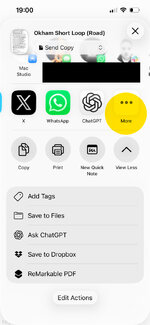
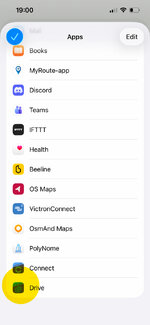
From iOS Share menu have you selected the "more" option?
Drive should be there at the bottom of the list.

IMG_7522.jpg

IMG_7523.jpg
 
It sort of "guesses" what apps are compatible with the file type.
But you can force certain apps to be displayed in the share sheet.
 
I’ve figured it out, it’s along the lines our esteemed Roman correspondent mentioned.

Basically, if you just locate the file in file manager then press Share the Drive app doesn’t appear.

However, if you locate the file, click it to open it (and then end up with a page of gobbledegook text) and then >share the the phone looks for apps that can open the file and the then drive app appears as a destination
 
If you are using an Android phone it will put unused App's into deep sleep.
Sometimes open, play around with an APP then close it, and it will reappear in your list of options


Back
Top Bottom