Sharing a GPX from XT

Spud

Active member
UKGSer Subscriber
Joined
Jul 24, 2015
Messages
498
Reaction score
46
Location
Fylde England
I would like to share some of my routes from my XT to others ..
I can share via the drive App but the recipient can't make any use of the sent GOX, just seems a long list of Gobbledegook, that they can't make use of....
Can anyone help.qirh this please?
Many thanks in advance

Sent from my Pixel 8a using Tapatalk
 
You have sent the recipient a GPX file.

The recipient now has to use an app to open and display it. It’s no different to you sending the recipient a ‘Word’ document, for which he’ll need the ‘Word’ app to open, or he’ll get gobbledegook.

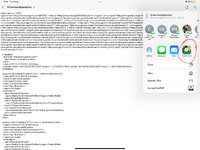
For example, here is a screenshot of a GPX file, downloaded to my iPad:

IMG_0613.jpeg


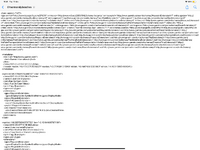
If I just open it (ie. what my iPad terms as ‘Preview Content’ I get:

IMG_0615.png


Which is what I assume your recipient sees.

If though I open the GPX in Pocket Earth;

IMG_0616.jpeg

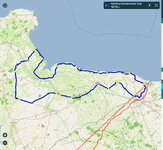
I see the blue route displayed correctly:

IMG_0618.jpeg


Ignore the red lines, that is something else, which I happened to have open at the time.


To help us to help you, what does the recipient intend to do with the GPX file? If we know that, we should be able to help you.
 
Last edited:
You have sent the recipient a GPX file.

The recipient now has to use an app to open and display it. It’s no different to you sending the recipient a ‘Word’ document, for which he’ll need the ‘Word’ app to open, or he’ll get gobbledegook.

For example, here is a screenshot of a GPX file, downloaded to my iPad:

View attachment 392408


If I just open it (ie. what my iPad terms as ‘Preview Content’ I get:

View attachment 392411


Which is what I assume your recipient sees.

If though I open the GPX in Pocket Earth;

View attachment 392412

I see the blue route displayed correctly:

View attachment 392413


Ignore the red lines, that is something else, which I happened to have open at the time.


To help us to help you, what does the recipient intend to do with the GPX file? If we know that, we should be able to help you.
Thank you. So I guess he has to "save" the file to a device and then use a programme to open it ?
I'm not sure which device he's using, but he's BMW, so it'll be a Zumo or Nav I'm guessing.

Sent from my Pixel 8a using Tapatalk
 
Last edited by a moderator:
He can use a number of online websites that will allow him to upload the route to, he can then view it or use their software to then upload said route to whatever sat nav he is using. some have basic functions for free others totally free others subscription based.

MRA (myrouteapp) a favourite on these pages
Kurviger another one,

or browse the GPS forum on this very site

or as wapping suggested above use basecamp or mapsource if using a garmin unit.


Back
Top Bottom