


rob mac
Registered user
Right, the chin bar is done and rebuilt. Put it to one side and bring back the main body of the helmet.
On each side of the helmet is a Frankenstein Bolt (cuz it sticks out the side of your neck - clever eh?) these are there to give the chin bars something to latch on. They are held by captive nuts inside the helmet. You can access these without stripping the lining out, just take the pop out cheek pads out for ease.
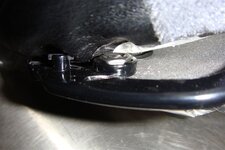
Remove them by unbolting them ( the outside head of the Frankenstien Bolt is 8mm) whilst keeping one little pinky inside to catch the captive nut that is going to go under the kitchen table if you don't. (UPON REASSEMBLY MORE THREAD LOCK ON THESE)
Make a lead out of speaker cable and put a ringe tongue crimp on the end (complete with heatshrink if we're doing this properly!)
Now the crimp on the end of this must be a a "crabs claw"
Take a standard ring tongue crimp
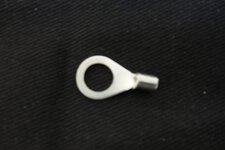
Cut out the top section of the ring
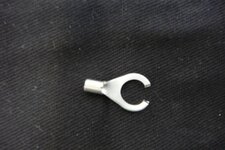
This has to be done because the internal part of the Frankenstein bolt you are going to put it on has a stepped shoulder and you wont get it to close small enough otherwise (when you pm me to say it doesn't work I'll bet you it'll be this bit not making contact) Refit the Frankensteins with the ring tongue in situ closing it down to grip the shoulder off the Frankenstein bolt (don't worry, you'll see what I mean)
Repeat for both sides and rebuild (dont forget Threadlock)
Now run those mic wires around the helmet in exactly the same way as you would hide them on a standard Autocom fit (my preference is to the rear)
Refit the plug that you cut off the mic boom ( you promised you wouldn't throw it away) to the two wires from the Frankenstein bolts. Polarity is important here. The wiring on the Autocom has a stripe on one of the two conductors as an identifier, this should match all the way through from the mic, through the chin bar latch to this plug and indeed out of the plug on the original Autocom loom. Solder and heatshrink sleeve is the best method here.
Fit the speakers and din plug/ loom as you normally would.
Your just about done,
Fit the chin bar back to the helmet, make sure everything lines up, make sure the chin bar latches, make sure it releases properly. Make sure there is no freeplay in the locking catches/Frankenstein bolts (There was as standard on mine and there's no adjustment) When you're happy fully reassemble it.(THREADLOCK on those hinge bolts)
Try it out, lock the chin bar down, hold the helmet body firm, move the chin bar on it's freeplay - does it crackle/interference? Yeah, you've got a slack latching mechanism so you'll need to do the final thing.
Last thing,
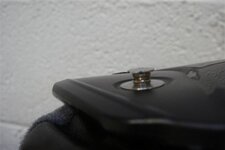
On the Frankenstien bolts external shoulder wrap one layer of locking wire around like a cotton bobbin - This stops the freeplay and as it's soft makes a good connection.This is sacrificial i.e it may well wear but who cares, it takes seconds to replace (mine's still good on the original) and indeed has got rid of the slack in my mechanism that was there from factory
Any questions just ask.I'll gladly help anyone who comes down to my workshops http://www.cveglos.co.uk Can I just say though, I'm not telling you to do this, I'm showing you what I have done. Don't do it if you don't feel safe/confident/happy/sure and please, please don't have a pop at me for showing others.
On each side of the helmet is a Frankenstein Bolt (cuz it sticks out the side of your neck - clever eh?) these are there to give the chin bars something to latch on. They are held by captive nuts inside the helmet. You can access these without stripping the lining out, just take the pop out cheek pads out for ease.
Remove them by unbolting them ( the outside head of the Frankenstien Bolt is 8mm) whilst keeping one little pinky inside to catch the captive nut that is going to go under the kitchen table if you don't. (UPON REASSEMBLY MORE THREAD LOCK ON THESE)
Make a lead out of speaker cable and put a ringe tongue crimp on the end (complete with heatshrink if we're doing this properly!)
Now the crimp on the end of this must be a a "crabs claw"
Take a standard ring tongue crimp
Cut out the top section of the ring
This has to be done because the internal part of the Frankenstein bolt you are going to put it on has a stepped shoulder and you wont get it to close small enough otherwise (when you pm me to say it doesn't work I'll bet you it'll be this bit not making contact) Refit the Frankensteins with the ring tongue in situ closing it down to grip the shoulder off the Frankenstein bolt (don't worry, you'll see what I mean)
Repeat for both sides and rebuild (dont forget Threadlock)
Now run those mic wires around the helmet in exactly the same way as you would hide them on a standard Autocom fit (my preference is to the rear)
Refit the plug that you cut off the mic boom ( you promised you wouldn't throw it away) to the two wires from the Frankenstein bolts. Polarity is important here. The wiring on the Autocom has a stripe on one of the two conductors as an identifier, this should match all the way through from the mic, through the chin bar latch to this plug and indeed out of the plug on the original Autocom loom. Solder and heatshrink sleeve is the best method here.
Fit the speakers and din plug/ loom as you normally would.
Your just about done,
Fit the chin bar back to the helmet, make sure everything lines up, make sure the chin bar latches, make sure it releases properly. Make sure there is no freeplay in the locking catches/Frankenstein bolts (There was as standard on mine and there's no adjustment) When you're happy fully reassemble it.(THREADLOCK on those hinge bolts)
Try it out, lock the chin bar down, hold the helmet body firm, move the chin bar on it's freeplay - does it crackle/interference? Yeah, you've got a slack latching mechanism so you'll need to do the final thing.
Last thing,
On the Frankenstien bolts external shoulder wrap one layer of locking wire around like a cotton bobbin - This stops the freeplay and as it's soft makes a good connection.This is sacrificial i.e it may well wear but who cares, it takes seconds to replace (mine's still good on the original) and indeed has got rid of the slack in my mechanism that was there from factory
Any questions just ask.I'll gladly help anyone who comes down to my workshops http://www.cveglos.co.uk Can I just say though, I'm not telling you to do this, I'm showing you what I have done. Don't do it if you don't feel safe/confident/happy/sure and please, please don't have a pop at me for showing others.

